This thread has been locked.

If you have a related question, please click the "Ask a related question" button in the top right corner. The newly created question will be automatically linked to this question.

LAUNCHXL-F280049C: Issues interfacing with the EQEP module

Part Number: LAUNCHXL-F280049C
Other Parts Discussed in Thread: SYSCONFIG, C2000WARE, MSPM0G3505

Tool/software:

When going through the EQEP lab in the C28x academy tutorials none of the position variables are updating. I've gone through and checked signals (I don't have an oscilloscope right now so I just used the onboard ADC). I have the correct pins for my A,B, and I signals. The register read is just not updating with any values. Checking the solution in the training for f28004x there are settings that are different from the tutorial in the sysconfig. Neither the tutorial or the given solution update the values. The go into the ISR and pass the base check and then go to reading the register but the value is not counting which seems like it's not enabled properly seeing as the PWM signals for testing appear correct. Not sure where to go from here as I need to use the EQEP for my controller so help would be appreciated.

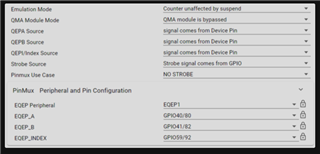
  • The go into the ISR and pass the base check and then go to reading the register but the value is not counting which seems like it's not enabled properly seeing as the PWM signals for testing appear correct.

    Hi David, 

    Are you able to get to the entry of the ISR? If so, sounds like the UTOUT interrupt is being generated correctly and the eQEP is running.

    Can you double check your pinmux selection in the GUI? Ensure that ePWM is being outputting on GPIO0, GPIO1. 

    I had just ran the lab and I am able to see the values being updated properly. I noticed in our lab's solution there is a bug with the index strobe being generated which should be generated from GPIO2. As well as the UTOUT value should be set to 1000000. I will make sure the solution gets updated in the next c2000ware release.

    Best regards,

    Ryan Ma

  • Hi David,

    Can you try using this as the project?

    The ePWM was also not being configured correctly. This lab was ported from a device using 120Mhz as SYSCLK instead of 100Mhz SYSCLK for F28004x. Apologize for this confusion.

    Best regards,

    Ryan Ma

    https://e2e.ti.com/cfs-file/__key/communityserver-discussions-components-files/171/eqep_5F00_lp_5F00_f28004x.7z

  • Hello Ryan,

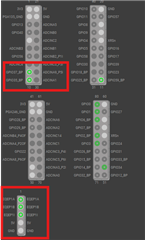
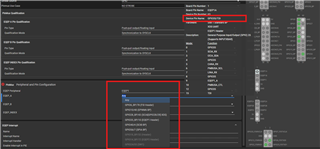
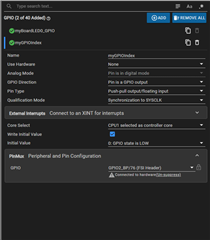
    So the issue was the pins were connected to GPIOxx_BP instead of just GPIOxx. When I connect the QE signals to the backpack pins defined the values update. That's because for the Use Hardware I selected EQEP1 and that's what the pin configuration defaulted to. When I try to change the pin configuration settings there is no option to connect it to the non-backpack header. I need to use the intended header pins so how do I go about this? 

    Also it is a little confusing how often the sysconfig files and settings in ccs differ. Example I don't have the same dropdown settings as in your screenshot. 

    Thanks,
    David Blow

  • Hi David,

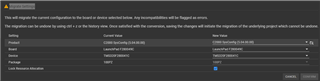
    Must be due to the board enabled feature. Can you ensure that the following is selected?

    Click on the device icon -> Switch -> Board set to Launcpad f280049C

    Best regards,

    Ryan Ma

  • It's showing the correct board.

  • When trying to build the project you sent I get these errors. Not sure why it's deleting files when trying to build.


    [0]**** Clean-only build of configuration CPU1_RAM for project eqep_lp_f28004x ****
    [1]"D:\\ti\\ccs\\utils\\bin\\gmake" -k -j 24 clean -O

    [2]DEL /F "syscfg\error.h" "eqep_lp_f28004x.out"
    [3]DEL /F "lab_main.obj" "device\device.obj" "device\f28004x_codestartbranch.obj"
    [4]DEL /F "lab_main.d" "device\device.d"
    [5]DEL /F "device\f28004x_codestartbranch.d"
    [6]RMDIR /S/Q "syscfg"
    [7]Could Not Find C:\Users\david.blow\workspace_ccstheia\eqep_lp_f28004x\CPU1_RAM\syscfg\error.h
    [8]Could Not Find C:\Users\david.blow\workspace_ccstheia\eqep_lp_f28004x\CPU1_RAM\device\f28004x_codestartbranch.d
    [9]Finished clean

    [10]**** Build Finished ****
    [11]**** Build of configuration CPU1_RAM for project eqep_lp_f28004x ****
    [12]"D:\\ti\\ccs\\utils\\bin\\gmake" -k -j 24 all -O

    [13]Building file: "../lab_eqep_launchpad.syscfg"
    [14]Invoking: SysConfig
    [15]"D:/ti/ccs/utils/sysconfig_1.24.0/sysconfig_cli.bat" --script "C:/Users/david.blow/workspace_ccstheia/eqep_lp_f28004x/lab_eqep_launchpad.syscfg" -o "syscfg" -b "/boards/LAUNCHXL_F280049C" --compiler ccs

    [16]Usage:
    [17] cli [--product &lt;file&gt;] [--board <board>] [--device <device>] [--package <package>] [--variant <variant>] [--script <file>] [--output <path>] [--context <context>]
    [18] cli --help
    [19] cli --version

    [20] example: cli --product &lt;sdk_root&gt;/.metadata/product.json --device MSPM0G3505 --package "VQFN-32(RHB)" --script project/example.syscfg --output project/debug

    [21] Note that the all arguments other than '--help' and '--version' may also be
    [22] specified via the script with an embedded @cliArgs comment directive.
    [23] E.g. // @cliArgs -d MSP432P401R

    [24] If an argument is embedded in a script and explicitly specified via the CLI
    [25] then precedence is given to the CLI arguments. Additionally, specifying
    [26] "--board" or "--device" on the CLI will override any "--board" and "--device"
    [27] arguments specified in the script.

    [28] Note that --script can be supplied multiple times, as long as each --script
    [29] is associated with a --context. All arguments supplied after a --script
    [30] apply to that script, and only certain arguments are script-specific.

    [31]Invalid argument '--product': No product with name "C2000WARE" and version "5.04.00.00" found
    [32]gmake: *** [subdir_rules.mk:11: build-1009803089] Error 1
    [33]gmake: Target 'all' not remade because of errors.
    [34]**** Build Finished ****

  • Hi David,

    It also may be due to the sysconfig tool version and c2000ware version that is different between ours.

    Quick summary of the changes I had to do 

    1.  Update ePWM1's TBPRD to be 20,000
    2. Update ePWM1's CMPA to be half of TBPRD (10,000)
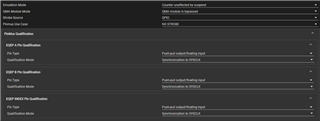
    3. Update eQEP's Unit Timer Period inside of edge capture unit to be 1000000
    4. Add a new GPIO instance
    5. Update the following lines within lab_main.c
      1.         DEVICE_DELAY_US(400000L);
                GPIO_writePin(myGPIOIndex, 1);
                DEVICE_DELAY_US(200L);
                GPIO_writePin(myGPIOIndex, 0);

    Best regards,

    Ryan Ma

  • I am able to get these outputs but per my previous reply this is with connecting it to the backpack pins (blue) not the header pins (green) for the EQEP that are at the front of the board that are supposed to be used with it. I don't see any option to make it not the BP pin inputs.

  • Hi David,

    Yes that is most likely due to the switch not being enabled. Also you can enable the Use Hardware feature to select the booster back pins.

    Best regards,

    Ryan Ma


  • I have the switches flipped but the AB signals are still only being read through the backpack pins and not the header pins. Weirdly it seems to be that the index signal is being read from the jumper pins because I can get the encoder count to reset to 0 by plugging the index signal in but the AB signals don't register from the QEP headers and still only register from the backpack pins.

  • HI David,

    For now are you able to continue your work with the backpack bins instead of the dedicated eQEP header pins?

    I will forward this thread to our launchpad expert.

    Best regards,

    Ryan Ma

  • I should be able to make do for right now. I will also mention that I'm having issues with project importing in CCS where it will import the project as a bunch of blank folders on some of the solution examples, but I'll keep looking around for solutions. If not that'll be another thread. 

    Thanks for the help.

  • Hi David,

    It may be better to create two new threads. One regarding the booster pack vs dedicated eqep header pins and another for your import issues you're seeing.

    That way we can close this thread regarding the original issue.

    Will that be okay?

    Best regards,

    Ryan Ma

  • Hi David,

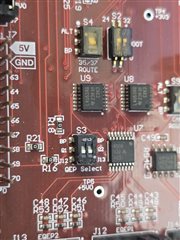
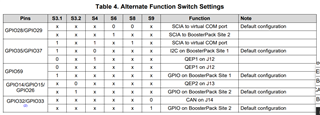
    If you're using EQEP1, which corresponds to GPIO35/37 on the eQEP interface at the bottom of the board, you will need to have the S4 switch in the UP position. I see that it is currently in the DOWN position from your picture

    Would be good to refer to this table in the LaunchPad user guide

    Regards,

    Peter