This thread has been locked.

If you have a related question, please click the "Ask a related question" button in the top right corner. The newly created question will be automatically linked to this question.

TMS320F28069M: How to use GUI compose to setup two parameter?

Part Number: TMS320F28069M

Tool/software:

Hello everyone

Is that possible to setup two parameter by GUI composer online?

For example,

Using input component value to setup "gUserParams.motor_numPolePairs" and "polepair."

Now I use two input component and I want to use one component. 

Or I should use other component?

thank you

  • Hello,

    Now I use two input component and I want to use one component. 

    Are you simply looking for one widget with one input field where you can select which variable to bind to?

    Thanks

    ki

  • Hello

    I am looking for one widget to bind two variables.

    Thanks

    Hallay

  • I'm not sure you can do this with one widget. I will bring this thread to the attention of the GC experts to confirm.

  • If i understand correctly, then you are trying to control two variables on the target side using a single gui control to ensure that they are in synch. 

    There is not such support to configure this graphically through a single widget's property. 

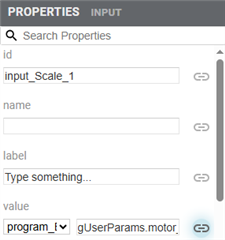
    However, you could try to binding programmatically to your widget. (NOTE: you should only have one type of binding configured, through the GUI/property page... this the picture that you included) or programmatically through javascript. If you have both then you most likely will see side effects on values. 

    In summary you would need to open index.js and uncomment function after comment block titled

    /*----------------

    Boilerplate code for databinding

    and uncomment this block, along with function signatures and wiatformodel calls. you would need to keep widget as is but your targetmodelID would need to be changed to match your program model (I can't make out full model id from your pictures, but is the left side of you binding, looks like "program_I"

    In example below the code has two functions getter (when getting data from target and sending it to widget) setter performs the transformation in reverse direction, when user changes the widget. They are doing a simple conversion of value from Celsius to Fahrenheit. 

    In your case you would not be doing any value change, but you would be adding additional code to get a reference to a model and then then getting a binding for second variable and then setting it to the same value. 

    // bindingRegistry.bind('widget.id.propertyName', 'targetModelId.targetVariable',
    // value => { return value*5/9 + 32; }, /* getter */
    // value => { return (value-32)*9/5; } /* setter */
    // );

    thus a code would be something like. 

    bindingRegistry.bind('widget.input_Scale_10.value', 'program_I.polepair',
    value => {

    let gVarsBinding = bindingRegistry.getModel('program_I').getBinding('gUserParams.motor_numPolePairs');

    gVarsBinding.setValue(value);  //this and line above get the binding to second variable and set it to same value. 

    return value; // we still want to set the actual input widget value. 

    }, /* getter */
    value => { return (value-32)*9/5; } /* setter */
     );

    Martin

  • Hello Martin

    Thanks for your reply

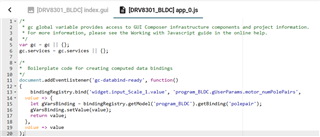
    I use your suggestion ,please see below.

    Is there anything wrong, 'gUserParams.motor_numPolePairs' change but 'polepair' doesn't.

    Hallay

    -----------------------

    bindingRegistry.bind('widget.input_Scale_1.value', 'program_BLDC.gUserParams.motor_numPolePairs',
    value => {
    let gVarsBinding = bindingRegistry.getModel('program_BLDC').getBinding('polepair');
    gVarsBinding.setValue(value);
    return value;
    },
    value => value
    );

    ---------------------------------

  • Hello Hallay, 

    The first function(i.e. where we get binding to polepair)  implements the direction of when gUserParams.motor_numPolePairs is read from MCU and updates the widget. In order to see the change reflected when user makes a change in the drop down, you would need to add same code in the "setter" function as well. 

    Martin