This thread has been locked.

If you have a related question, please click the "Ask a related question" button in the top right corner. The newly created question will be automatically linked to this question.

TMS320F28379D: USB Flash Programming in Production

Part Number: TMS320F28379D
Other Parts Discussed in Thread: TMDSCNCD28379D, C2000WARE

Tool/software:

Dear TI Support,

One of my customers would like to use a USB flash to load the firmware during the production process.

I am currently working on this at the firmware level, but I noticed that we need to connect via the XDS debugger to change a register value before we can flash using USB.

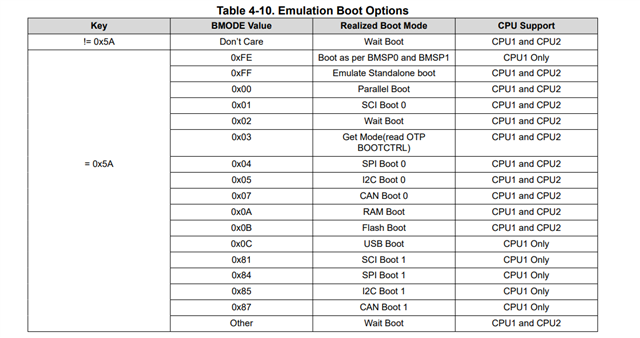
Specifically, we have to write 0x0C5A to the boot mode select address (0xD00) using the debugger.

The issue is that the person responsible for flashing the code in production has never used Code Composer Studio (CCS), and there won’t be a JTAG debugger available on the production line.

Could you please clarify this point: Is it necessary to write 0x0C5A to RAM every time before flashing via USB? Or is there a way to automate or embed this step so that USB flashing can be performed without a debugger?

Ultimately, my goal is to be able to load the initial firmware using only a USB on CPU1 and CPU2 flash drive during production. Is this feasible?

Thank you for your support.

Best regards,
S. Tarik

  • Hi S. Tarik,

    Writing 0xC5A to 0XD00 is only for the emulation of standalone boot. This is mainly meant for ensuring that the boot mode setting correct and verified before writing to the BOOTCTRL register in the user-configurable DCSM OTP.   

    Also, refer to the following app note USB Flash Programming of C2000Tm Microcontrollers

    Best Regards

    Siddharth

  • Hello Siddharth,

    I have a question regarding USB boot and flashing. Specifically, is it possible to flash the device through the USB port without having access to the BMODE value?

    This is a critical point for us, as once the product is delivered, we no longer have access to the JTAG connection. Therefore, all firmware updates must be handled exclusively via the USB port.

    Thank you in advance for your help.

    Best regards,
    S. Tarik

  • I attempted to use the TMDSCNCD28379D to validate and run the TI emulated example, but I encountered a driver issue on Windows 10.

    Below is the step-by-step procedure I followed. I also searched the TI E2E forum, as I noticed that others have experienced the same problem.

    1. I compiled the TI example project "F2837xD_usb_flash_kernels_cpu01" for CPU1.

    2. I connected to the board using XDS100v2 and loaded the file "F2837xD_usb_flash_kernels_cpu01.out" into RAM and run.

    3. I updated the adresse in the memory browser 0xd00 with 0x0C5A value.
    4. I then performed a Reset, followed by Resume, and started the execution (Run).

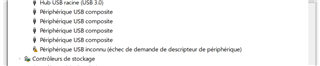
    5. After that, a new peripheral device appeared under Windows device manager.

    6. I tried to update the driver by pointing to the folder:
      C:\ti\c2000\C2000Ware_5_04_00_00\utilities\flash_programmers\usb_flash_programmer\windows_driver
      However, Windows reported that the best driver is already installed, so no changes were made.

    7. For reference, the SW1 DIP switch is set to position 11 and A:SW1 A=ON, B=ON, corresponding to the (ISO, ISO) configuration.


  • Hi, 

    What error does the Device manager show for the newly detected device? 

    Best Regards

    Siddharth

  • Unknown USB Device (Device Descriptor Request Failed)

  • Do you have any news please about this thread?