This thread has been locked.

If you have a related question, please click the "Ask a related question" button in the top right corner. The newly created question will be automatically linked to this question.

LAUNCHXL-F280049C: Empty Projects Being Imported

Part Number: LAUNCHXL-F280049C


Tool/software:

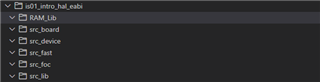
I am trying to follow through the InstaSPIN-FOC for F28004xC labs but am unable to because whenever the projects are imported they only create blank folders. How can this be fixed?
  • HI,

    Can you let us know what version of the SDK, CCS you are attempting to use to import the projects? Can you also let us know the process you are using to import the projects.

    Regards,

    Ozino

  • Here are the versions of the SDK and CCS. I do believe they should be the newest versions.

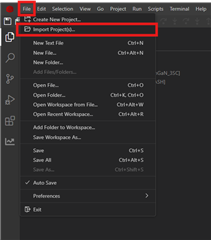
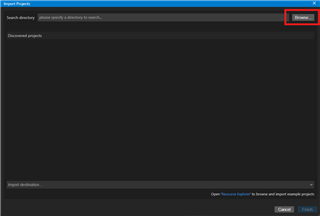
  • The process to import project:

    I found them in the drv8320rs folders as that's the devices I'm using with the labs anyway. This problem is not limited to just the 8320 files though and is more general. Also as another when importing the projects (and them creating just empty folders) when restarting ccs the error comes up ...

  • This issue also only seems to be present on the local CCS. I tried using Resource Explorer import of the project and ran into the same issues. When using CCS Cloud and importing from the Resource Explorer everything is there.

  • Hi David,

    Thanks for the information. I'm letting the instaSPIN and MotorControl SDK experts know. They will respond shortly.

    Regards,

    Ozino

  • Hi David, 

    I saw the same error message upon starting up CCS today, but I was able to import the project without any issue. I am using the same version of CCS and the MCSDK as described in your post and I have also tried with other CCS versions. I don't think this is an issue with the project/SDK, so I'll send this over to the CCS team and see if they can help.

    Kind regards,
    Skyler

  • Hi David,

    I am unable to reproduce this issue with the same versions of CCS and MotorControl SDK.  The same example project imports and builds successfully for me.

    Can you please attach the log file mentioned in the error popup that you see?

    Thanks,

    Baltasar

  • How can I do so? When I tried to attach the file earlier it wouldn't let me because it wasn't a supported file type.

  • It's just a text file.  You could try to change its extension to .txt, but I seem to be able to attach a '.log' file without issues.

    !SESSION 2025-07-15 12:00:10.524 -----------------------------------------------
    eclipse.buildId=unknown
    java.version=21.0.6
    java.vendor=Eclipse Adoptium
    BootLoader constants: OS=win32, ARCH=x86_64, WS=win32, NL=en_US
    Framework arguments:  -application com.ti.ccs.server.start -pluginCustomization C:\CCS\20.3.0.00004\ccs\eclipse\ccs.preferences.ini -ccs.socketPath \\.\pipe\f995c650cc20962bd4a75445527ce226.sock -ccs.workspaceFolderPaths c:\Users\a0389310\workspace_ccstheia -ccs.defaultImportDestinationPath c:\Users\a0389310\workspace_ccstheia -ccs.buildSecurityPolicy level:desktop
    Command-line arguments:  -os win32 -ws win32 -arch x86_64 -application com.ti.ccs.server.start -pluginCustomization C:\CCS\20.3.0.00004\ccs\eclipse\ccs.preferences.ini -data C:\Users\a0389310\AppData\Local\Texas Instruments\CCS\.ccs-server\workspaces\f995c650cc20962bd4a75445527ce226 -ccs.socketPath \\.\pipe\f995c650cc20962bd4a75445527ce226.sock -ccs.workspaceFolderPaths c:\Users\a0389310\workspace_ccstheia -ccs.defaultImportDestinationPath c:\Users\a0389310\workspace_ccstheia -ccs.buildSecurityPolicy level:desktop
    
    !ENTRY com.ti.ccs.core 1 0 2025-07-15 12:00:11.167
    !MESSAGE [ccs.trace] CCS> NOTE: CCS install-image directory was explicitly set to 'C:/CCS/20.3.0.00004/ccs'
    
    !ENTRY com.ti.ccs.core 1 0 2025-07-15 12:00:11.395
    !MESSAGE [ccs.trace] CCSServer> IDE session in progress: ad93f475-0381-4567-a7a2-c69c474a5e55 (server v20.3.0.202507112334)
    

    Baltasar

  • Thanks David, looks like it worked this time.

    There should also be a file named ".bak_0.log" in the same directory.  Could you also attach that as well?

    Baltasar

  • Thanks David,

    I'm attaching a potential patch.  Could you please give it a try and let me know if it resolves your issue?

    To install the patch:

    1. Find the identically named file in your <ccs>/ccs/eclipse/plugins/ directory, and rename it to have the ".jar_orig" extension
    2. Copy the downloaded file into the same directory
    3. Re-start CCS

    Try to see if this resolves the issue without re-importing the project.  And if it doesn't, then try to re-import the project.

    Thanks,

    Baltasar

    https://e2e.ti.com/cfs-file/__key/communityserver-discussions-components-files/171/com.ti.ccs.project_5F00_20.2.0.202505162334.jar

  • Thanks Baltasar. That fixed the issue of the folders being imported as blank and no errors on startup or importing other projects so far.

  • Thank you for verifying the patch, David.  I will include this fix in the upcoming CCS v20.3.0, and you can continue to use the patch until then.

    Baltasar