This thread has been locked.

If you have a related question, please click the "Ask a related question" button in the top right corner. The newly created question will be automatically linked to this question.

LAUNCHXL-F28069M: Large and wrong values in Expressions during the debug

Part Number: LAUNCHXL-F28069M

Tool/software:

I am debugging lab01c

How come I get these values?
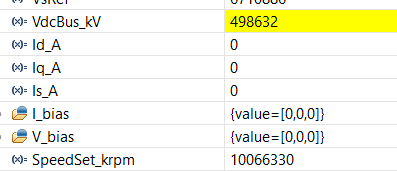
I simply set Flag_enableSys to 1.

Is it because the values entered are converted to IQ24?..although there would be no point in plotting them in live expressions, it is impossible to understand the real value.

Should I enable polite real time debugging?

(this is an option not mentioned in the old pdf)

  • Hi,

    If it is IQ number type I think you can right click the variable in the expressions window and change how it's displayed. Like below.

    Best,

    Kevin

  • Thank you!
    I was looking at "number format" and hadn't seen "Q-values".

    How do I know whether a variable is Q-value(31), Q-value(24) or Q-value(15)?

    For example PID-values:

    In the case of Kp_spd ... it is present in the code twice:

    ..but in both cases I do not know if it is declared Q-value(31), Q-value(24) or Q-value(15)

    EDIT: I do not rule out the possibility that perhaps these PID parameters are not in Q format ... but are simply random values initialised in memory that I have to set

  • Hi, 

    How do I know whether a variable is Q-value(31), Q-value(24) or Q-value(15)?

    You should just be able to check the variable declaration. ctrl + left click or F3 on windows in CCS to go to declaration quickly.

    Best,

    KEvin