This thread has been locked.

If you have a related question, please click the "Ask a related question" button in the top right corner. The newly created question will be automatically linked to this question.

TMS320F28388D: Watchdog Reset not working

Part Number: TMS320F28388D
Other Parts Discussed in Thread: SYSCONFIG

Tool/software:

Hi,

We have customize board where we are using watchdog reset in CPU1 as "Watchdog can generate an interrupt signal; reset signal is disabled". 

But the device is not getting rebooted after watchdog reset. 

We are able to see the 51usec pulse on XRSn pin but device goes in hang state instead of loading the application.

__interrupt void
INT_WAKE_ISR(void)
{

EALLOW;

SysCtl_setWatchdogMode(SYSCTL_WD_MODE_RESET);

EDIS;

// Step 6: Infinite loop - no interrupts can service watchdog now
while(1);
}

  • Hi,

    Do you have CCS connected ? If yes then with CCS connected, device boots as per emulation boot and you need to set it correctly at address 0xD00 for device to boot. Please refer the BOOTROM section in TRM to look at the detial.

    Regards,

    Vivek Singh

  • Hi Vivek, 

           The CCS is not connected.

           In our application address 0xD00 is not getting updated/written. Looks like this this is part of BOOTROM code.

    #define PIEVECTTABLE_BASE         0x00000D00U
     
     How it can be set?
     
  • Hi Vivek, 

           The CCS is not connected.

           In our application address 0xD00 is not getting updated/written. Looks like this this is part of BOOTROM code.

    #define PIEVECTTABLE_BASE         0x00000D00U
     
     How it can be set?
    Does the Boot ROM uses boot0(GPIO_84) and boot1(GPIO_68) pin states as high after watchdog reset and boot from flash, or it do something else as well?
  • If CCS is not connected then emulation boot should not matter.

  • Do you see the XRSn toggle only once or it keep toggling ?

  • XRSn toggles only once.

    If CCS is not connected than how controller BOOTs ?

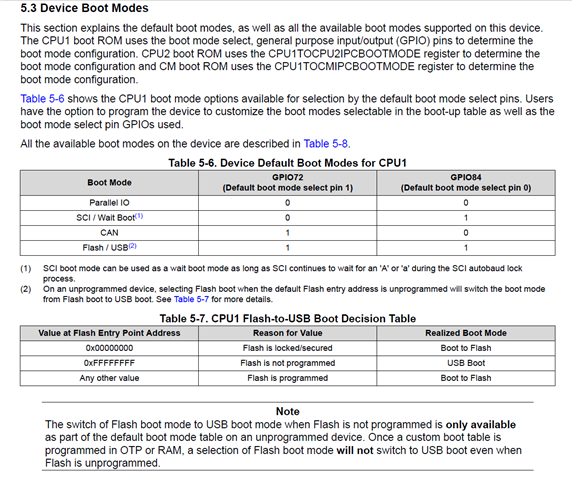
  • Without CCS, controller reads the BOOTMODE pins and boot. You can refer BOOTROM chapter in device TRM for all the detail about this.

    Vivek Singh

  • Hi Vivek, 

                Can we use GPIO68 (Boot1) and GPIO84(Boot0) instead of GPIO72 and GPIO84 ?  device is booting up correctly on power on reset but not booted on Watchdog reset with GPIO68 and GPIO84.

      As mentioned in datasheet section-

       " 5.4.1 Configuring Boot Mode Pins for CPU1 " the boot mode pin can be customized by user. 

                Is it okay to customize these pins ? also BOOTPINCONFIG is OTP(One time programmable) location so is it modifiable?

  • Hi,

    Can we use GPIO68 (Boot1) and GPIO84(Boot0) instead of GPIO72 and GPIO84 ? 

    Yes, you can do it by programming the OTP. If you are using the sysconfig then in DCSM section, you should have option to change the BOOT pin. Please note that once it's changed, it'll always boot as per new boot pin setting (even at power-up)

    device is booting up correctly on power on reset but not booted on Watchdog reset with GPIO68 and GPIO84.

    What is the value on these pins during power-up and during WD reset ? Could it be possible that these pins driven by external component on board during WD reset ? 

        Is it okay to customize these pins ? also BOOTPINCONFIG is OTP(One time programmable) location so is it modifiable?

    Yes, but these can not be modified. User can change it once by configuring the Z1 first and then Z2 but after that it will be done. 

    Also I would suggest to use the emulation boot method Ist to try it out.

    Regards,

    Vivek Singh