This thread has been locked.

If you have a related question, please click the "Ask a related question" button in the top right corner. The newly created question will be automatically linked to this question.

TMS320F28379D: Code composer 20.3.1 issue

Part Number: TMS320F28379D


Hi Sir/Madam,

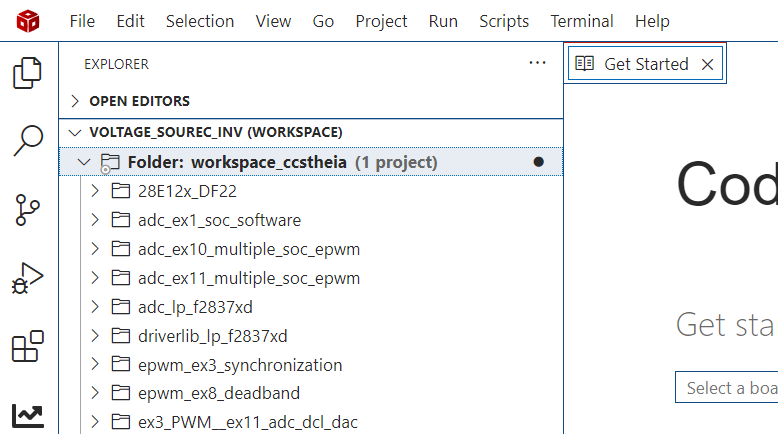
My code composer workspace is showing only 1 project . But I have 18 projects in workspace. 

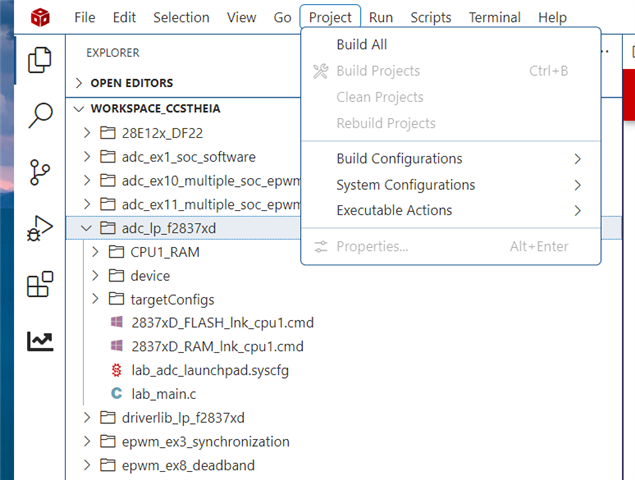
What could be the issue? If I click on any project , build optoins are inactive.It was working properly, but suddenly this happend. I have attached screen shot for reference.
 

e89d2d64-87a4-4b77-923c-71711e66c4c0.png


  • Hi Prashant,

    I think “workspace_csstheia” is the workspace you were using earlier, where all your 18 projects (28E12x_DF22, etc.) are located. Right now, you have opened "VOLTAGE_SOURCE_INV" , which is not your actual workspace , it’s just the parent folder where "workspace_csstheia" resides. In this state, you won’t be able to build your projects.

    Please follow these steps:

    File (top-left) → Open Folder → Select “workspace_csstheia”

    Once you open the correct workspace, all your projects will appear as normal folders (not subfolders), and you will be able to build them in CCS without any issues.

    Regards ,
    Lakshya Verma

  • Dear Lakshya,

    I am opening the correct workspace. For the correct workspace , see below path C:\Users\PrashantGugle\workspace_ccstheia

    I don't know why VOLTAGE_SOURCE_INV is appearing at the top.  Even with VOLTAGE_SOURCE_INV at the top, I was able to build the projects.

    After doing your steps File (top-left) → Open Folder → Select “workspace_csstheia”   I am not able to build the projects.

    So what could be issue? 

    Thanks and regards,

    Prashant Gugle

  • Hi Prashant,

    Could you please elaborate on how you were unable to build the projects?
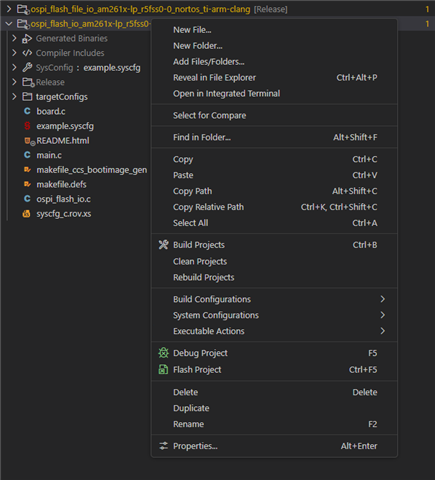
    For example, when you right-click on a project folder, is the “Build Projects” option missing?

    Regards,
    Lakshya Verma

  • Hi Lakshya,

    You are correct, when we right click on project folder,"build project" option missing. Also from project menu option is missing.

    Thanks and regards,

    Prashant Gugle

  • Hi Prashant,

    From the screenshot, I can see that CCS is not recognizing your folders as actual CCS Projects. Normally, a valid CCS project shows a small cube icon on the folder and also displays a build configuration next to the project name (such as [RAM], [FLASH], [Debug], etc.).
    Since neither the cube icon nor the configuration label is visible, CCS is treating the folders as plain file directories, which is why options like Build Project and Properties are greyed out.

    Could you please try restarting CCS once to see if the issue resolves?
    If the problem still persists, please try re-importing the projects  via:

    1. Go to File > Import Project(s)...
    2. Browse to the root of your project in your workspace directory
    3. Select Import projects at their original locations in the drop-down box at the bottom of the dialog
    4. Click Finish

    Regards,

    Lakshya Verma

  • Dear Lakshya,

    After following below steps, all the "build options are visible, and able to build the projects,

    1. Go to File > Import Project(s)...
    2. Browse to the root of your project in your workspace directory
    3. Select Import projects at their original locations in the drop-down box at the bottom of the dialog
    4. Click Finish

    Thanks for your reply.

    Prashant Gugle