Part Number: LAUNCHXL-F28379D

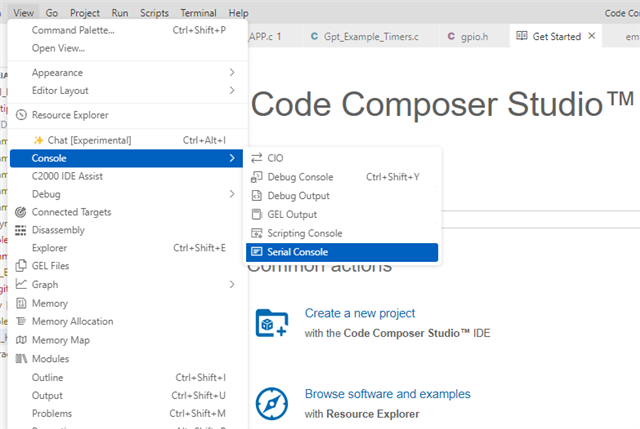
For the latest version of Code Composer Studio the option for launch terminal is not found. How can this be done for UART?
Given below fig is from training given in TI. 
This thread has been locked.
If you have a related question, please click the "Ask a related question" button in the top right corner. The newly created question will be automatically linked to this question.
Part Number: LAUNCHXL-F28379D

For the latest version of Code Composer Studio the option for launch terminal is not found. How can this be done for UART?
Given below fig is from training given in TI. 
Hello,
If you are simply trying to open a serial console, you can do so by using the tool bar 'View" > "Console" > "Serial Console"

From here, a Serial console window should open. There is a left-most button in the upper right corner that can allow you to configure your COM port.


Hope this helps! There is also a CCS User Guide available online. This information is referenced here: https://software-dl.ti.com/ccs/esd/documents/users_guide_ccs_20.0.2/ccs_ide.html?highlight=serial#view.
Best Regards,
Allison