


Part Number: CCSTUDIO-THEIA
I'm using the latest CCS-theia together with the XDS110 Debugger probe on an F28000157 board.
I'm not yet working on low-power features, but will be sometimes in the near future.
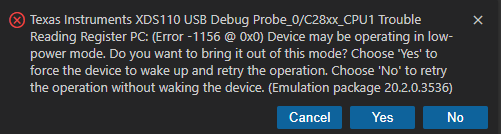
Once in a while, the supply to my board is cut unexpectedly, while I'm debugging, and sometimes, if it happens while I'm in a breakpoint (hardware breakpoint, running from flash), I get this:

As soon as the power is back, the board boots from flash, and is working as expected.
CCS however continues to be in a strange error mode, since no matter which of the four options (X, Cancel, Yes, or No) I select, the popup re-appears immidiately. Disconnecting the USB from the XDS100 has equally no result.
The only method I've found to recover from this error, is to close down CCS completely.
Right after a restart of CCS, the communication to the XDS100 can be re-assumed as if it was never there, new code can be flashed and debugging can start over.
This all points to some locked state in CCS, that blocks debugging after a fault.
Is there anything else I can try, or is this just a plain CCS/XDS100 (driver) bug?

