This thread has been locked.

If you have a related question, please click the "Ask a related question" button in the top right corner. The newly created question will be automatically linked to this question.

F29H859TU-Q1: How to link customer's own discrete project to multi-core project

Part Number: F29H859TU-Q1

Hi team,

I ask this for my customer.

In this thread: https://e2e.ti.com/support/microcontrollers/c2000-microcontrollers-group/c2000/f/c2000-microcontrollers-forum/1577209/f29h859tu-q1-how-to-build-a-multi-core-project-with-multi-core-sysconfig/6081764?tisearch=e2e-sitesearch&keymatch=%2520user%253A610907#

It metioned that system.xml link all the core project to one multi-core project.
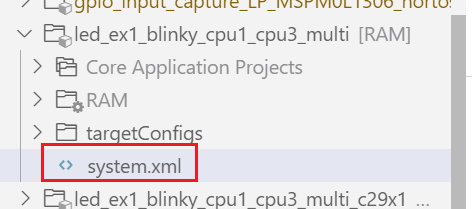
image.png

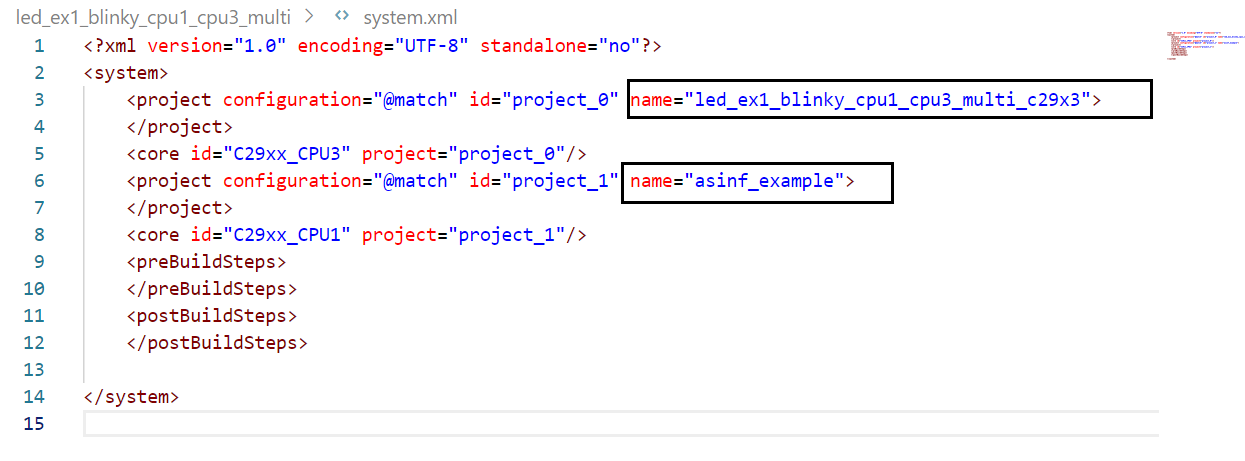
Now customer want to link their own project to the multi-core project, what they need to modify in the system.xml file? And any other in project configuration needed to be modified in addition to xml file? Do we have more detailed description for this?image.png
BRs

Shuqing

  • Hi Shuqing .

    To link examples into a multicore project, the user first needs to edit the system.xml file in the master project folder. Additionally, the user is required to modify the pre-build and post-build steps of the projects to be merged, which may also involve changes to the makefile. It is recommended that customers create their multicore project by importing an empty multicore project and building on it, rather than attempting to merge existing projects from scratch, as this approach is more complex and prone to errors.

    Currently, there is no proper documentation available on how to merge projects into a multicore project from scratch. I will raise this documentation-related issue with the relevant concerned team.

    Regards ,
    Lakshya Verma 

  • Hi Verma,

    Now customer have the project1 run in MCU1, and have project2 run in MCU2, they want to use 1 pcs F29 to realize this. And they want to run project1 in CPU1 and run project2 in CPU3.

    Because they have their own projects, they don't want to develop the multi-core project in empty multi-core project, they want to merge these two project to one multi-core project directly.

    So based on you reply before, if customer want to merge two project to one multi-core project, they need to:

    1. edit the system.xml file in the master project folder. 

    2. modify the post-build and pre-build.

    I import the empty multi-core demo in SDK, in different project(empty_project_multi, empty_project_multi_c29x1, empty_project_multi_c29x2, empty_project_multi_c29x3), it has the different post-build and pre-build content, do I need to modify the different post-build and pre-build content in different projects? Could you help to clarify it.

    BRs

    Shuqing

  • Hi Shuqing,

    Let me explain the complete flow.

    When you import empty_project_multi into your workspace, it also imports the following projects automatically:
    • empty_project_multi_c29x1
    • empty_project_multi_c29x2
    • empty_project_multi_c29x3

    The empty_project_multi project contains a system.xml file.
    This file specifies:
    • Which projects are part of the multi-core system, and
    • The order in which these projects are built.

    As shown in the attached image, the compilation order is CPU3 project → CPU2 project  → CPU1 project  (this order is important).


    In this setup:
    • CPU1 (project: empty_project_multi_c29x1) acts as the master core
    • CPU2 and CPU3 (projects: empty_project_multi_c29x2 and empty_project_multi_c29x3) act as secondary cores

    CPU1 is responsible for starting and initializing CPU2 and CPU3.This behavior can be seen in the empty_project_multi_c29x1.c file.

    If you check Build → Steps for each project:
    • CPU2 and CPU3 projects have only post-build steps
    • CPU1 project has both pre-build and post-build steps

    The overall build flow is as follows:
    1. CPU3 is built first . After compilation, its post-build step generates cpu3App.bin.


    2. CPU2 is built next . After compilation, its post-build step generates cpu2App.bin.


    3. CPU1 build starts , before compilation, CPU1 pre-build steps use cpu2App.bin and cpu3App.bin to determine how much memory space needs to be reserved for CPU2 and CPU3 programs (refer to cpuAppSec2.c, cpuAppSec3.c, and the CPU1 pre-build commands). CPU1 is then compiled and linked.
    After compilation, CPU1 post-build steps copy the CPU2 and CPU3 binaries into CPU1’s output file.

    As a result, the final CPU1.out contains: CPU1 program + CPU2 program + CPU3 program

    When CPU1.out is loaded and executed:
    CPU1 starts first , CPU1 initializes CPU2 and CPU3 then CPU2 and CPU3 are released from reset .All cores synchronize using IPC

    To merge individual single-core examples from scratch, the following are required:
    • Editing system.xml
    • Correctly configuring pre-build and post-build steps
    • Having one master project that initializes its own CPU, then initializes the other CPUs and loads their programs

    This master project must follow the same structure as empty_project_multi_c29x1.

    Creating this setup entirely from scratch is complex and error-prone.
    That is why I recommend starting with empty_project_multi and building your application on top of it.

    Regards ,
    Lakshya Verma