This thread has been locked.

If you have a related question, please click the "Ask a related question" button in the top right corner. The newly created question will be automatically linked to this question.

TMS320F28P550SJ: Issue with Flash Programming using Flash API v4.0.0 (TMS320F28P550)

Part Number: TMS320F28P550SJ

Hello,

I’m having a problem writing data to Flash using Flash API v4.0.0 on the TMS320F28P550SJ9.

Setup:
MCU: TMS320F28P550SJ9
Flash API: v4.0
Interrupts: disabled
Bank 4 is fully reserved for data (no code)
Flash API runs from RAM

Problem:
I’m trying to write data to empty Bank 4 (address 0x100000). The data is split into chunks of 4 words (U16):

1. 0x5A5A, 0x5A5A, 0x5A5A, 0x5A5A
2. 0xFFFF, 0xFFFF, 0xFFFF, 0xFFFF
3. 0xA5A5, 0xA5A5, 0xA5A5, 0xA5A5
4. 0xFFFF, 0xFFFF, 0xFFFF, 0xFFFF
5. 0x0001, 0x0002, 0x0003, 0x0004
6. 0x0005, 0x0006, 0x0006, 0x0007


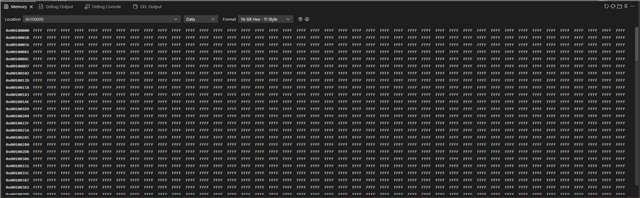
Before starting the programming procedure, I verify that the target memory is blank: 
1. manually (byte-by-byte comparison) 
2. using Fapi_doBlankCheck 
3. through memory view in CCS 

In all cases, the memory was empty

before_flash.png

Behavior during programming:
1. Data is written in chunks (4 × U16).
2. Chunks 1–4 are programmed correctly.
3. When attempting to program the next chunk, Fapi_getFsmStatus returns 0x101 (decimal: 257).

chunk_1_4.png

According to Flash API v4.0.0 documentation:
1. bit 8: Program command failed because an attempt was made to program a stored value
2. bit 0: Command Done

I’ve checked all addresses and offsets — everything looks correct.
After erasing Bank 4 manually in CCS and restarting the firmware, all data writes correctly

after_manual_erase.png


Code:

uint16_t CHUNKS = length / 4U;

uint16_t CHUNK_NUM = 0;
for(CHUNK_NUM = 0; CHUNK_NUM < CHUNKS; CHUNK_NUM++)
{
        Fapi_StatusType fapi_status_ret = Fapi_Status_FsmBusy;

    while(Fapi_checkFsmForReady() != Fapi_Status_FsmReady);

    volatile Fapi_FlashStatusType flash_status_ret = Fapi_getFsmStatus();

    if(flash_status_ret != 0 )
    {
        fapi_status_ret = Fapi_issueAsyncCommand(Fapi_ClearStatus);

        if(fapi_status_ret != Fapi_Status_Success)
        {
            __asm(" ESTOP0");
            return FALSE;
        }
    }

    flash_status_ret  = Fapi_getFsmStatus();

    uint16_t err = (Fapi_checkFsmForReady() == Fapi_Status_FsmReady) && 
                (flash_status_ret == 0x03U || (flash_status_ret == 0U)) ? FALSE : TRUE;

    if(err == TRUE)
    {
        __asm(" ESTOP0");
        return FALSE;
    }

    if(Fapi_setupBankSectorEnable((FLASH_WRAPPER_PROGRAM_BASE + FLASH_O_CMDWEPROTA), MASK_A) != Fapi_Status_Success)
    {
        __asm(" ESTOP0");
        return FALSE;
    }

    if(Fapi_setupBankSectorEnable((FLASH_WRAPPER_PROGRAM_BASE + FLASH_O_CMDWEPROTB), MASK_B) != Fapi_Status_Success)
    {
        __asm(" ESTOP0");
        return FALSE;
    }


    uint16_t offset = 4U * CHUNK_NUM;

    if(Fapi_Status_Success != Fapi_issueProgrammingCommand( (uint32_t*) (0x100000U + offset),
                                                            (uint16_t*) (data_to_save + offset), 
                                                            4U, NULL, 0U, Fapi_AutoEccGeneration))
    {
        __asm(" ESTOP0");
        return FALSE;
    }

    while(Fapi_checkFsmForReady() != Fapi_Status_FsmReady);

    flash_status_ret = Fapi_getFsmStatus();

    if (flash_status_ret != 0x0U && flash_status_ret != 0x3U)
    {
        __asm(" ESTOP0");
        return FALSE;
    }

}


Question:

What could be causing the inability to program the memory, even though the bank was previously verified as blank?


Thank you in advance for any help!

Best regards,
Karol


  • Hi,

    I apologize as the expert is currently out of office due to the holidays in the US. Please expect a reply once the holidays have past.

    Kind regards,

    AJ Favel

  • Hi Karol,

    Is this issue repeatable on the failure state during initial programming?

    Thanks and regards,

    Charles

  • Hi Charles,

    Thank you for your reply.

    If you mean reproducing this issue, for example on an eval board with the code I provided, I’m not sure yet (I’ll check tomorrow). However, the situation on my side is a bit more complex because it involves a fairly large application. That said, the issue consistently occurs in the following scenario:

    1. Update our bootloader (uses FAPI for programming)

    2. MCU restart (WDT)

    3. Update the application (uses FAPI for programming)

    4. MCU restart (WDT)

    5. Run the provided code – always the same effect

    The bootloader and application reside in flash BANKS 0–3.
    Step 5 want write to  BANK 4 

  • Hello,

    What is the value of the address parameter when the programming call fails? Before programming, are the ECC bits corresponding to the region you are trying to program also erased? Every 64 bits of data corresponds to 8 bits of ECC. The bank 4 ECC region starts at 0x0109 0000. See the flash memory map in the datasheet for sector-specific addresses.

    Best,

    Alex

  • Hi Alex,
    Sorry for the long delay in replying, but I did not have access to the hardware.

    So, Alex, here are the details:

    1. I erased the entire MCU memory. The memory looks like this:


    2. I programmed our firmware, and it looks like this:


    3. This is how the memory looks before starting data programming:


    4. I carefully checked the entire Bank 4 using:
       a) Fapi_doBlankCheck
       b) Comparing all values in Bank 4 to 0xFFFF

       Both checks returned OK and the program continued without any issues.

    5. I started the flash programming process:

    • The first 2 chunks were programmed correctly (0x100000 – 0x100007):
      Values:

      0x5A5A, 0x5A5A, 0x5A5A, 0x5A5A,
      0xFFFF, 0xFFFF, 0xFFFF, 0xFFFF


    • The next 2 chunks were also programmed correctly (0x100008 – 0x10000F):
      Values:
      0xA5A5, 0xA5A5, 0xA5A5, 0xA5A5,
      0xFFFF, 0xFFFF, 0xFFFF, 0xFFFF

    The memory looks like this:


    7. When I tried to program the next chunk at address 0x100010, I got the same error as described before (0x101 (decimal: 257).

    The memory then looks like this:


    As I understand it, the Fapi_doBlankCheck function tells me that:

    1. The flash is not programmed (blank).

    2. It is possible to program the tested address.

    Is that correct?

  • Hello,

    Based on your screenshots, the flash bank 4 ECC region is being written when you program your firmware onto the device. This is the origin of your FSM error. The first data segments may program correctly if their ECC codes match what is already present in flash, but when the FSM tries to program the ECC value to a different value it is unable to without an erase. 

    Is any code or data allocated to bank 4 when programming your firmware to the device? Are you able to add an erase call just before reprogramming this region?

    Best,

    Alex

  • Ok, thank you for your reply — this is a helpful lead regarding my problem.

    Based on the Reference Guide TMS320F28P55x Flash API Version 4.00.00.00 and the function Fapi_doBlankCheck():


    There are a few things I don’t understand, and maybe you can help me clarify them:

    1. What exactly does this function check? Before programming, I check the entire FLASH BANK 4 using this function and don’t get any errors

    2. Does this function check only if the FLASH address equals 0xFFFF, or does it also check the corresponding ECC?

    3. Does this function work as it’s supposed to?

    Additionally, in my case, BANK 4 is used exclusively to emulate EEPROM in our solution. No code or anything else is stored there.

    Thank you very much for your answers.

    Best,
    Karol

  • Hello Karol,

    This function checks to see if the main array flash is equal to 0xFFFF, it does not check the ECC values. This is the intended behavior.

    Is bank 4 being included in your firmware image somehow?

    Best,

    Alex

  • Alex, thank you very much for your valuable feedback.

    You were right — it turned out to be an issue in our bootloader or in the HEX file. Most likely, one of the HEX files was filled all the way up to the last flash byte (0xFFFF). However, after manually clearing the memory:

    • the flash was empty

    • the ECC was empty

    → there were no issues with writing to flash.

    Thanks again — much appreciated!