This thread has been locked.

If you have a related question, please click the "Ask a related question" button in the top right corner. The newly created question will be automatically linked to this question.

XDS110ISO-EVM: XDS110ISO-EVM can't connect to target

Part Number: XDS110ISO-EVM

Hi,

I have purchased an XDS110ISO-EVM probe, because non-isolated probe keep disconnecting during debug due to common mode noise. However, I can't get it to work.

I am using an F280033 target on a custom board. Programming the target works perfectly using a regular non-isolated XDS110 probe.

However, when using the XDS110ISO-EVM probe (exact same project, exact same ccxml file), I get the following error message :

image.png

Which is strange, because the probe is correctly detected by windows : 
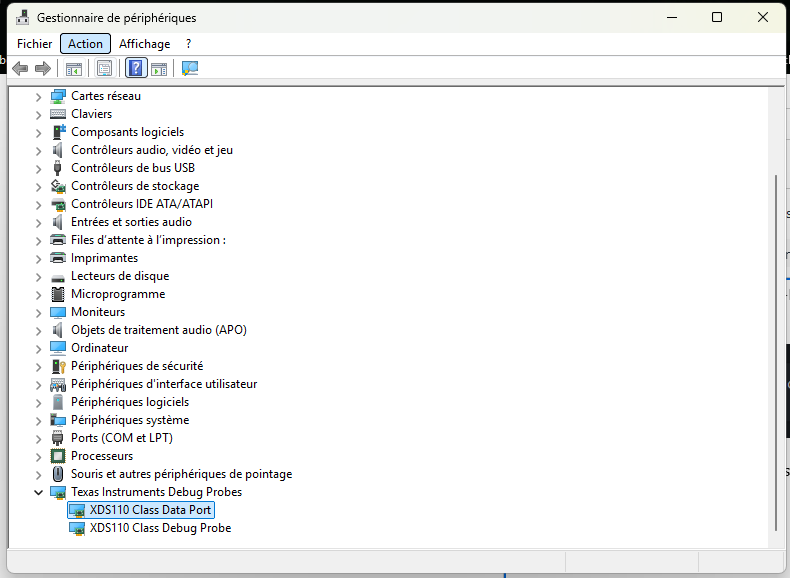
image.png

When I go into advanced mode and try to test the connexion, I get the following result : 


-----[Print the board config pathname(s)]------------------------------------

C:\Users\A0564~1.THU\AppData\Local\TEXASI~1\
CCS\CCS_20_4\0\0\BrdDat\testBoard.dat

-----[Print the reset-command software log-file]-----------------------------

This utility has selected a 100/110/510 class product.
This utility will load the adapter 'jioxds110.dll'.
The library build date was 'Nov 20 2025'.
The library build time was '14:44:07'.
The library package version is '20.4.0.3756'.
The library component version is '35.35.0.0'.
The controller does not use a programmable FPGA.
The controller has a version number of '5' (0x00000005).
The controller has an insertion length of '0' (0x00000000).
This utility will attempt to reset the controller.
This utility has successfully reset the controller.

-----[Print the reset-command hardware log-file]-----------------------------

The scan-path will be reset by toggling the JTAG TRST signal.
The controller is the XDS110 with USB interface.
The link from controller to target is direct (without cable).
The software is configured for XDS110 features.
The controller cannot monitor the value on the EMU[0] pin.
The controller cannot monitor the value on the EMU[1] pin.
The controller cannot control the timing on output pins.
The controller cannot control the timing on input pins.
The scan-path link-delay has been set to exactly '0' (0x0000).

-----[An error has occurred and this utility has aborted]--------------------

This error is generated by TI's USCIF driver or utilities.

The value is '-233' (0xffffff17).
The title is 'SC_ERR_PATH_BROKEN'.

The explanation is:
The JTAG IR and DR scan-paths cannot circulate bits, they may be broken.
An attempt to scan the JTAG scan-path has failed.
The target's JTAG scan-path appears to be broken
with a stuck-at-ones or stuck-at-zero fault.

Again, no issue with a regular XDS110 probe. 

Please help me get this to work.

Thanks in advance,

Adrien


  • Hi Adrien,

    Can you take a look at our JTAG debugging guide? More specifically, take a look at Table 4-1 which details steps to take to debug the error that you are currently seeing. 

    Kind regards,

    AJ Favela 

  • Hi,

    I have followed the procedure in the manual. There seems to be an issue with the boot mode, as the XRSx was going low every ~15ms in FLASH boot mode. My working hypothesis is that this is due to a bootloader issue with the part I am working with (F280033), which is the object of another thread (here). Anyway, I have changed it (temporarily) to wait boot, and the XRSn got stable.

    Other than that, nothing stands out. However, the error message has changed :

    IcePick_C_0: Error connecting to the target: (Error -2131 @ 0x0) Unable to access device register. Reset the device, and retry the operation. If error persists, confirm configuration, power-cycle the board, and/or try more reliable JTAG settings (e.g. lower TCLK). (Emulation package 20.4.0.3756) 
    

    Following the instruction in the table, I have tried a projectless debug, but I still can't connect to the core (same error message).

    Best regards

    Adrien

  • Hi Adrien,

    With the new error message populating, have you attempted to test your connection to the board via the .ccxml file? If this does not work can you try power cycling the board and reattempting?

    Kind regards,

    AJ Favela 

  • Hi AJ,

    Yes, I have tried to connexion via the ccxml file. Same message, including  after power cycling.

    Best regards,

    Adrien

  • Hi Adrien,

    Have you attempted all the other debug steps mentioned in Table 4-1 for error -2131?

    Kind regards,

    AJ Favela 

  • Hi AJ,

    Yes, I have, like I said 2 days ago.

    Following the instruction in the table, I have tried a projectless debug, but I still can't connect to the core (same error message).

    Adrien

  • Hi,

    Is it possible to have some support, please ?

    We really need to have an isolated JTAG probe working !

    Adrien

  • Hi Adrien,

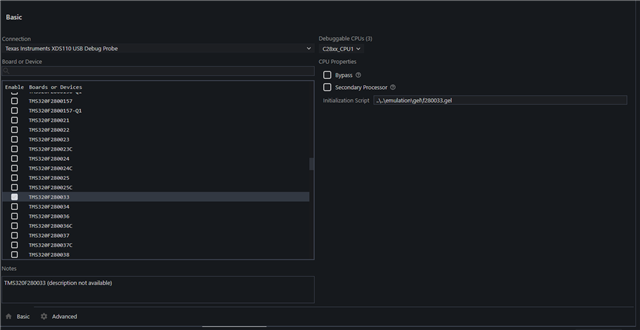
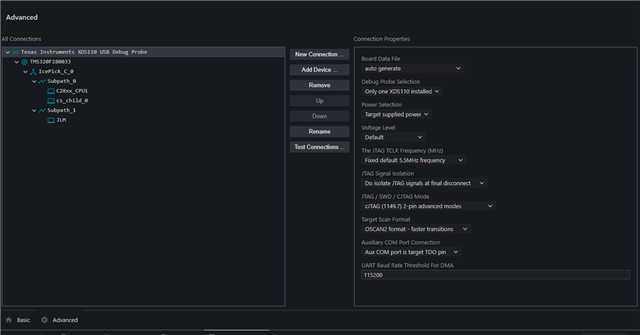
    Apologies for the late response. By chance could you send me a screenshot of your .ccxml file (including both the basic and advanced tabs)?

    Kind regards,
    AJ Favela 

  • Hi AJ,

    Here it is.

    I can send you the ccxml file if needed.

    I have tried reducing the speed down to 1MHz, without any effect.

    I have also tried all combinations of JTAG / SWD in the ccxml file and switch on the eval board, without effect.

    Adrien

  • Hi Adrien,

    Yes can you please send me your .ccxml file. I would like to test it on my side if possible

    Kind regards,
    AJ Favela

  • Hi AJ,

    Here it is.

    <?xml version="1.0" encoding="UTF-8" standalone="no"?>
    <configurations XML_version="1.2" id="configurations_0">
        <configuration XML_version="1.2" id="configuration_0">
            <instance XML_version="1.2" desc="Texas Instruments XDS110 USB Debug Probe" href="connections/TIXDS110_Connection.xml" id="Texas Instruments XDS110 USB Debug Probe" xml="TIXDS110_Connection.xml" xmlpath="connections"/>
            <connection XML_version="1.2" id="Texas Instruments XDS110 USB Debug Probe">
                <instance XML_version="1.2" href="drivers/tixds510icepick_c.xml" id="drivers" xml="tixds510icepick_c.xml" xmlpath="drivers"/>
                <instance XML_version="1.2" href="drivers/tixds510c28x.xml" id="drivers" xml="tixds510c28x.xml" xmlpath="drivers"/>
                <instance XML_version="1.2" href="drivers/tixds510cs_child.xml" id="drivers" xml="tixds510cs_child.xml" xmlpath="drivers"/>
                <instance XML_version="1.2" href="drivers/tixds510ajsm.xml" id="drivers" xml="tixds510ajsm.xml" xmlpath="drivers"/>
                <property Type="choicelist" Value="4" id="SWD Mode Settings">
                    <choice Name="cJTAG (1149.7) 2-pin advanced modes" value="enable">
                        <property Type="choicelist" Value="1" id="XDS110 Aux Port"/>
                    </choice>
                </property>
                <platform XML_version="1.2" id="platform_0">
                    <instance XML_version="1.2" desc="TMS320F280033" href="devices/f280033.xml" id="TMS320F280033" xml="f280033.xml" xmlpath="devices"/>
                </platform>
            </connection>
        </configuration>
    </configurations>

    Adrien

  • Hi Adrien, 

    I see that you are attempting to use cJTAG, can you confirm that you have set the switch (S1) on the XDS110ISO-EVM to use cJTAG.

    Additionally can you send me a picture of your current setup of the EVM?

    Kind regards,

    AJ Favela  

  • Hi AJ,

    Yes, as I said earlier, I have tried the switch in both JTAG and cJTAG position, and both position for all JTAG / cJTAG / SWD option in the ccxml file.

    I have also tried all combinations of JTAG / SWD in the ccxml file and switch on the eval board, without effect.

    Here is a photo of a setup.

    Adrien

  • Hi Adrien,

    I apologize for the late response, I was discussing this issue with the team.

    Can you confirm you are using the latest CCS as the issue may be stemming from not having the latest drivers and also re-flash. 

    Lastly, some more helpful documentation can be found within the XDS110SupportReadMe.pdf which can be found within the following path. C:\ti\ccsXXX\ccs\ccs_base\common\uscif\xds110

    Kind regards,
    AJ Favela