This thread has been locked.

If you have a related question, please click the "Ask a related question" button in the top right corner. The newly created question will be automatically linked to this question.

CCSTUDIO-THEIA: Updating clang language server i CCS?

Part Number: CCSTUDIO-THEIA
Other Parts Discussed in Thread: C2000WARE

Since updating from CCS 20.2.0, CGT 22.6.2.LTS, and C2000Ware 5.04.00.00.
to latest CCS 20.4.0, CGT 22.6.3.LTS, and C2000Ware 6.00.01.00, I've had problems with InteliSense.

The problems are specifically ctrl+click on functions that are in C2000Ware driverlib, such as ADC_readResult()  - ctrl+click on the driverlib header files, such as adc.h, and compilation works flawlessly.

Over the weeks, I've spend hours trying to figure out what changed in the configuration that could affect this.

And then suddenly, out of the blue, a CCS popup said "An updated clang language server is available. Upgrade from 19.1.2 to 21.1.0.?"

After performig this update, everything worked.

But now my colleuges and my other computers, are lacking behind, as they did not get the upgrade popup (yet?)

Checking the Help -> Software Update, I can see (if I enable "Show up-to-data packages") this lists of packages:

  IDE Core Features 20.4.0.13
  C2000 (C28) Support 6.28.3
  C2000 (C29) Support 1.2.28

They are all the same versions as before the Clang upgrade.

How can I specifically see, and update, the clang language server version?

  • And then suddenly, out of the blue, a CCS popup said "An updated clang language server is available. Upgrade from 19.1.2 to 21.1.0.?"

    Do you have the below option enabled?

    It is typically disabled by default.

    How can I specifically see

    To check the clangd version, there are a few ways:

    1) Browse to <CCS INSTALL DIR>\ccs\theia\resources\clangd and run:

    > clangd -version

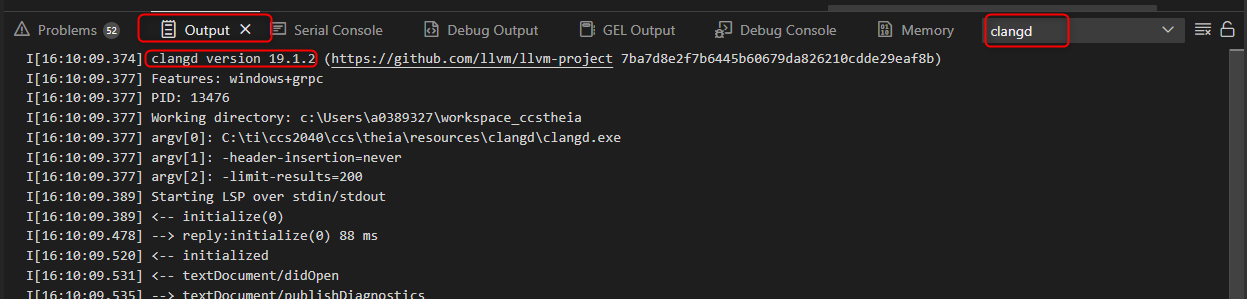
    2) Open the Output view and select "clangd" in the dropdown to see clangd messages:

    and update

    Open the Command Palette and type "clangd" and select the below:

    This will force an update check:

    Thanks

    ki

  • Thank you for this most excellent guide,  

    I did indeed have Check Updates enabled, but to the best of my knowledge I have not touched it.

    The Command Palette option will be of great use!

  • I did indeed have Check Updates enabled, but to the best of my knowledge I have touched it.

    I believe we used to have it enabled by default in earlier versions but disabled it in later versions. The reason is that sometimes a newer version could potential conflict with something in CCS and cause errors. Hence we wanted people to stay with the version we validate CCS with and only want people to update if they really needed to.