TMS320F28069F: Running code from SRAM

Part Number: TMS320F28069F
Other Parts Discussed in Thread: C2000WARE

Hello,

I need to develop my own tool for programming flash of TMS320F devices.

For this purpose I have implemented a simple application in CCS Studio that blinks LED and writes some data to flash. The application is executed from SRAM, and the MAP file generated by Studio shows SRAM addresses as expected. The project is executed using "Flash Project" or "Debug Project" in Studio and everything works properly.

Now, I extract the data from the HEX or OUT file generated by the project and send it to the device from my tool using the JTAG interface. The following steps are performed:

  1. Send data to SRAM using SYS_ACC_W instruction
  2. Write the entry_point address to the CPU IC register
  3. Execute the code by writing EXE_CONT value to EXE_DIR bits of MF_REG_0

The issue is the code is not executed. What is missing in my sequence?

Please your assistance.

Thanks


  • Edward,

    At first glance through some documentation there is mention of the need to execute Run Test Idle between IR scans.  Although it is not needed for each IR scan, our experience is such that it is simpler to just insert this between all IR scans vs keeping track.  let me know if you are already doing this.

    Also, I want to make sure you have all the collateral around the emulation for the C28x.  Do you have access to a My Secure Resources folder already, and if so can you provide the name of that package?  Based on your comments above, I think you have access to some of this material, but I just want to make sure you have everything I do in terms of documentation.

    Best,

    Matthew

  • Hello Matthew,

    1. Run Test Idle is executed between IR scans.

    2. My implementation is done according to the following documents:

                SPRUF82 - August 2008

                SPRUHS1C - October 2014–Revised November 2019

                SPRU430F - August 2001–Revised April 2015

                SPRUH18I - JANUARY 2011 – REVISED JUNE 2022

    I need more information about the CPU registers and the exact sequence required to run the core via JTAG.

    Which values should be written to the CPU registers (e.g. IC, SP) before running the core?

    Thanks,

    Edward

  • Edward,

    I'm going to send you a private chat in order to share some documents off forum. I think you will need to accept the connection request in order for me to do so.  Let me know if you have any issues or don't see it.

    Best,

    Matthew

  • Hello Matthew,

    I don't see the connection request.

    Thanks,

    Edward

  • Edward,

    Can you see if there is a notification pending in either of the two highlighted links in the E2E header:

    If you still don't see anything, I can try and email you directly.

    Best,

    Matthew

  • Hello Matthew,

    There is no notification pending.

    Please email it directly to edwards@softlog.com.

    Thanks

  • Sent just now.

    Best,

    Matthew

  • Thanks.

    I will check and update later.

  • Hello Matthew,

    Is it important to obtain the same SSR value as described in the paragraph "JTAG Scan Sequences"?

    For example, I have implemented the connect sequence as described in the document, but not all bits of the SSR match the expected values.

    Thanks,

    Edward

  • Hello Matthew,

    Is it important to obtain the same SSR value as described in the paragraph "JTAG Scan Sequences"?

    For example, I have implemented the connect sequence as described in the document, but not all bits of the SSR match the expected values.

    Thanks,

    Edward

  • Edward,

    Sorry for the delay here, I need to loop in some others for comment.  Will try and get something for you tomorrow US time.

    Best,

    Matthew

  • Edward,

    Update from my side, I'm working on getting the source for our internal CCS driver, this should give you something to replicate on your end.  Hopefully have something in the next day or so.

    Best,

    Matthew

  • Edward,

    Email sent to just now with the attached drivers as mentioned in my last post.

    Best,

    Matthew

  • Hello Matthew,

    How can these drivers help me execute my application from SRAM?

    I am now sure there is no issue with my device connection sequence, since I can read the flash and other registers properly.

    The issue is that the LED does not blink when the application is executed from my firmware, but it does blink when the application is executed using “Flash Project” in CCS Studio.

    What could be the cause of this?

    Perhaps there is a problem with my CCS project?

    Thanks,

    Edward

  • Edward,

    Thanks for the detail, I thought we were stuck on a more fundamental scan issue, I mis-understood.

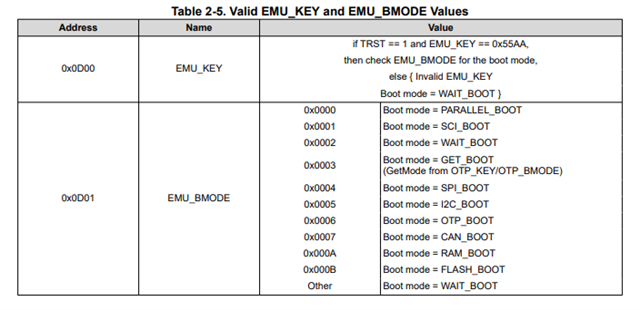
    In your code/setup you need to write to the EMU_KEY and EMU_BOOT registers so that the BROM knows to boot to flash, even though the emulator is connected.  When the emulator is connected (TRSTn = 1) BROM will look at the below to determine bootmode, vs the boot pins.  Else the device will enter into wait boot if the below doesn't match the expected contents.

    Best,
    Matthew

  • Hello Matthew,

    A writing to EMU_KEY and EMU_BOOT didn't solve my issue.

    The sequence below is done by me:

    1. Loading data to SRAM according to my application HEX file generated by CCS environment

    2. Writing _c_int00 value from MAP file to IC register (0x140)

    3. Writing 0x55AA to EMU_KEY register (0x0D00)

    4. Writing 0x000B to EMU_BMODE register (0x0D01)

    5. Running the core by writing 0x87FF to MF_REG_0

    Please your assistance.

    Thanks,

    Edward

  • Edward,

    I would change step #2, instead of loading the C_int00 into the IC register directly, use the JTAG sequence to issue a CPU reset instead.  This should place the CPU PC at the BROM entrypoint instruction. 

    Since you are loading a RAM image(apologies here, I mixed up that you were loading to flash, vs creating a flash loader), you should place your first instruction at address 0x0000(M0 RAM).  You can just use 1 32-bit word to hold a branch instruction to the rest of your code, likely in a bigger memory region.  Or if small enough you can place the whole code in M0.

    You will need to change the EMU_BMODE to "Ah" for RAM boot.

    There are some calibration steps that the BROM will do for you, so that once this calls your code the device will be configured correctly(oscillator calibrated, etc).

    I am not sure why loading Cint into the IC/PC isn't working, as that is what CCS would do for a typical load/run.  However, in that case CCS is going to invoke some instructions in the GEL file that take care of the fact that the BROM is not executed.  I'd like to avoid all of that with the Boot method.

    Let me know if this works and we can go from there.

    Best,

    Matthew

  • Hello Matthew,

    My sequence now is:

    1. Loading data to SRAM according to my application HEX file generated by CCS environment

    2. Issue core reset

    3. Writing 0x55AA to EMU_KEY register (0x0D00)

    4. Writing 0x000A to EMU_BMODE register (0x0D01)

    5. Writing 0x0040XXXX to address 0 (0x0040 - LB instruction, 0xXXXX - address of my code)

    6. Running the core by writing 0x87FF to MF_REG_0

    I tried some 0xXXXX values, but it doesn't work.

    Can I send you XML file generated from my project's OUT file using the ofd2000.exe tool?

    Thanks,

    Edward

  • Yes, if you want to send me the .out as well that will be helpful.  Let me know if I need to set up a share drive/cloud drive for this.\

    Best,
    matthew

  • Hello Matthew,

    Please find the OUT file in the link https://www.jumbomail.me/j/rJ7NEhUS4ku0-h7.

    Thanks,

    Edward

  • Edward,

    US was out of the office yesterday for national holiday.  Please give me another day to download and complete the analysis.

    Best,
    Matthew

  • Edward,

    The TI intranet is blocking me from using this link...I can download it privately and then push back to myself.  But I let the link expire it appears.  Can you upload it one more time?

    Best,

    Matthew

  • Edward,

    I see the issue.  Since we are going to boot to RAM, letting the BROM take care of setting up the device and branching to your application code, we need to have a branch instruction at the RAM entry point (address 0x0000) to your code.  The code you attached does not have that instruction at address 0x0000, so that is why you don't see it work correctly.

    You can use the example here: C:\ti\c2000\C2000Ware_6_00_00_00\device_support\f2806x\examples\c28\adc_soc for the files I'm about to mention:

    You will see in the linker.cmd file 28069_RAM_lnk.cmd.  You can just use this as your linker, but the following lines are what are important to boot to RAM:

    BEGIN       : origin = 0x000000, length = 0x000002

    BOOT_RSVD   : origin = 0x000002, length = 0x00004E (this is a keep out as the ROM will use this area for its stack, etc)

    all the other RAM is fair game for your .text/.ebss, etc.

    Now, you also need to make sure and include the F2806x_CodeStartBranch.asm file in your project.  This has 2 provisions:

    1)Will place the branch instruction to your program code at address specified in BEGIN(in this case 0x0000)

    2)With option, you can disable/enable the watchdog on the device.  I would recommend disabling it, as we don't want that interrupting the flash operations.

    Just for context when you load your current .out file directly with CCS, there are provisions to start the code for you at "main".  while you can also set the PC to "main" with a JTAG scan sequence, what is not happening with this flow are things that CCS does, usually with the help of the GEL file, in order to support not executing cinit/brom.  In your case this is impractical, so it will be safer to boot to RAM, and above should let this work correctly.

    Best,

    Matthew

    MEMORY
    {
    PAGE 0 :
       /* BEGIN is used for the "boot to SARAM" bootloader mode   */
    
       BEGIN       : origin = 0x000000, length = 0x000002
       RAMM0       : origin = 0x000050, length = 0x0003B0
       RAML0_L3    : origin = 0x008000, length = 0x002000	 /* RAML0-3 combined for size of .text */
       														 /* in Example_F2806xSWPrioritezedInterrupts */
       RESET       : origin = 0x3FFFC0, length = 0x000002
       FPUTABLES   : origin = 0x3FD590, length = 0x0006A0	 /* FPU Tables in Boot ROM */
       IQTABLES    : origin = 0x3FDF00, length = 0x000B50    /* IQ Math Tables in Boot ROM */
       IQTABLES2   : origin = 0x3FEA50, length = 0x00008C    /* IQ Math Tables in Boot ROM */
       IQTABLES3   : origin = 0x3FEADC, length = 0x0000AA	 /* IQ Math Tables in Boot ROM */
    
       BOOTROM    : origin = 0x3FF3B0, length = 0x000C10
    
    
    PAGE 1 :
    
       BOOT_RSVD   : origin = 0x000002, length = 0x00004E     /* Part of M0, BOOT rom will use this for stack */
       RAMM1       : origin = 0x000400, length = 0x000400     /* on-chip RAM block M1 */
       RAML4       : origin = 0x00A000, length = 0x002000     /* on-chip RAM block L4 */
       RAML5       : origin = 0x00C000, length = 0x002000     /* on-chip RAM block L5 */
       RAML6       : origin = 0x00E000, length = 0x002000     /* on-chip RAM block L6 */
       RAML7       : origin = 0x010000, length = 0x002000     /* on-chip RAM block L7 */
       RAML8       : origin = 0x012000, length = 0x002000     /* on-chip RAM block L8 */
       USB_RAM     : origin = 0x040000, length = 0x000800     /* USB RAM		  */
    }
    
    
    SECTIONS
    {
       /* Setup for "boot to SARAM" mode:
          The codestart section (found in DSP28_CodeStartBranch.asm)
          re-directs execution to the start of user code.  */
       codestart        : > BEGIN,      PAGE = 0
       ramfuncs         : > RAMM0,      PAGE = 0
       .text            : > RAML0_L3,   PAGE = 0	
       .cinit           : > RAMM0,      PAGE = 0
       .pinit           : > RAMM0,      PAGE = 0
       .switch          : > RAMM0,      PAGE = 0
       .reset           : > RESET,      PAGE = 0, TYPE = DSECT /* not used, */
    
       .stack           : > RAMM1,      PAGE = 1
       .ebss            : > RAML4,      PAGE = 1
       .econst          : > RAML4,      PAGE = 1
       .esysmem         : > RAML4,      PAGE = 1
    
       IQmath           : > RAML0_L3,   PAGE = 0
       IQmathTables     : > IQTABLES,   PAGE = 0, TYPE = NOLOAD
       
       /* Allocate FPU math areas: */
       FPUmathTables    : > FPUTABLES,  PAGE = 0, TYPE = NOLOAD
       
       DMARAML5	        : > RAML5,      PAGE = 1
       DMARAML6	        : > RAML6,      PAGE = 1
       DMARAML7	        : > RAML7,      PAGE = 1
       DMARAML8	        : > RAML8,      PAGE = 1   
    
      /* Uncomment the section below if calling the IQNexp() or IQexp()
          functions from the IQMath.lib library in order to utilize the
          relevant IQ Math table in Boot ROM (This saves space and Boot ROM
          is 1 wait-state). If this section is not uncommented, IQmathTables2
          will be loaded into other memory (SARAM, Flash, etc.) and will take
          up space, but 0 wait-state is possible.
       */
       /*
       IQmathTables2    : > IQTABLES2, PAGE = 0, TYPE = NOLOAD
       {
    
                  IQmath.lib<IQNexpTable.obj> (IQmathTablesRam)
    
       }
       */
       /* Uncomment the section below if calling the IQNasin() or IQasin()
          functions from the IQMath.lib library in order to utilize the
          relevant IQ Math table in Boot ROM (This saves space and Boot ROM
          is 1 wait-state). If this section is not uncommented, IQmathTables2
          will be loaded into other memory (SARAM, Flash, etc.) and will take
          up space, but 0 wait-state is possible.
       */
       /*
       IQmathTables3    : > IQTABLES3, PAGE = 0, TYPE = NOLOAD
       {
    
                  IQmath.lib<IQNasinTable.obj> (IQmathTablesRam)
    
       }
       */
    
    }
    

  • Hello Matthew,

    It doesn't resolve my issue.

    My sequence now is:

    1. Loading data to SRAM according to my application HEX file generated by CCS environment

    2. Writing 0x55AA to EMU_KEY register (0x0D00)

    3. Writing 0x000A to EMU_BMODE register (0x0D01)

    4. Writing 0x004091BE to address 0 (0x0040 - LB instruction, 0x91BE - address of .cinit)

    5. Issue core reset

    6. Running the core by writing 0x87FF to MF_REG_0

    Is it correct?

    My project contains three CMD files. These CMD files and the MAP file are attached in the link below:

    https://www.jumbomail.me/j/mAM3IF82GUyqXC6

    Please check if there are any issues with them.

    Thank you,

    Edward

  • Edward,

    Can you renew the download/share code, it has expired.

    Best,

    Matthew

  • Hi Matthew,

    Please find link below:

    https://www.jumbomail.me/j/tdPnTTRLoU2gxkm

    Thanks,

    Edward

  • Edward,

    I've posted a modified ZIP file back to the share drive.  Summary is that in the Example_Flash2806x_SW_API_RAM_boot.cmd 

    line 126 should be

    codestart           : > BEGIN         PAGE = 0

    this was

    codestart           : > PRAML0        PAGE = 0

    Also, you will need to exclude the Example_Flash2806x_SW_API_RAM.cmd file from the build(I think this snuck in there during debug).

    I've verified this boots to RAM correctly, let me know if you see it work on your end.

    Best,

    Matthew

  • Hi Matthew,

    The modified project didn't resolve my issue. I can't still execute it from SRAM.

    My sequence is:

    1. Loading data to SRAM according to my application HEX file generated by CCS environment

    2. Writing 0x55AA to EMU_KEY register (0x0D00)

    3. Writing 0x000A to EMU_BMODE register (0x0D01)

    4. Writing 0x004091BE to address 0 (0x0040 - LB instruction, 0x91BE - address of .cinit)

    5. Issue core reset

    6. Running the core by writing 0x87FF to MF_REG_0

    Is it correct?

    Thanks,

    Edward

  • Edward,

    Can you try to remove step 4 and see if this works?  That step should not be needed, with the EMUKEY/BMODE writes we are doing in steps 2/3.

    Best,

    Matthew