This thread has been locked.

If you have a related question, please click the "Ask a related question" button in the top right corner. The newly created question will be automatically linked to this question.

CODECOMPOSER: F29 - Memory Setting - Sections falls into a memory region that is not writable

Part Number: CODECOMPOSER
Other Parts Discussed in Thread: UNIFLASH, F29H85X-SOM-EVM

Hello,

I wrote a linker command file and I get the following error: "C29xx_CPU1: Loader: One or more sections of your program falls into a memory region that is not writable.  These regions will not actually be written to the target.  Check your linker configuration and/or memory map.".

This error prevents from loading the software on the evaluation board using CCS.

However, I am able to download this software without any problem using UniFlash and then I am able to debug this software using CCS.

I reviewed the map file, I also generated an hex file from the out file, I also used "c29objdump.exe --full-contents" to extract info from the out file. And I don't see anything that seems to be in a non writable Flash area.

So, the questions:

1/ Why can I download the software with UniFlash and not with CCS ?

2/ The error message indicates that one or more sections of my program falls into a memory region that is not writable, but where can I find which sections this message is talking about ? Is this information stored in a log file ? If not, then it should indicate either in the error message or in a log file referenced in the error message the sections (address, content...) that falls into a memory region that is not writable to help the user

3/ From there, how can I identify these sections as the review of the cmd file, of the map file and of the out file did not allow to find the problem ?

Thank you

Ronan

  • TI internal note: please refer to the customer files I pointed to in the notes of the Thread tracking toolkit. Thank you.

  • Hi,

    Which CCS version are you using?

    Thanks

    Aswin

  • Hello Aswin,

    I am using CCS 20.4.0.

    Ronan

  • Hello Ronan,

    Which device are you using? F29P32, F29H85, F29P58?

    In Uniflash, can you try using "Create Session From Existing Target Configuration File" and selecting the one you use for CCS? Are you still able to successfully program through Uniflash when using this method?

    Best,

    Alex

  • Hello Alex,

    I am using a F29H85 (board F29H85X-SOM-EVM).

    Here is the content of the file F29H850TU9.ccxml used in CCS and that I used in UniFlash as requested:

    <?xml version="1.0" encoding="UTF-8" standalone="no"?>
    <configurations XML_version="1.2" id="configurations_0">
      <configuration XML_version="1.2" id="configuration_0">
        <instance XML_version="1.2" desc="Texas Instruments XDS110 USB Debug Probe" href="connections/TIXDS110_Connection.xml" id="Texas Instruments XDS110 USB Debug Probe" xml="TIXDS110_Connection.xml" xmlpath="connections"/>
        <connection XML_version="1.2" id="Texas Instruments XDS110 USB Debug Probe">
          <instance XML_version="1.2" href="drivers/tixds510cs_dap.xml" id="drivers" xml="tixds510cs_dap.xml" xmlpath="drivers"/>
          <instance XML_version="1.2" href="drivers/tixds510c29x.xml" id="drivers" xml="tixds510c29x.xml" xmlpath="drivers"/>
          <instance XML_version="1.2" href="drivers/tixds510cortexM.xml" id="drivers" xml="tixds510cortexM.xml" xmlpath="drivers"/>
          <instance XML_version="1.2" href="drivers/tixds510sec_ap.xml" id="drivers" xml="tixds510sec_ap.xml" xmlpath="drivers"/>
          <platform XML_version="1.2" id="platform_0">
            <instance XML_version="1.2" desc="F29H850TU9" href="devices/f29h850tu9.xml" id="F29H850TU9" xml="f29h850tu9.xml" xmlpath="devices"/>
          </platform>
        </connection>
      </configuration>
    </configurations>

    With this file, downloading using UniFlash continues to work fine.

    Ronan

  • Hello Ronan,

    I have a few more questions:

    • After navigating to the CPU1 Properties window, are you able to see the "Flash Settings" menu option in the "Categories" dropdown?
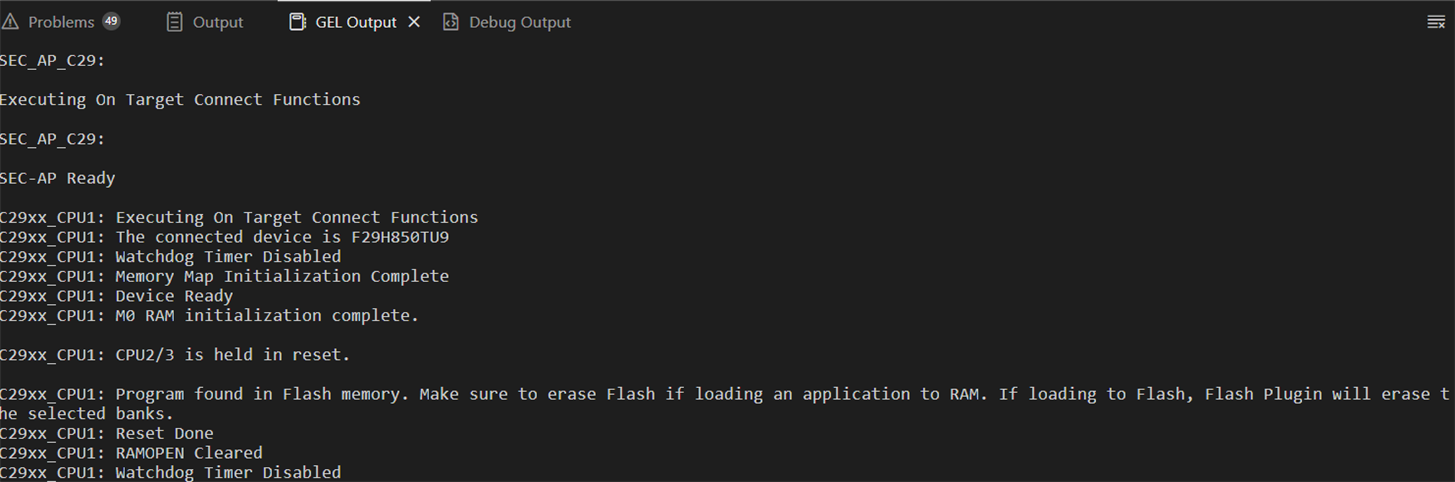
    • Do you see the following printout on your initial connection to the device?
    • Are you able to provide your .out and .map files? If not, are you able to provide your linker command file? I will try to replicate this issue

    In the meantime, you can try the following steps:

    1. Close CCS and Uniflash
    2. In your CCS 20.4 installation, rename ccs_base/DebugServer/bin/FlashC2000v3.dll to FlashC2000v3.dll.backup
    3. Then, from your Uniflash installation, copy the deskdb/content/TICloudAgent/win/ccs_base/DebugServer/bin/FlashC2000v3.dll into the DebugServer/bin folder of your CCS installation
    4. Start CCS and try to flash your program

    Best,

    Alex

  • Hello Alex,

    First point: I am in contact with Marlyn Rosales Castaneda for another topic and we had a meeting earlier today with her and some of her colleagues. And during this meeting, we also talked a little bit of this topic. So I showed here the issue. And they did not find a solution. The only proposal was to try to use the latest version of CCS.

    So, now, back to your questions:

    • I do not see "Flash Settings"
    • I do not have these messages during the "initial connection". Now, here is my interpretation of "initial connection": I open CCS, I click on "Debug" and I get my initial connection.
      Here are the messages I get in "GEL Output":

      And here are the messages I get in "Debug Output":
    • I provided to Mr Charlot different files (out, map, cmd...) through a TI Drive. All these files are prefixed with "1615804-".

    I tried to replace "FlashC2000v3.dll" in CCS by the one from UniFlash but I get the same result.
    Then I compared the 2 bin folders and these dll are identical between CCS 20.4.0 and UniFlash 9.4.1.

    I now installed the version 20.4.1 of CCS and I see that FlashC2000v3.dll is different from what I have in CSS 20.4.0 and UniFlash 9.4.1.

    However, the result is the same, only the messages are a little bit different:

    Is there any log file created that could provide additional information like, for example, the address which is in a non writable area ?

    Thank you

    Ronan

  • 2 Additional points regarding the update to CCS 20.4.1:

    • In fact, I am not sure if "FlashC2000v3.dll" was different because I redid a comparison and now they are identical.
    • Now I see the menu "Flash Settings"

    And now, the very confusing part: I just retried to debug the software (and so to download it with CCS) and it is working fine.

    I don't think I changed anything between the previous post and this post.

    Or maybe the error in the previous post had nothing to do with the initial problem. If this is the case, then I am curious to know what changed in CSS 20.4.1 compared to CSS 20.4.0 that can explain why the error disappeared.

    Ronan

  • Hello Ronan,

    Is there any log file created that could provide additional information like, for example, the address which is in a non writable area ?

    Unfortunately, there is not a log file listing the exact offending sections. Your new screenshots indicate that this part of the issue has been resolved - CCS now recognizes that your program is in a valid memory region and is attempting to load it to flash.

    The second error you encountered (after installing CCS 20.4.1) indicates that the device was likely in a bad state. Oftentimes this can be resolved with an XSRn or switching to wait boot and erasing the flash.

    Best,

    Alex

  • Hello Ronan,

    If this is the case, then I am curious to know what changed in CSS 20.4.1 compared to CSS 20.4.0 that can explain why the error disappeared.

    The CCS release notes are located in this file: file:///C:/ti/ccs2040/ccs/doc/CCS_20.4.0_ReleaseNote.htm. I ha venot installed CCS 20.4.1 yet but would assume the same for this version.


    Best regards,
    François.

  • Thanks Alex for your support.

    Ronan