This thread has been locked.

If you have a related question, please click the "Ask a related question" button in the top right corner. The newly created question will be automatically linked to this question.

TMS320F28P559SJ-Q1: Unable to Unlock Memory in DCSM

Part Number: TMS320F28P559SJ-Q1
Other Parts Discussed in Thread: UNIFLASH

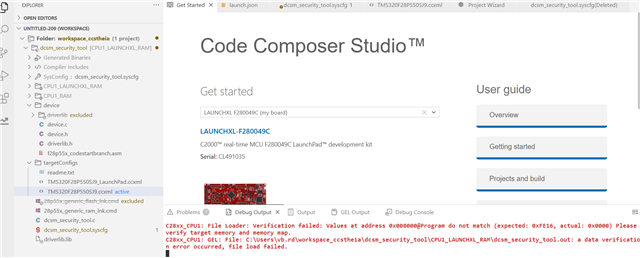
I'm using TMS320F28P559SJ-Q1 TI chips for the first time and trying to lock and unlock using DCSM module.

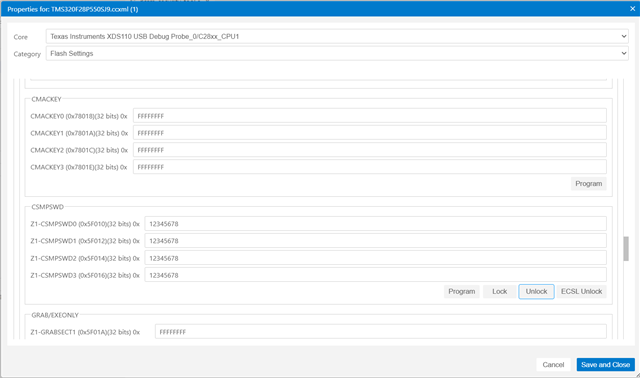
I m using latest CCS 20.4.1, what I have done so far I have import dcsm project from the driverlib and set the values for CMD passwords in Zone1 Linkpointer and secure them all fig.1

image.png
Fig 1

When I trying to unlock it, unable see the unlock option here.

Please help me to unlock my chip.
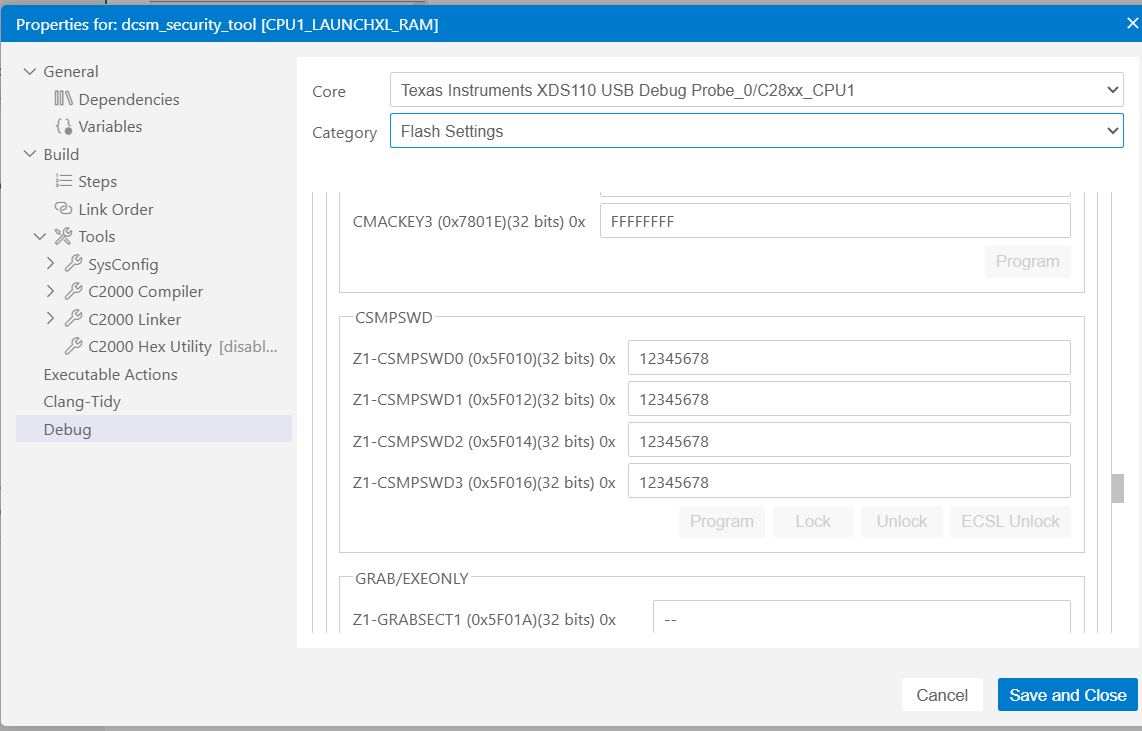
image.png

  • Hi Vikas,

    This version of the flash tool does not interface with the DCSM.

    You must right-click on CPU1 from the Debug window after connecting to the device to open the flash tool, after that you should have capability to unlock DCSM.

    Thank you,

    Luke

  • But I m not able to see any options as like you mentioned please explain in details or by attaching some screenshots if possible, only I can see above options(in attached screenshot) in the debug window and please mentioned which version should I used.

  • Can you right click on your target configuration file and select "start project-less debug"?  This should connect you to the target. Then right click on your project and select properties -> Debug -> Category = Flash Settings. You should see the CSM unlock button here.

    Thank you,

    Luke

  • I have tried mentioned method, whenever I click on unlock button error pop as "It is showing target is not connected or does not have flash support" 


  • Hello,

    Are you connected to CPU1 before attempting to unlock the device? If so, what version of CCS are you using?

    Best,
    Matt

  • Yes, you can see in attached snapshot and I m using latest CCS 20.4.1

  • Hi Vikas,

    I recreated this scenario on my end with CCS 20.4.1. Can you please perform the following steps: 

    1. Right click on the target configuration file in your project folder and select "start project-less debug"
    2. click on the debug icon on the left hand tool bar
    3. right click on CPU1 and select "Connect Target"
    4. right click on CPU1 and select "properties"
    5. Change the category drop-down to "Flash Settings"
    6. Scroll down to the CSMPSWD menu
    7. enter your custom passwords in the password fields
    8. click "Unlock"
    9. verify zone 1 is unlocked by viewing address 0x78000 in the memory menu. If the part is still locked you would see all 0s here.

    Let me know if this works for you.

    Thank you,

    Luke

  • Hello Luke,

    Thanks for the reply, 

    I have tried the methods that you have said and now I can able to see unlock option there and I enter the same passwords but I don't know why seems like device is still locked. (see memory read image)


    Also I m getting another error I don't if this one is because of my zone 1 is still locked I m trying to program again without unlocking the first, I mean I have tried the unlocking method that you have mentioned earlier but device is still locked and I m trying to program the chip.


    One more thing I wanted to add up that When I was trying to lock the zone for the first time It was asking me to put values in JTAGPSWDL0 & JTAGPSWDL1, so I put the same values there.

  • Hey Vikas,

    Can you confirm you're able to follow all of the steps I listed above using CCS 20 only? We can look at the uniflash issue afterwards.

    Also have  you enabled JTAGLOCK / JLM_ENABLE on this device in your OTP settings?

    thank you,

    Luke

  • Hello Luke,

    I have followed all the steps carefully and my JTAGLOCK / JLM_ENABLE was on disable.

    Another question I wanted to ask you when I m trying to do the same with another programmer i.e. from  Blackhawk XDS560 v2 System Trace emulator I m getting below error, It is not getting connected with device any solution you have on it?

    My PCs port showing that hardware is connected properly and drivers are also downloaded as I can see in 
    C:\Program Files (x86)\Blackhawk\Emulation\Drivers\USB-PCI\v3.2.1.8


    IcePick_C_0: Error connecting to the target: (Error -286 @ 0x0) The PLL programming function has suffered a timeout. This may be an honest-to-goodness software or VHDL bug. (Emulation package 20.4.0.3756)

    Even I m not be able connect my device using Blackhawk emulator, showing below error


  • Vikas,

    Please confirm whether the CCS flow I described works. If not, please show at which point in the process it failed with screenshots. I am struggling to follow your process to determine a root cause.

    Thank you,

    Luke

  • Hello Luke,

    The problem is solved now from your mentioned process and I wanna thank you for this..

    But can you please help me in another issue which is regarding Blackhawk v2 System Trace Emulator which I described earlier...

    Thank you,

  • Hello Vikas,

    Now that the DCSM question is resolved, please open a new thread on the JTAG question so it can get routed to the correct expert.

    Best,
    Matt