This thread has been locked.

If you have a related question, please click the "Ask a related question" button in the top right corner. The newly created question will be automatically linked to this question.

SYSCONFIG: SysConfig fail

Part Number: SYSCONFIG

Hi,

I just installed a fresh copy of Win11 and CCS 20.4.1., and standalone SysConfig 1.26.2+4477.

We use F280049C.

When doing some settings in ClockTree, then click CLOCK DOMAIN VIEW, then click CAN CLOCK it gives error:

Unable to render selection

TypeError: Cannot read properties of undefined (reading 'getID')
Hide Details...

at predicate (webpack://sysconfig/src/pinmux/services/objectManagers/clockIpInstanceMgr.ts:375:91) at func (webpack://sysconfig/node_modules/lodash/lodash.js:740:11) at Function.some (webpack://sysconfig/node_modules/lodash/lodash.js:9965:14) at predicate (webpack://sysconfig/src/pinmux/services/objectManagers/clockIpInstanceMgr.ts:375:49) at func (webpack://sysconfig/node_modules/lodash/lodash.js:572:12) at Function.every (webpack://sysconfig/node_modules/lodash/lodash.js:9195:14) at predicate (webpack://sysconfig/src/pinmux/services/objectManagers/clockIpInstanceMgr.ts:375:13) at func (webpack://sysconfig/node_modules/lodash/lodash.js:572:12) at Function.every (webpack://sysconfig/node_modules/lodash/lodash.js:9195:14) at h.isTerminalNode (webpack://sysconfig/src/pinmux/services/objectManagers/clockIpInstanceMgr.ts:372:12)


Any ideas how to solve this?
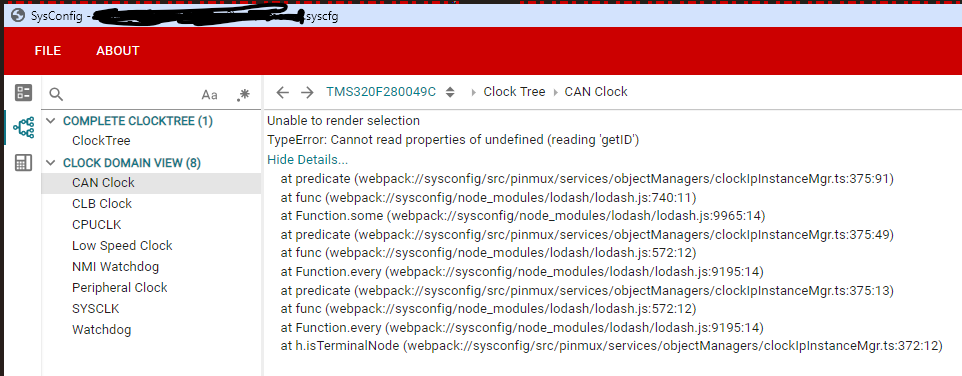
screensh.png

Best regards,

Rudy

  • Hi Rudy,

    Thank you for your question. Apologies for the late reply.

    Can you try using the sysconfig tool integrated within CCS and not the standalone tool? You can open your project in CCS and just open the .syscfg file and the SysConfig gui should pop up. Can you try and let me know if that works?

    Thanks,

    Ira

  • Hi Ira,

    Opening SysConfig in CCS works, but not in the standalone tool.

    BR,

    Rudy

  • Hi Ruud,

    Do you have any existing errors in any part of your SysConfig file (for example, in some other peripherals that you might be using in your code)? If yes, then you'll have to resolve those first.

    If that is not the case, then can you clear cache and relaunch the sysconfig tool? You can go to %LOCALAPPDATA% (through win + R) and you should see a folder called .ti or.sysconfig

    Can you delete/rename this folder to something like .ti_backup and then relaunch sysconfig tool + CCS?

    Thanks,

    Ira

  • I deleted as you requested and it looked promising. It looks like I can do some settings (+Add blocks) and save them. I noticed that no board.h and board.c is generated this time (it does generate pinmux .h .c  files). I can also save this config, but I cannot open it anymore due to an error.

  • Do you have an instance named DC-DC1 in your sysconfig file? Can you rename it to something like DCDC1 or DC_DC1? The hyphen can create an issue in instance name at times and JS may treat it like a subtraction.

    Thanks,

    Ira

  • Hi Ira,

    Note that it fixes the issue when the following lines are changed (see first line: the hyphen must stay!), from:

    const DC-DC1 = scripting.addPeripheral("DC-DC");
    DC-DC1.$name = "MyDC-DC1";

    DC-DC1.$suggestSolution = "DC-DC1";
    DC-DC1.VFBSW.$suggestSolution = "GPIO22_VFBSW";
    DC-DC1.VSW.$suggestSolution = "GPIO23_VSW";

    To:

    const DC_DC1 = scripting.addPeripheral("DC-DC");
    DC_DC1.$name = "MyDC_DC1";

    DC_DC1.$suggestSolution = "DC_DC1";
    DC_DC1.VFBSW.$suggestSolution = "GPIO22_VFBSW";
    DC_DC1.VSW.$suggestSolution = "GPIO23_VSW";

    Can you pass it to development, this is a time conuming issue?

    Thanks for your help!

    BR,

    Rudy

  • Hi Rudy,

    Glad to know the issue is fixed. I'll make a note of it and let the Sys Config dev team know. 

    Thanks,

    Ira