This thread has been locked.

If you have a related question, please click the "Ask a related question" button in the top right corner. The newly created question will be automatically linked to this question.

TMS320F280039C: SCI programming stucked on Attempting autobaud to send function message...

Part Number: TMS320F280039C

Hello Support team,

I'm new to TI microcontroller, I'm trying to update the control board of the TMS320F280039C controlCARD using the serial flash programmer.

This is how I set my control card:

S1A P1->Off, S1A P2->Off.

S2 P1->0(GPIO24), S2 P2->1(GPIO32) as described in the datasheet*:
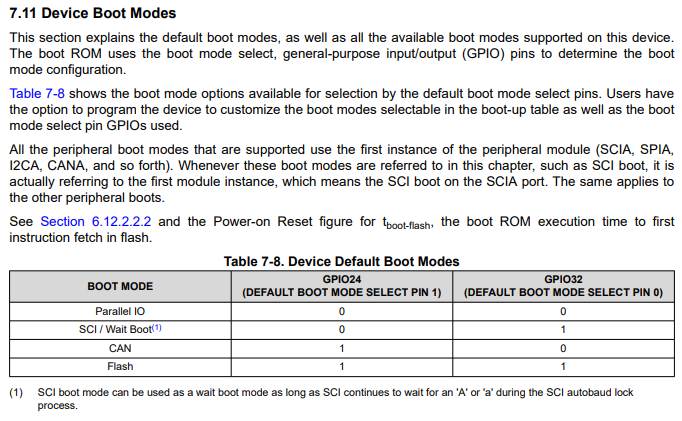
image.png

S3->Internal (UP)

I'm using an MCP2221A USB to UART converter (but I've tried also an FTDI with same result). The RX pin of the MCP2221A brakoutmodule is connected to pin 76 of the control card docking and the TX pin is connected to the pin 78 of the control card docking. GND of both boards are connected.

I've compiled the kernel project and generated the programming file using hex2000 attached.

I turn on the control card, launche the serial_flash_programmer.exe application with the following string: 

C:\Work\Documenti\BitBucket\MCP2221A\bin\Debug\net8.0>C:\Work\Documenti\BitBucket\MCP2221A\bin\Debug\net8.0\FlashProg\serial_flash_programmer.exe -d f28003x -k C:\Work\Documenti\BitBucket\MCP2221A\bin\Debug\net8.0\kernels\flash_kernel_ex3_sci_flash_kernel.txt -a C:\Work\Documenti\BitBucket\MCP2221A\bin\Debug\net8.0\firmware\led_ex1_blinky.txt -p COM33 -b 115200 -v

but it always remains in the "Attempting autobaud to send function message..."

I've checked with the scope if the character "A" is sent properly and it is, levels are correct, but the microcontroller never answer.

Could you explain me where is my mistake?

Thank you

*The control board manual report a different configuration, which one the correct one?

image.png

flash_kernel_ex3_sci_flash_kernel.txt 

  • Hi Alberto,

    Your S1:A switch configuration is correct for bringing the UART signals to the baseboard that looks correct. For the bootmode selection switch, you should refer to the table in the controlCARD user guide. Note the positions indicated in the user guide refer to the switch level and not the logic levels which are shown in the datasheet. This is to align with the default switch position that our switch components come in from the manufacturer. Can you try with this updated configuration and let me know if the issue persists?

    Regards,

    Peter

  • Thanks for your reply.

    Now I set:

    S2.1(GPIO24) to 1 (up) and the logic level is 3.3V

    S2.2(GPIO32) to 0 (down) and the logic level is 0+

    With this setup the UART's logic levels are not correct:

    docking pin 78 is 3.3V (PC UART TX->uC UART RX). Correct

    docking pin 76 is FLOATING (PC UART RX->uC UART TX). NOT correct it shall be 3.3V driven by the uC TX port. 

    With the datasheet configuration I almost had 3.3V on both pins in idle state, as expected in a UART line.

  • Hi Alberto,

    Can provide an image of the board switch configuration? That will help clarify the desired switch configuration. Please make sure to power cycle the board when you alter the switch configuration to ensure the device is booting from the correct bootmode. Let me allow our serial flash programmer experts to review this to see if there are any gaps, but it sounds like from a hardware perspective, you are correctly configured. You can also attempt to use the onboard XDS110 which supports the USB-to-UART, just be sure to adjust the board switches as per the user guide

    Regards,

    Peter

  • Hi Peter, 

    yesterday I was able to program my board. to do this I had to:

    1) reduce the uart speed to 38400 baud

    2) Modify and recompile the srial flash prog software

    3) connect PC TX and RX ti GPIO28 and 29.

    4) configure S2 pins as follows: GPIO24 =0 down, GPIO32=1up

    ow my question are:

    1) why I cant reach higher speeds? any advice?

    2) is it possible to modify the serial flash programmer to program the ucontroller without the human intervention?

    Thank you

  • Hi Alberto,

    Peter is OOO this week, please expect a delay in response.

    Thanks

    Aswin

  • Hello Alberto,

    Is the autobaud failing when trying to load the kernel or the application? If the kernel, please see this note from section 4.8.8.2.1 of the TMS320F28003x Real-Time Microcontrollers Technical Reference Manual (Rev. C):

    Best,

    Alex

  • Thank you for your help!