This thread has been locked.

If you have a related question, please click the "Ask a related question" button in the top right corner. The newly created question will be automatically linked to this question.

TMS320F28377D: C2000Ware Serial Flash Programming Error on DCSM Memory

Part Number: TMS320F28377D
Other Parts Discussed in Thread: C2000WARE

I am a co-worker with Lily. She asked me to download the firmware with the latest SCI kernel. Because she tried to do it two years ago like the below post, but it failed.

https://e2e.ti.com/support/microcontrollers/c2000-microcontrollers-group/c2000/f/c2000-microcontrollers-forum/1316859/tms320f28377d-c2000ware-serial-flash-programmer-fmstat-error-with-dcsm-reserved-memory/5019466?tisearch=e2e-sitesearch&keymatch=%20user%3A6776

So, I installed C2000Ware_6_00_01_00 and built the kernel in '.\C2000Ware_6_00_01_00\device_support\f2837xd\examples\dual\F2837xD_sci_flash_kernels'.

I successfully downloaded the kernel, and then I tried to download the firmware, but I have the following error.

Let me know how to solve this problem.

 

  • Hello,

    Can you try adding 64-bit programming support for this address range to the CopyData() function in Shared_Boot.c?

    Best,

    Alex

  • Hi Alex,

      I tried to understand CopyData() but I didn't. How can I add 64-bit programming support? Can you let me know an example?

    Best,

    Jeong

  • Hello Jeong,

    You can do something similar to the following, please note that this code is a rough reference implementation and has not been tested:

    ...lines 1-266

    //
    //program 8 words at once, 128-bits
    //
    if((fail == 0) && ((BlockHeader.DestAddr % 0x8U) == 0x0U))
    {
        //
        //program 8 words at once, 128-bits
        //
        oReturnCheck = Fapi_issueProgrammingCommand((uint32 *)BlockHeader.DestAddr,
                                           miniBuffer,
                                           sizeof(miniBuffer),
                                           0,
                                           0,
                                           Fapi_AutoEccGeneration);
        while(Fapi_checkFsmForReady() == Fapi_Status_FsmBusy);
        oFlashStatus = Fapi_getFsmStatus();
        if(oReturnCheck != Fapi_Status_Success || oFlashStatus != 0)
        {
            if(fail == 0) //first fail
            {
                statusCode.status = PROGRAM_ERROR;
                statusCode.address = BlockHeader.DestAddr;
                setFlashAPIError(oReturnCheck);
                statusCode.flashAPIFsmStatus = oFlashStatus;
            }
           fail++;
        }
    }
    else if (fail == 0)
    {
        //
        //program 4 words at once, 64-bits
        //
        oReturnCheck = Fapi_issueProgrammingCommand((uint32 *)BlockHeader.DestAddr,
                                           miniBuffer,
                                           4,
                                           0,
                                           0,
                                           Fapi_AutoEccGeneration);
        while(Fapi_checkFsmForReady() == Fapi_Status_FsmBusy);
        oFlashStatus = Fapi_getFsmStatus();
        if(oReturnCheck != Fapi_Status_Success || oFlashStatus != 0)
        {
            if(fail == 0) //first fail
            {
                statusCode.status = PROGRAM_ERROR;
                statusCode.address = BlockHeader.DestAddr;
                setFlashAPIError(oReturnCheck);
                statusCode.flashAPIFsmStatus = oFlashStatus;
            }
           fail++;
        } 
    }

    Essentially the idea is to add a check to see if an incoming address is 64-bit, but not 128-bit, aligned. If it is, then use 64-bit programming by passing the length as 4 to Fapi_issueProgrammingCommand instead of 8. Similar modifications may need to be made to the verification code just below this section.

    Line 352 (updating the wordsWritten variable) will also need to be updated to increment by 0x4 after programming 64 bits.

    Best,

    Alex

  • Hi Alex,

    Your code is excellent. I can successfully download the CPU1 firmware without any errors. I really appreciate your help.
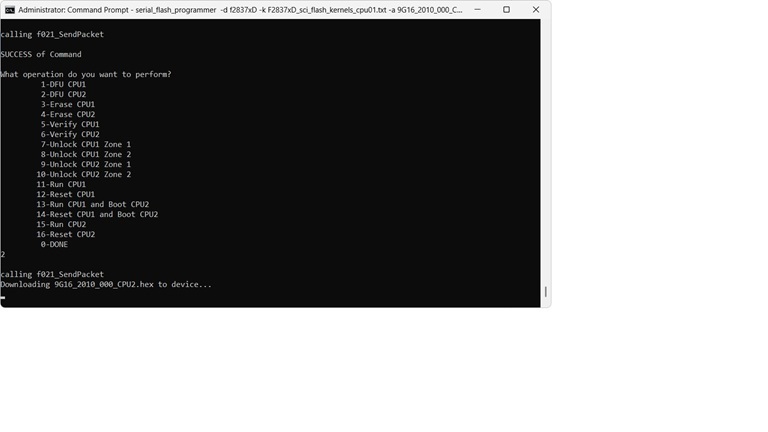
    But I tried to download the CPU2 firmware after finishing the CPU2 kernel download. It's not starting as below.

    Let me know how to fix this problem.

    Best,
    Jeong

  • Hello Jeong,

    On this device, each CPU has its own dedicated flash bank. Flash programming for CPU2's banks must be done through CPU2. You can use the flash_kernels_cpu02 project to accomplish this. To load it in, first load the CPU01 kernel, then perform the CPU1 DFU, then "Run CPU1 and Boot CPU2". This changes ownership of the SCI peripheral to CPU2 and brings it out of reset. After doing this, load the CPU02 kernel and you should be able to perform the CPU2 DFU.

    Best,

    Alex

  • Hi Alex,

    Thank you for your quick response.

    I loaded the CPU1 kernel, then performed 'DFU CPU1', then ran 'Run CPU1 and Boot CPU2'. So, the CPU2 kernel was successfully downloaded. Then I tried to do 'DFU CPU2' as you proposed, but it's not starting like the above.

    And I also tried to 'DFU CPU2' after running 'Reset CPU1 and Boot CPU2', but it's still not starting as before.

    Can you let me know if you have another suggestion?

    Best,

    Jeong

  • Hello Jeong,

    Apologies for the delay in response, I am still looking into this.

    Best,

    Alex

  • Hi Alex,

    Thank you for your attention to this matter.

    Best,

    Jeong