This thread has been locked.

If you have a related question, please click the "Ask a related question" button in the top right corner. The newly created question will be automatically linked to this question.

TMS320F280039C: F280039CSPZ Software download and startup issues

Part Number: TMS320F280039C

Dear team,

Fault phenomenon: After downloading the program, F280039C did not run properly when powered on again.

Solution: Configure the F280039C boot option to flash boot through the downloader, then power it back on and F280039C can run normally.

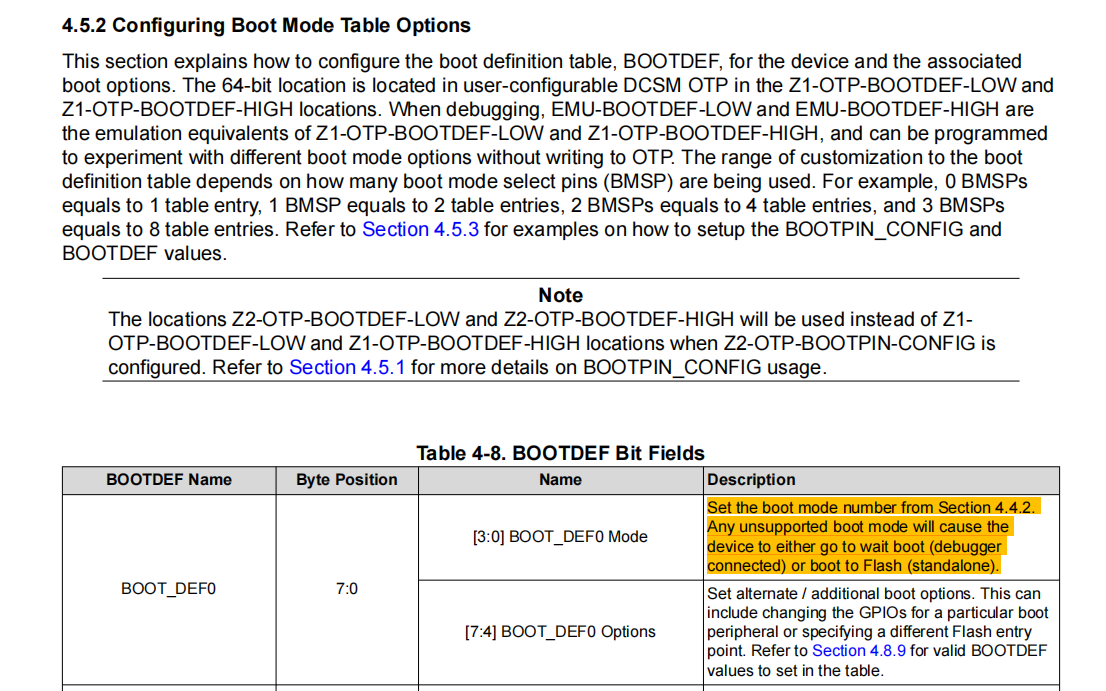
Problem analysis: In the documentation of F280039C, as shown below, if the boot mode is not configured, it will eventually switch to Flash boot.
aaa.png
Because the peripheral hardware circuit of F280039C is not configured with a boot mode, it will be set to flash boot according to the document; But in reality, when we produced more than 500 pcs in this batch, there were 5 abnormal pcs that could not be started normally.

Please help analyze the reasons and whether the meaning expressed in the document we understand is accurate.

  • Hello,

    Solution: Configure the F280039C boot option to flash boot through the downloader, then power it back on and F280039C can run normally.

    Do you mean you programmed the OTP with boot configurations?

    The Boot ROM won't check the BOOTDEFx values unless the BOOTPIN-CONFIG.KEY (0x5A) is programmed. Assuming you haven't programmed the boot configurations in the OTP, that means that the default boot modes will be used when decoding the default BMSPs (GPIO24 and GPIO32). Can you confirm the state of these GPIOs?

    Best,
    Matt