CCSTUDIO: SysConfig Not Installed

Part Number: CCSTUDIO
Other Parts Discussed in Thread: SYSCONFIG

Greetings,

I am trying to install SysConfig on my computer.  It says that it did it, but CCS is unable to see it.  I tried the default location, and then installed it again next to a version which had already been installed.  But still no luck.  The specific warning is:

Product SysConfig v1.18.0 is not currently installed. A compatible version 1.21.0 will be used.

I must be installing it incorrectly, but I'm at a loss as to what it is.

Thank you,

Ed

  • Hi Ed,

    Make sure you install CCS in the default path, either C:/ti or {Home}/ti based on your OS.

    If you are using the older CCS (Eclipse) based versions, you can update the paths as follows:

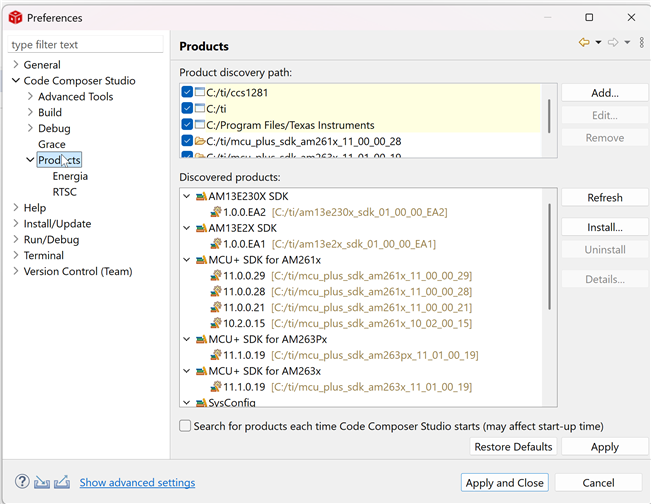
    1. In CCS top pane, go to Window, click preferences:

    2. Select Code Composer Studio -> Products

    3. Then click on Refresh, try to see if the path of sysconfig is automatically added. If not, manually add the path in product discovery path.

    4. Click apply and close.

    5. Restart CCS.

    6. In your project properties, try to see if you can change the sysconfig version to the desired version,

    Regards,
    Shaunak

  • If using CCS Theia,

    You can find the settings at the bottom-left, 

    1. Click the settings wheel and select CCS settings

    2. Then try to refresh and see if the sysconfig gets detected, else manually add the path.

    3. Click ok, save and exit

    4. restart CCS and try to see if the correct version works now.

    Regards,
    Shaunak

  • The preferences saw it and let me add it.

    Thank you,

    Ed