This thread has been locked.

If you have a related question, please click the "Ask a related question" button in the top right corner. The newly created question will be automatically linked to this question.

TMS320F2800155: The simulation debugging for the safe startup seems to have no effect.

Part Number: TMS320F2800155

Hi team

I am using the routine for debugging and aiming to implement the secure boot function. Currently, I have set EXEONLY,
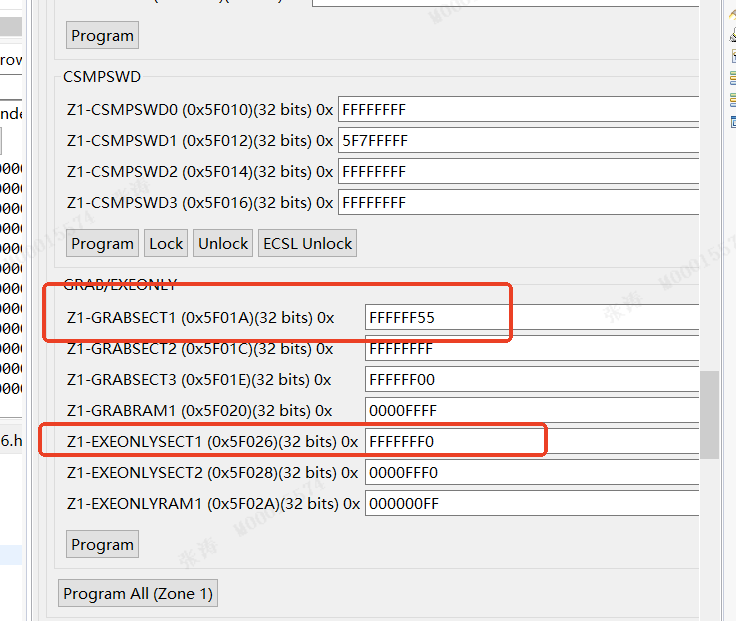
1773662215226_6a34c0c473d342a68440255febba662b.png

 configured CAMC, and checked the corresponding hex to generate CMAC. The corresponding hex is as follows, along with the corresponding files.

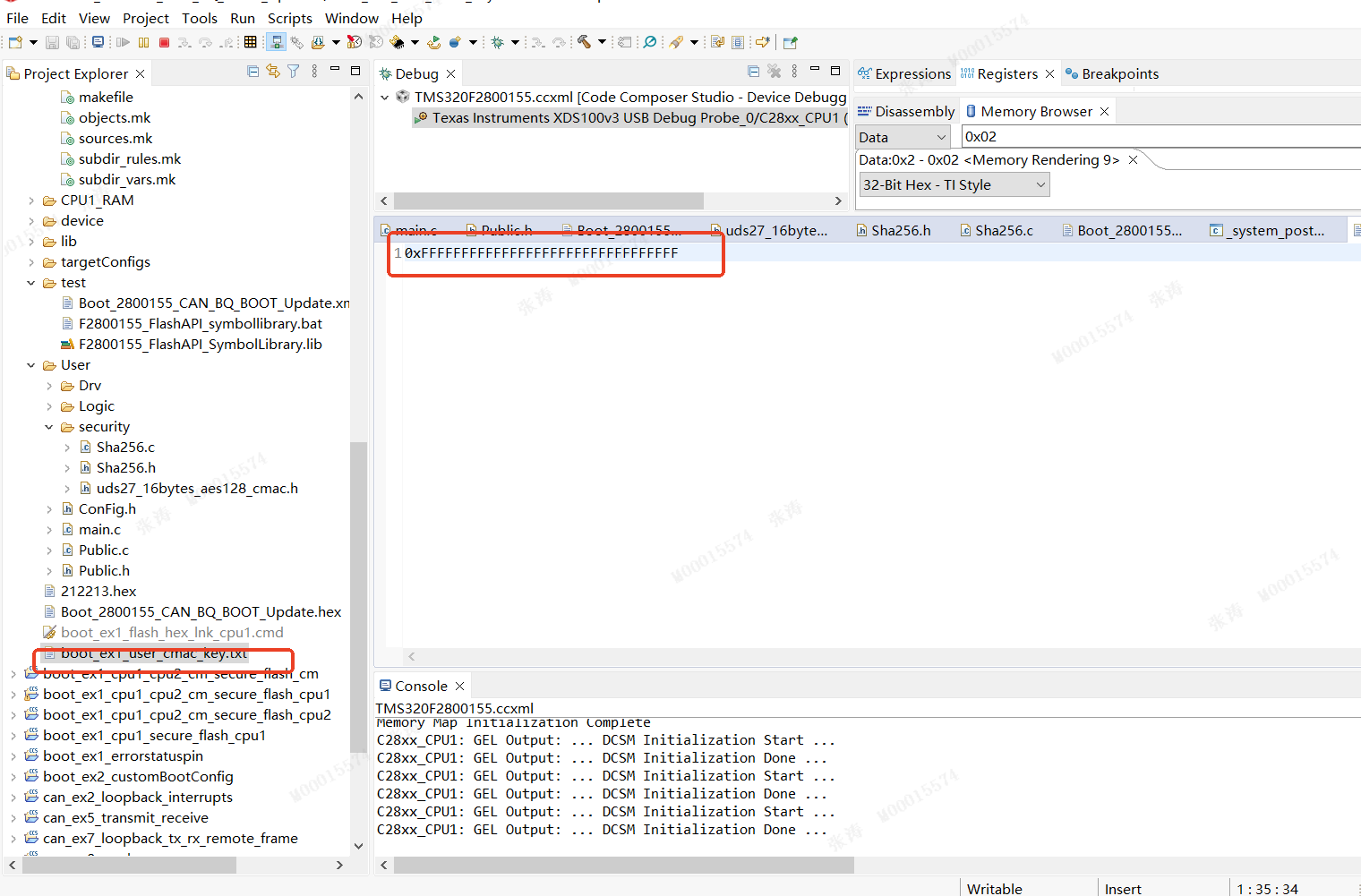
image.png

image.png


I configured EXEONLY using unitflash, burned the corresponding hex file, and performed simulation using CCS. I wrote 5AFFFFFF and FFFFFF0A at addresses 0x0d00 and 0x0d04 respectively, simulating the secure boot startup. I set breakpoints, and the program ran normally. However, I couldn't see the success flag 0x3 or the burned.out file at address 0x02. Since the.out file doesn't have CMAC, according to the rules, the program shouldn't be able to start normally. But the burned.out program still runs. What could be the reasons for this? Could you please check if I missed anything?
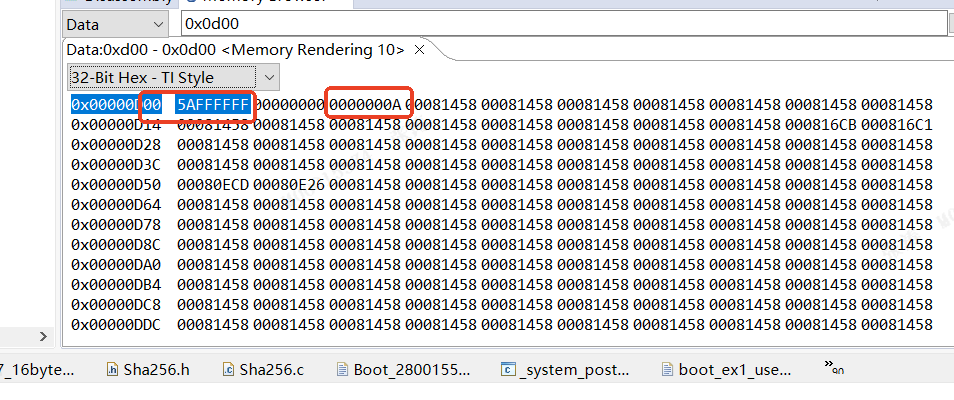
image.png

Best Regards

Zhang

  • Hello,

    Since the.out file doesn't have CMAC, according to the rules, the program shouldn't be able to start normally. But the burned.out program still runs.

    That is correct. Only the .hex generated from the hex utility will have the golden CMAC tag embedded.

    I configured EXEONLY using unitflash, burned the corresponding hex file, and performed simulation using CCS.

    Did you program the .hex or .out file? It seems like you reference both in your description.

    I wrote 5AFFFFFF and FFFFFF0A at addresses 0x0d00 and 0x0d04 respectively, simulating the secure boot startup

    Did you reset the CPU after writing the emulation boot configurations? Otherwise, the secure boot flow will not run.

    However, I couldn't see the success flag 0x3 or the burned.out file at address 0x02.

    What do you mean by address 0x02? Do you mean the offset from the flash entry point where the golden CMAC tag resides?

    Are you doing additional flash verification in your application? If so, what is CPU1BROM_calculateCMAC() returning? 

    Best,
    Matt

  • Hi Matt

    Currently, the simulation startup has been successfully activated. I have observed the phenomenon I expected. However, when I imported the corresponding OTP configuration, the program failed to start normally. I used unitflash to burn the corresponding hex file. Before this, I had already burned the corresponding.out file (the purpose was to configure the corresponding flash encryption and the OTP secure boot). The configuration burned in is as follows:

    对应的code为

    .sect "dcsm_otp_z1_gpreg"
    .retain
    .long 0x5AFF1820 ;Z1OTP_GPREG1 = Z1_BOOTPIN
    .long 0x5Affffff ;Z1OTP_GPREG2
    .long 0x0A03040A ;Z1OTP_GPREG3 = Z1OTP_BOOTDEF_LOW
    .long 0xFFFFFFFF ;Z1OTP_GPREG4 = Z1OTP_BOOTDEF_HIGH

    The currently configured pins are GPIO24 and GPIO32, and the pin states are both at high level (11). Therefore, the BOOTDEF3 corresponds to the pin state, and it is configured for 0A safe boot. However, the boot failed at this time. I'm certain that my pin states are correct. So, where might the problem lie?

    Also, please find attached my DCSM configuration.

    ;----------------------------------------------------------------------
    ; Zone 1
    ;----------------------------------------------------------------------
         .sect "dcsm_otp_z1_linkpointer"
          .retain
          .long 0x00003FFC
          .long 0x00003FFC
          .long 0x00003FFC
        
         .sect "dcsm_otp_z1_jlm_enable"
          .retain
          .long 0xFFFF000F     ;Z1OTP_JLM_ENABLE
    ;;     .sect "dcsm_otp_z1_jtag_pswdh"
    ;;      .retain
    ;;      .long 0x4BFFFFFF     ;Z1OTP_JTAGPSWDH0
    ;;      .long 0x3FFFFFFF     ;Z1OTP_JTAGPSWDH1
    
         .sect "dcsm_otp_z1_cmac_key"
          .retain
          .long 0xFFFFFFFF     ;Z1OTP_CMACKEY0
          .long 0xFFFFFFFF     ;Z1OTP_CMACKEY1
          .long 0xFFFFFFFF     ;Z1OTP_CMACKEY2
          .long 0xFFFFFFFF     ;Z1OTP_CMACKEY3
      
         .sect "dcsm_otp_z1_pswdlock"
          .retain
          .long 0xFB7FFFFF
          
         .sect "dcsm_otp_z1_crclock"
          .retain
          .long 0x7FFFFFFF
       
       .sect "dcsm_otp_z1_gpreg"
          .retain
          .long 0x5AFF1820     ;Z1OTP_GPREG1 = Z1_BOOTPIN
          .long 0x5Affffff     ;Z1OTP_GPREG2
          .long 0x0A03040A     ;Z1OTP_GPREG3 = Z1OTP_BOOTDEF_LOW
          .long 0xFFFFFFFF     ;Z1OTP_GPREG4 = Z1OTP_BOOTDEF_HIGH
         .sect "dcsm_zsel_z1"
          .retain
          .long 0x12345678     ;Z1OTP_CSMPSWD0 (LSW of 128-bit password)
          .long 0x1DFFFFFF     ;Z1OTP_CSMPSWD1
          .long 0x12345678     ;Z1OTP_CSMPSWD2
          .long 0x12345678     ;Z1OTP_C
          
          .long 0x55555555     ;Z1OTP_GRABSECT1
          .long 0x55555555     ;Z1OTP_GRABSECT2
          .long 0x55555500     ;Z1OTP_GRABSECT3
          .long 0x0000AAAA     ;Z1OTP_GRABRAM1
          .long 0xFFFFFFFF     ;Reserved
          .long 0xFFFFFFFF     ;Reserved
          
           
          .long 0xFFFFFFF0     ;Z1OTP_EXEONLYSECT1
          .long 0x0000FFF0     ;Z1OTP_EXEONLYSECT2
          .long 0x000000FF     ;Z1OTP_EXEONLYRAM1
          .long 0xFFFFFFFF     ;Reserved
          .long 0xFFFFFFFF     ;Z1OTP_JTAGPSWDL0
          .long 0x7B7FFFFF     ;Z1OTP_JTAGPSWDL1    
          
    ;----------------------------------------------------------------------
    ; Zone 2
    ;----------------------------------------------------------------------
         .sect "dcsm_otp_z2_linkpointer"
          .retain
          .long 0x00003FFC
          .long 0x00003FFC
          .long 0x00003FFC
    
         .sect "dcsm_rsvd_z2"
          .retain
          .long 0xFFFFFFFF     ;Reserved
         .sect "dcsm_otp_z2_pswdlock"
          .retain
          .long 0x1F7FFFFF
          
            .retain
          .long 0x3FFFFFFF
                
    ;;     .sect "dcsm_otp_z2_gpreg"
    ;;      .retain
    ;;      .long 0x5AFFFFFF     ;Z2OTP_GPREG1 = Z2_BOOTPIN
    ;;      .long 0x5AFFFFff     ;Z2OTP_GPREG2
    ;;      .long 0xFFFFFF0A     ;Z2OTP_GPREG3 = Z2OTP_BOOTDEF_LOW
    ;;      .long 0xFFFFFFFF     ;Z2OTP_GPREG4 = Z2OTP_BOOTDEF_HIGH
          .sect "dcsm_rsvd1_z2"
          .retain
          .long 0xFFFFFFFF     ;Reserved
          .long 0xFFFFFFFF     ;Reserved
    
          .sect "dcsm_zsel_z2"
          .retain
          .long 0x12345678     ;Z2OTP_CSMPSWD0 (LSW of 128-bit password)
          .long 0x4FFFFFFF     ;Z2OTP_CSMPSWD1
          .long 0x12345678     ;Z2OTP_CSMPSWD2
          .long 0x12345678     ;Z2OTP_CSMPSWD3 (MSW of 128-bit password)
     
          .long 0xAAAAAAAA     ;Z2OTP_GRABSECT1
          .long 0xAAAAAAAA     ;Z2OTP_GRABSECT2
          .long 0xAAAAAA00     ;Z2OTP_GRABSECT3
          .long 0x0000AAAA     ;Z2OTP_GRABRAM1
          .long 0xFFFFFFFF     ;Reserved
          .long 0xFFFFFFFF     ;Reserved
          
          .long 0xFFFFFFFF     ;Z2OTP_EXEONLYSECT1
          .long 0x0000FFF0     ;Z2OTP_EXEONLYSECT2
          .long 0x000000FF     ;Z2OTP_EXEONLYRAM1
          .long 0xFFFFFFFF     ;Reserved
          .long 0xFFFFFFFF     ;Reserved
          .long 0xFFFFFFFF     ;Reserved
        

  • Hello,

    Can you check the following in the CCS memory browser:

    • Confirm the golden CMAC tag is correctly programmed to address 0x80002 (after loading the HEX). What value is there?
    • Confirm secure flash boot has started by checking the boot status at address 0x2. What value is there?
      • If not, probe XRSn to see if the device is being reset 

    Best,
    Matt