This thread has been locked.

If you have a related question, please click the "Ask a related question" button in the top right corner. The newly created question will be automatically linked to this question.

MSPM0G3107: Factory reset in Uniflash CLI for MSPM0G3107

Part Number: MSPM0G3107
Other Parts Discussed in Thread: UNIFLASH, , MSPM0G3507

Hi Experts,

Seems that there is no factory reset operation for mspm0g3107 in uniflash commnad line.

image.png

Could you pleae help checking if we support it? Customer need this function for mass production, especially for programming the locked devices.

Regards,

Hang

  • Hi Hang,

    Uniflash does not generate a script for this by default. However, here is one I have written that performs a factory reset for the MSPM0G3507. It should be run from within the standalone package generated by Uniflash.

    @echo off
    setlocal
    
    REM =========================================================================
    REM Factory Reset Script for MSPM0G3507
    REM =========================================================================
    REM This script performs a factory reset on the MSPM0G3507 device using
    REM TI UniFlash DSLite command line tool.
    REM =========================================================================
    
    echo =========================================================================
    echo MSPM0G3507 Factory Reset Script
    echo =========================================================================
    echo.
    echo This script will perform a factory reset on your MSPM0G3507 device.
    echo.
    echo WARNING: This will erase all flash memory and restore factory settings!
    echo          All application code and data will be permanently lost!
    echo.
    echo Press Ctrl+C to cancel, or
    pause
    
    REM Path to this batch script
    set SCRIPT_PATH=%~dp0
    
    REM Path to DSLite executable
    set DSLITE_EXE=%SCRIPT_PATH%ccs_base\DebugServer\bin\DSLite.exe
    
    REM Path to configuration file
    set CCXML_CONFIG=%SCRIPT_PATH%user_files\configs\MSPM0G3507.ccxml
    
    REM Check if DSLite executable exists
    if not exist "%DSLITE_EXE%" (
        echo ERROR: DSLite executable not found at:
        echo %DSLITE_EXE%
        echo.
        echo Please ensure UniFlash is properly installed.
        pause
        exit /b 1
    )
    
    REM Check if configuration file exists
    if not exist "%CCXML_CONFIG%" (
        echo ERROR: Configuration file not found at:
        echo %CCXML_CONFIG%
        echo.
        echo Please ensure the MSPM0G3507.ccxml file exists.
        pause
        exit /b 1
    )
    
    echo.
    echo Step 1: Connecting to device...
    echo.
    
    REM Perform Automatic Factory Reset
    echo Executing Automatic Factory Reset...
    echo Command: "%DSLITE_EXE%" flash --config="%CCXML_CONFIG%" --post-flash-device-cmd=AutomaticFactoryReset -e
    echo.
    
    "%DSLITE_EXE%" flash --config="%CCXML_CONFIG%" --post-flash-device-cmd=AutomaticFactoryReset -e
    
    echo.
    echo =========================================================================
    echo Factory Reset Completed Successfully!
    echo =========================================================================
    echo.
    echo The MSPM0G3507 device has been reset to factory defaults.
    echo All flash memory has been erased.
    echo.
    pause
    exit /b 0
    

    Just be sure to change the designated configuration file to be for the device you are using.

    Best Regards,
    Brian

  • Hi Experts,

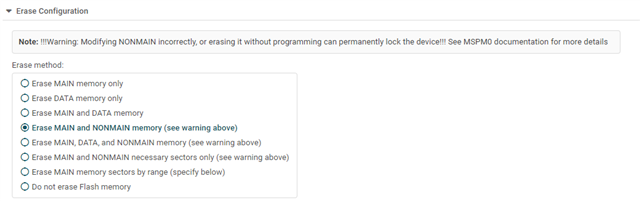
    I can Factory Reset completed successfully and Mass Erase completed successfully, but I want to execute Erase Configuration: Erase MAIN and NONMAIN memory, but it does not seem to be succeeding, nor can I locate the necessary command. Could you please provide the correct command?

    Preparing ...
    PT_LOAD[0]: 0 of 13632 at 0x0
    PT_LOAD[1]: 0 of 96 at 0x3540: 97%
    PT_LOAD[2]: 0 of 80 at 0x35a0: 98%
    PT_LOAD[7]: 0 of 96 at 0x41c00000: 98%
    error: CORTEX_M0P: File Loader: Memory write failed: Flash Programmer: Error, Attempting NONMAIN write without erasing!
    Finished: 98%

  • Hi y ff,

    In Uniflash, editing your erase configuration can be done in the "Settings & Utilities" tab:

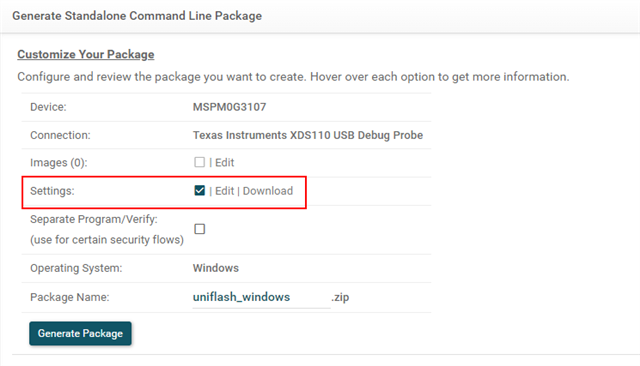
    These settings will be included in the standalone package if the Settings check box is marked:

    After receiving this error, it is likely you will be unable to connect to the Cortex M0. To recover, you can issue a factory reset and should be able to connect again. 

    Best Regards,
    Brian

  • Hi Brian,

    An update here. 

    The current issue is that the dslite can not unlock device with SWD password. We can unlock the device with CCS and uniflash GUI, but not dslite. All three tools use same .ccxml, which holds a SWD password.

    For Automation purpose, we can not use CCS or Uniflash GUI for mass production.

    How to unlock SWD with dslite?

  • Hi Hang,

    I would have to spend some more time looking more into the DSLite script to see if I would be able provide a solution. I will unfortunately not be available during the week of the 13th-17th. I have reassigned the thread to SDTO for further support.

    Best Regards,
    Brian

  • We can unlock the device with CCS and uniflash GUI

    How are you unlocking the device via CLI with dslite? Your screenshot only shows the automatic factory reset command failing. Can I see the command for unlock?

    Thanks

    ki

  • Hi Ki,

    The message you quote saids "unlocking with GUI", not CLI. By that point I am not able to unlock the device via CLI yet.

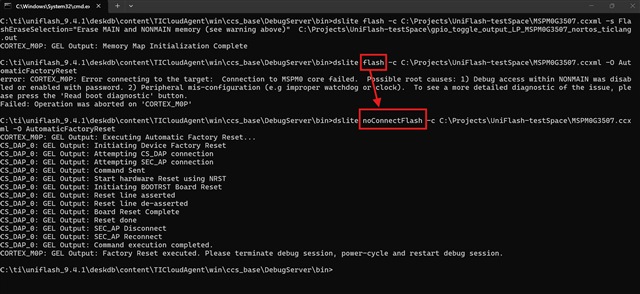
    Nevertheless, the MSP team had shared with me that using the noConnectFlash mode can do the factory reset cia CLI. The commands is like:

    dslte noConnectFlash -c my.ccxml -O AutomaticFactoryreset.

    Customer had built automatic script based on the above command, but they know little about the noConnectFlash mode and is looking for document for this mode.

    Regards,

    Hang  

  • Nevertheless, the MSP team had shared with me that using the noConnectFlash mode can do the factory reset cia CLI.

    I am not aware of the "noConnectFlash" mode. It does not seem documented and it doesn't work for me. Did you get some additional script from MSP team? 

    Thanks

    ki

  • Hi Ki,

    Nothing additional, just a command. See below picture where I fail when using "flash" and success when using "noConnectFlash"

  • ah, I see. It looks like I need to run the DSLite executable directly to use noConnectFlash. Running the dslite.bat file does not seem to work.

  • you can use the .bat like: dslite.bat --mode = noConnectFlash 

  • Yes  that's right. I need the --mode. Thanks. Is customer looking for exactly what this command does?

    > dsilte noConnectFlash -c my.ccxml -O AutomaticFactoryReset

    There are some details in the noConnectFlash.dsls script in:

    [UNIFLASH INSTALL DIR]\deskdb\content\TICloudAgent\win\ccs_base\DebugServer\scripts

    However it can be a bit cryptic. I'll see if there is a better explanation.