This thread has been locked.

If you have a related question, please click the "Ask a related question" button in the top right corner. The newly created question will be automatically linked to this question.

TMS320F28377S: Command line build (ccs-server-cli) CCS 20

Part Number: TMS320F28377S

I've been unsuccessful building from the command line with ccs-server-cli.

ccs-server-cli just displays its help menu. It give no indication of when was wrong with the command line parameters. This is not at all helpful.  Possibly the issue is related to the fact that I am using a workspace file CMCScannerPlusPlusWS.theia-workspace instead of a workspace folder?

 Ex below.

PS C:\> c:\ti\ccs2040\ccs\eclipse\ccs-server-cli -workspace 'C:\CompanyName\projects\CMCScannerPlusPlus\' -application com.ti.ccs.apps.buildProject -ccs.workspace -ccs.configuration DEBUG_FLASH

# --------------------------------------------------------------------------------
# Usage:
        ccs-server-cli.bat -workspace '<workspace-dir>' -application com.ti.ccs.apps.buildProject
                (-ccs.projects [<name> ]+ | -ccs.locations [<path> ]+ | -ccs.workspace) [<options>]

# where options include:
        -ccs.projects [<name> ]+
                Space-separated list of project-names to build.

        -ccs.locations [<path> ]+
                Alternatively, space-separated list of project-locations to build.

        -ccs.workspace
                Alternatively, build entire workspace.

        -ccs.buildType (incremental | full | clean)
                The type of build to perform (optional).
                Defaults to 'incremental'.

        -ccs.configuration <name>
                The build-configuration to build (optional).
                Defaults to active build-configuration.

        -ccs.listErrors
                List all errors after build completes (optional).

        -ccs.listProblems
                List all errors and warnings after build completes (optional).

        -ccs.autoImport
                Automatically import projects at their original locations (optional).

        -ccs.autoOpen
                Automatically open any closed projects (optional).

        -ccs.defaultImportDestination '<dir>'
                Default import-destination. This is the workspace where user-projects will be created/imported by default.

        -ccs.args '<file>'
                File containing any extra arguments (optional).

        -ccs.help
                Print this help message.


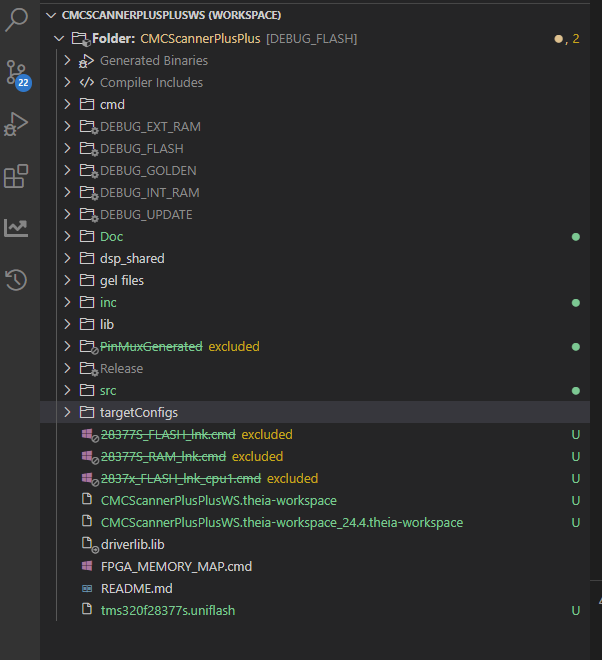
Folder structure:
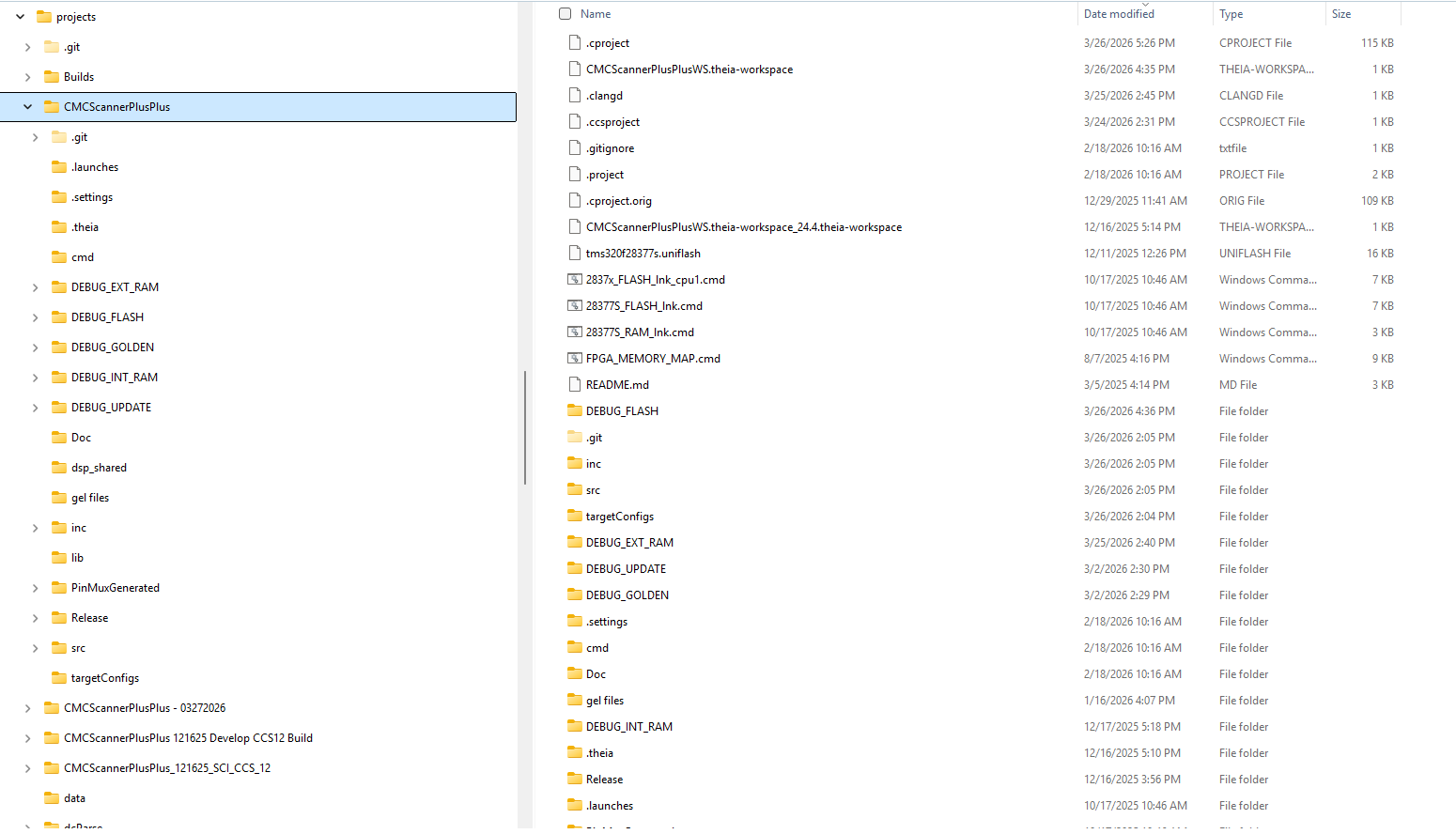
image.png


CCS 

image.png


  • Hello,

    PS C:\> c:\ti\ccs2040\ccs\eclipse\ccs-server-cli -workspace 'C:\CompanyName\projects\CMCScannerPlusPlus\' -application com.ti.ccs.apps.buildProject -ccs.workspace -ccs.configuration DEBUG_FLASH

    It looks like you are using PowerShell.

    For using powershell, please see my post:

     RE: CODECOMPOSER: CCS with PowerShell: cannot create new project on Windows 

  • Using a dos command line (console) instead of PowerShell command changes things, but still not successful. It seems it does not find a project to build. Console output attached.

  • Using a dos command line (console) instead of PowerShell command changes things, but still not successful. It seems it does not find a project to build. Console output attached.

    ###
    
    C:\BlueCrest\projects\CMCScannerPlusPlus>c:\ti\ccs2040\ccs\eclipse\ccs-server-cli -workspace 'C:\BlueCrest\projects\CMCScannerPlusPlus\CMCScannerPlusPLusWS.theia-workspace' -application com.ti.ccs.apps.buildProject -ccs.workspace -ccs.configuration DEBUG_FLASH -ccs.buildType all
    
    # ================================================================================
    # [Tue Mar 31 11:13:39 EDT 2026]: CCS headless build starting...
    
    
    # ----------------------------------------
    
    # --------------------------------------------------------------------------------
    # [Tue Mar 31 11:13:39 EDT 2026]: CCS headless build complete - 0 out of 0 projects have errors
    
    ###
    
    C:\BlueCrest\projects\CMCScannerPlusPlus>c:\ti\ccs2040\ccs\eclipse\ccs-server-cli -workspace 'C:\BlueCrest\projects\CMCScannerPlusPlus' -application com.ti.ccs.apps.buildProject -ccs.workspace -ccs.configuration DEBUG_FLASH -ccs.buildType all
    
    # ================================================================================
    # [Tue Mar 31 11:18:07 EDT 2026]: CCS headless build starting...
    
    
    # ----------------------------------------
    
    # --------------------------------------------------------------------------------
    # [Tue Mar 31 11:18:07 EDT 2026]: CCS headless build complete - 0 out of 0 projects have errors
    
    
    ###
    
    C:\BlueCrest\projects\CMCScannerPlusPlus>
    
    C:\BlueCrest\projects\CMCScannerPlusPlus>c:\ti\ccs2040\ccs\eclipse\ccs-server-cli -workspace 'C:\BlueCrest\projects\' -application com.ti.ccs.apps.buildProject -ccs.project CMCScannerPlusPlus -ccs.configuration DEBUG_FLASH -ccs.buildType all
    
    # --------------------------------------------------------------------------------
    # Usage:
            ccs-server-cli.bat -workspace '<workspace-dir>' -application com.ti.ccs.apps.buildProject
                    (-ccs.projects [<name> ]+ | -ccs.locations [<path> ]+ | -ccs.workspace) [<options>]
    
    # where options include:
            -ccs.projects [<name> ]+
                    Space-separated list of project-names to build.
    
            -ccs.locations [<path> ]+
                    Alternatively, space-separated list of project-locations to build.
    
            -ccs.workspace
                    Alternatively, build entire workspace.
    
            -ccs.buildType (incremental | full | clean)
                    The type of build to perform (optional).
                    Defaults to 'incremental'.
    
            -ccs.configuration <name>
                    The build-configuration to build (optional).
                    Defaults to active build-configuration.
    
            -ccs.listErrors
                    List all errors after build completes (optional).
    
            -ccs.listProblems
                    List all errors and warnings after build completes (optional).
    
            -ccs.autoImport
                    Automatically import projects at their original locations (optional).
    
            -ccs.autoOpen
                    Automatically open any closed projects (optional).
    
            -ccs.defaultImportDestination '<dir>'
                    Default import-destination. This is the workspace where user-projects will be created/imported by default.
    
            -ccs.args '<file>'
                    File containing any extra arguments (optional).
    
            -ccs.help
                    Print this help message.
    
    Job found still running after platform shutdown.  Jobs should be canceled by the plugin that scheduled them during shutdown: com.ti.ccs.project.devices.DeviceModelLoader$InitializationJob$2
    

  • Regarding:

    C:\BlueCrest\projects\CMCScannerPlusPlus>c:\ti\ccs2040\ccs\eclipse\ccs-server-cli -workspace 'C:\BlueCrest\projects\' -application com.ti.ccs.apps.buildProject -ccs.project CMCScannerPlusPlus -ccs.configuration DEBUG_FLASH -ccs.buildType all

    I see a few issues here. 

    1. Use double quotes for your workspace and remove the trailing backslash
    2. The argument for specifying the project is -ccs.projects, not -ccs,project (note the missing "s" at the end)
    3. "all" is not a recognized parameter for -ccs.buildType. I assume you meant to specify "full"? 

    So your command should look like:

    c:\ti\ccs2040\ccs\eclipse\ccs-server-cli -workspace "C:\BlueCrest\projects" -application com.ti.ccs.apps.buildProject -ccs.projects CMCScannerPlusPlus -ccs.configuration DEBUG_FLASH -ccs.buildType full

    Note that CCS 20.4 had a few bugs related to build so i would encourage moving to CCS 20.5.0 when possible.

    Thanks

    ki

  • Thanks! Its working.