Part Number: TMS320F28388D
Other Parts Discussed in Thread: UNIFLASH
Hello,
We have our own PCB design with a microcontroller F28388DZWTS. The MCU is placed on a PCB with USB and JTAG connections. This PCB also has two 40-pin connectors to attach two additional boards.
Everything works fine over USB (FTDI) and/or JTAG in a debug session. However, in standalone mode, the MCU does not start booting.
These are the pins connected to the MCU on each connector:
Connectors:
- GPIO: 91, 92, 93, 94, 15, 18, 19, 20, 21, 22, 23, 26, 41, and some analog pins
- GPIO: 56, 58, 59, 60, 61, 62, 63, 64, 65, 66, 72, 84, 28, 29, XRSn
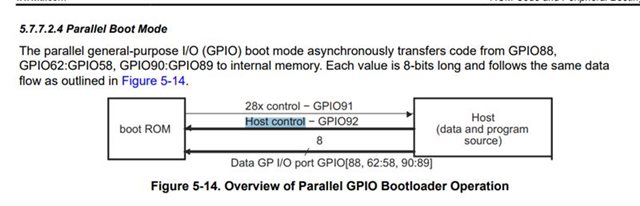
The main issue is with GPIO92. If I touch this pin with a jumper wire or even with my finger, the MCU immediately starts running. This behavior is independent of the firmware (it also happens with a very basic blinky program). Independent from attached PCB, it meas also same behaviour with/-out external bord that attached to the connecter
I tried adding different sized pull-down and pull-up resistors, as well as decoupling capacitors on GPIO92, but none of these helped. In every case, the MCU starts booting only when GPIO92 is touched.
I suspect that in this state, the boot sequence does not even start. If it had started and entered a wait mode, touching GPIO92 should not cause it to jump to flash boot again, correct?
According to the TRM, GPIO92 is used as I2C Boot Option (SCLA), but this is not the default configuration, and the OTP settings have never been changed.
The XRSn pin and boot select pins (GPIO72 and GPIO84) are set high by default with pull-up resistors, meaning the MCU should boot from flash.
The 25 MHz external crystal is also working normally. The MCU is not in a constant reset state — XRSn is high. When I connect via JTAG, I can establish a connection and start the MCU in a CCS debug session.
I have not been able to resolve this problem yet. Do you have any ideas?
Regards,
Josel