TMS320F28069: Transfer program in Stand-Alone CAN boot mode

Part Number: TMS320F28069

Hi,

I'm trying to update the program on my processor through CAN boot mode. I have the CAN boot mode selected with GetMode, as indicated in the TRM. 

I'm stucked transferring the program: after the Build of my project, the Program Data Stream of 8-bit (required for the CAN_Boot) is created as a ".txt" file. When I reset the chip, it starts in CAN boot mode and I transfer the content of the file via CAN as indicated (100kbps, MSGID=0x1, transfering only Byte0 and Byte1). After that, I expected the processor to exit from Boot and start running the program, but nothing happens. 

I tried to invert the byte 0 and 1 order, to change message DLC to 2 or 8, to write on the 8 bytes... nothing succesful. I'm checking the communication and the processor acknowledge the messages in the CAN boot mode, so communication must be correct.

And when I send a random message (without the 0x08AA key), then it exits the CAN boot and executes the previous program loaded in Flash (programmed through the Emulator), as expected.

So resuming, I have two questions:

  1. Why isn't loaded the transferred program? Am I doing something wrong? Is there any step I've forgotten?
  2. Each time that I reset the processor it comes into CAN boot, can I exit this CAN boot without the need of sending a random message? I would like to Jump To Flash but for that is necessary to change the OTP registers, that I need written for CAN boot.

Regards, Sergio

  • Hello,

    Why isn't loaded the transferred program? Am I doing something wrong? Is there any step I've forgotten?

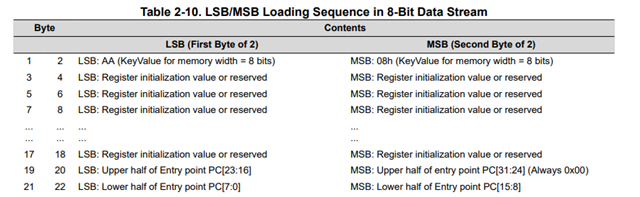
    Summary of the required data stream structure:

    1. Key value: 0x08AA (sent as 0xAA first, then 0x08—LSB first)
    2. 8 reserved words: 16 bytes of 0x00
    3. Entry point address: 32-bit (MSW first, then LSW, each word LSB-first)
    4. Data blocks: Each block has size, destination address, then data
    5. Termination: Block size of 0x0000

    Every 16-bit word must be sent LSB first, MSB second. For the key 0x08AA, you must transmit 0xAA first, then 0x08. This applies to the entire stream.

    DLC should be 2: The bootloader expects exactly 2 bytes per CAN frame.

    If any part is missing or malformed, the bootloader won't execute your program. Please ensure that proper termination is transmitted, you didn't mention this in your thread.

    Each time that I reset the processor it comes into CAN boot, can I exit this CAN boot without the need of sending a random message? I would like to Jump To Flash but for that is necessary to change the OTP registers, that I need written for CAN boot.

    The CAN bootloader on this device has no timeout; it waits indefinitely for data. Sending an invalid key to trigger exit to flash is the intended exit mechanism.

    The OTP registers for CAN boot (OTP_KEY=0x005A, OTP_BMODE=0x0007) cannot simultaneously configure jump-to-flash. This is a limitation with this generation of C2000 devices. A custom bootloader (stored in flash) approach is your most flexible path forward.

    Best,
    Matt

  • Estimate Matt,

    For the first part:

    I created a program to check the parts of the file I'm sending, it is alright:


    I transmit it with DLC=2, but it doesn't react. Do I have to load first the can_flash_kernel example? I think that is what the CAN Boot mode already executes. I tried to run with the debugger this can_flash_kernel, and transmit the file, to see what's happening. It seems that the processor doesn't read the messages properly, but I'm not sure then breakpoints doesn't work as I expect. But the CAN system is correct, I have already tested some apps with CAN and when I send a false key after boot, it loads the previous firmware.

    For the second part:

    for a custom bootloader could I try this approach? : https://e2e.ti.com/support/microcontrollers/c2000-microcontrollers-group/c2000/f/c2000-microcontrollers-forum/1622886/tms320f2800137-custom-bootloader?tisearch=e2e-sitesearch&keymatch=faq%3Atrue%20custom%20bootloader

    I don't know if it's possible with only one flash bank. The idea would be to have one app for the custom bootloader (being this as the can_flash_kernel with minimal modification) and other for the normal firmware.

  • Hello,

    Just to make sure, the proper flow to load an application over CAN into flash is:

    1. Device resets and goes into CAN boot mode in Boot ROM (as configured)
    2. CAN bootloader loads the CAN flash kernel into RAM first (since ROM cannot program flash directly)
    3. ROM branches to CAN flash kernel in RAM
    4. The CAN flash kernel accepts and programs the application into flash using the Flash API
    5. After programming is complete, the CAN flash kernel branches to the application entry point

    This is explained in detail in Section 3.2 of SPRUJH3. You can also load the boot ROM symbols to debug the CAN bootloader following the steps in Section 5.3.

    for a custom bootloader could I try this approach? : https://e2e.ti.com/support/microcontrollers/c2000-microcontrollers-group/c2000/f/c2000-microcontrollers-forum/1622886/tms320f2800137-custom-bootloader?tisearch=e2e-sitesearch&keymatch=faq%3Atrue%20custom%20bootloader

    I don't know if it's possible with only one flash bank. The idea would be to have one app for the custom bootloader (being this as the can_flash_kernel with minimal modification) and other for the normal firmware.

    Yes, that approach is valid, even on a single flash bank device. I would also refer to this FAQ on custom bootloading considerations:  [FAQ] C2000 Bootloading Design Considerations 

    Best,
    Matt

  • I didn't manage to flash an app over CAN with the CAN Boot mode. I send first the kernel and then my app, but nothing. It seems that the error is on the reception of the Bytes in the kernel's function CopyData(). The BlockSize read is incorrect, because of a previous receive problem maybe, and it causes the load fail. I don't know what to try further.

    Thanks for the help.

    Regards, Sergio.

  • Hello,

    To get on the same page: is the CAN bootloader in the Boot ROM is able to download the kernel correctly? Is the Boot ROM able to branch to the CAN flash kernel successfully? Do you allow some time for flash kernel to setup after downloading with the ROM bootloader?

    Best,
    Matt

  • is the CAN bootloader in the Boot ROM is able to download the kernel correctly? Is the Boot ROM able to branch to the CAN flash kernel successfully?

    I'm not completely confident how to use this Load Symbols function, because when I load symbols for the boot rom it doesn't permit to move over any code rows. But when I stop the processor, the Call Stack shows the functions from Boot, so I assume it's right. Then I let it run, I load the can_flash_kernel, I load Symbols and I can debug the code, so the can_flash_kernel was loaded correctly. Then I send my app (it has 30x more CAN-words than the can_flash_kernel), I load symbols of my project, but when I stop the processor there is nothing on Call Stack (just a HEX address) and any row where code execution stops.

    I have tried more things: when I load my app with debugger and I dis- and reconnect target and then load symbols, I can't see nothing on the call stack or can't debug code rows either. I mean I should be able to debug or see the Call Stack after loading symbols in this case.

    Do you allow some time for flash kernel to setup after downloading with the ROM bootloader?

    Yes, I power my pcb, then I send after some seconds the can_flash_kernel and after 15s approx I send my app.

  • Hello,

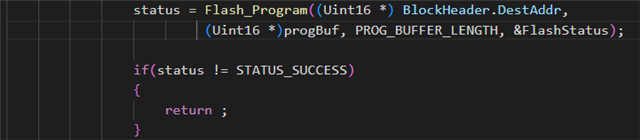
    Can you check if flash programming is successful in the flash kernel? There are a few error checks after Flash_Erase() and Flash_Program() calls, which simply return straight out of CopyData(). Instead, can you put a while(1) loop to see if there is a flash API error that you may be missing?

    Best,

    Matt

  • Hi Matt,

    yes, the problem is in the CopyData() function, it enters the loop you suggested. The status is 12, so there was a Invaled Address received for the next Block.

    I also saved the last Words received and I got this:

    On the left the last words received, at the right the "myapp.txt' file sent

    It seems that the error is on the reception of the Bytes in the kernel's function CopyData(). The BlockSize read is incorrect, because of a previous receive problem maybe, and it causes the load fail.

    I don't understand why this error happens on the line 504, that corresponds to the block 3 probably:


    I think a message is lost and the next words make no sense with a false order. But at the beginning the communication works right for a time and suddently happens that. 

    My other node is a PCAN-USB, so I'm pretty sure there is no error there.

    Regards, Sergio.

  • Hello,

    Thank you for confirming that, there must be some misalignment. 

    Are you sending the 8 reserved words between the 0x08AA key and the entry point PC?

    Also, note that even though you're configuring for an 8-bit data stream with 0x08AA key, the size of the block is defined as the number of 16-bit words in the block for both 8-bit and 16-bit data stream formats. For example, to transfer a block of 20 8-bit data values from an 8-bit data stream, the block size would be 0x000A to indicate 10 16-bit words.

    Best,

    Matt

  • ;   Message Number
    ;   |         Time Offset (ms)
    ;   |         |            Type
    ;   |         |             |           ID (hex)
    ;   |         |             |           |         Data Length
    ;   |         |             |           |         |    Data Bytes (hex) ... LSB to MSB
    ;   |         |             |           |         |    |
    ;---+--   ----+----  --+--  ----+---    +  -+ -- -- -- -- -- -- --
         1)      7503.8  Rx         0001  2  AA 08 
         2)      7503.9  Rx         0001  2  00 00 
         3)      7503.9  Rx         0001  2  00 00 
         4)      7503.9  Rx         0001  2  00 00 
         5)      7503.9  Rx         0001  2  00 00 
         6)      7503.9  Rx         0001  2  00 00 
         7)      7503.9  Rx         0001  2  00 00 
         8)      7503.9  Rx         0001  2  00 00 
         9)      7504.0  Rx         0001  2  00 00 
        10)      7504.0  Rx         0001  2  3E 00 
        11)      7504.0  Rx         0001  2  2C 6F 
        12)      7504.0  Rx         0001  2  02 00 
        13)      7504.0  Rx         0001  2  3F 00 
        14)      7504.0  Rx         0001  2  F6 7F 
        15)      7504.1  Rx         0001  2  7E 00 
        16)      7504.1  Rx         0001  2  0D 73 
        17)      7504.1  Rx         0001  2  1F 00 

    So looks what I send (starting of my "app.txt"). I don't think there is a problem in the format, then I'm first sending the can_flash_kernel correctly, with the same format, created by the Post-Build sentence "${CG_TOOL_HEX}" "${BuildArtifactFileName}" -boot -sci8 -a -o "${BuildArtifactFileBaseName}.txt".

    What I could try is to send each message with 1ms delay and maybe so are all messages correctly received.

  • Hello,

    Yes, I would try increase the message delay, especially given the flash program/erase times on this device:

    Best,

    Matt