C2000WARE: C2000ware installer version 26.00.00.00.STS is not signed

Part Number: C2000WARE

I just downloaded C2000Ware_26_00_00_00_STS_setup.exe from https://www.ti.com/tool/download/C2000WARE.

To my surprise found that the executable installer, unlike normally, is not digitally signed by TI or at all.

The sha is correct, though, but it still hinder me from installing the new version.

Hope for a quick fix.

  • Hi Flemming,

    Let me check with the team and get back to you.

    Thanks,

    Ira

  • Hi Flemming,

    I am able to install the software normally. What error are you getting when trying to download the SDK from https://www.ti.com/tool/download/C2000WARE.?

    Thanks,

    Ira

  • Hi Ira,

    I do not get errors trying to download the executable installer, but I'm not allowed to execute it once it's downloaded.

    It’s likely your organization has different installation requirements than ours.

    At my company, executable installers must be properly code-signed. Your C2000Ware installers (any any other TI released software) have always been signed, except for the most recent release. As a result, when I try to run the installer, our endpoint governance policy flags it as an invalid/unsigned/untrusted package and blocks execution.

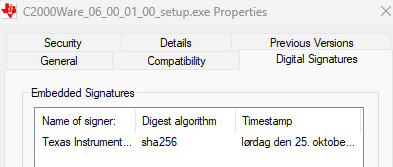
    For reference, C2000Ware_06_00_01_00_setup.exe is signed (signature shown below), 

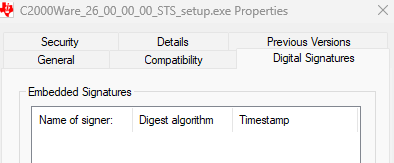
    while C2000Ware_26_00_00_00_STS_setup.exe is missing the signature (also shown below).

    Without a valid signature, many users in managed environments cannot install new software. Even outside managed environments, reputation-based protections (for example Windows Defender/SmartScreen) may flag unsigned installers as suspicious until enough users have installed them, which creates a period where the software is difficult or impossible to deploy.

    Could you please reissue the latest release with the usual code signing (or provide a signed installer) as soon as possible?

    Best regards

  • Hi,

    Let me check with the team.

    Thanks,

    Ira

  • Hi Flemming,

    The installer is now available via the updater. You can run the c2000WareUpdater.exe from any older version and it should fetch the signed installer.

    Thanks,

    Ira

  • Hi Ira,

    Once again I downloaded C2000Ware_26_00_00_00_STS_setup.exe from https://www.ti.com/tool/download/C2000WARE, with the hope that it had also been updated  (It would make everything so much easier.) 

    However it is still the unsigned version that I downloaded the other day.

    I have not been aware of the c2000WareUpdater.exe before now, but unfortunately it doesn't work in my situation, as it seems to only do "Download and install update". I need to use only "Download update ", so I can later transfer it to the computer where it is to be installed, and execute it there.

    I can try to transfer the c2000WareUpdater.exe to another computer, but where on the computer does it save the downloaded file, and can I stop the installation before it leaves traces on the computer?

    I'm looking forward to hearing back from you.

  • Hi Flemming,

    There was an issue with the proxy configuration on the machine due to which the installer was not signed. But since it has already been released to ti.com, the new (signed) installer will be available in the next release. 

    You can choose which folder in your computer you want the installer to get downloaded and you can delete the traces later on. You can do this directly on the computer you want it to execute from.

    Thanks,

    Ira

  • Thank you for the details, Ira.

    I was able to download the executable, and cancel the installation process. 

    The target computer is not network connected, so it would not be able to perform the download and update by itself.