This thread has been locked.

If you have a related question, please click the "Ask a related question" button in the top right corner. The newly created question will be automatically linked to this question.

LAUNCHXL-F280039C: Can't debug / flash F2800 on Mac mini

Part Number: LAUNCHXL-F280039C
Other Parts Discussed in Thread: C2000WARE

No matter what I do, even though the Test Connection works prefectly, when i try to flash the device, i get:

IcePick_C_0: Error connecting to the target: (Error -2131 @ 0x0) Unable to access device register. Reset the device, and retry the operation. If error persists, confirm configuration, power-cycle the board, and/or try more reliable JTAG settings (e.g. lower TCLK). (Emulation package 20.5.0.3902) 

I've tried everything, SW3 set to 0,1, 1,0... any combo never works. Is it a known issue on Mac? I see that TI is very much Windows oriented and that leads me to think it may be the problem. 

Is there anyone out there that has seen this issue and fixed it?

p.s. I've gone through this with Claude AI ad-nauseum, there must be a solution!

  • Hey Joe,

    Thanks for reaching out with this issue, I am going to get the thread assigned to our SDTO team to assist with MacOS debug.

    Best Regards,

    Zackary Fleenor

  • Thanks Zackary, 

    i was able to successfully bypass JTAG flashing by writing a little python script to flash over the USB using SCI, which involves setting S3-1 = ON, S3-2 = OFF  (SCI boot mode) so at least that works, but JTAG with Mac Mini M4 Pro doesn't seem to have a solution.. at least to my limitations. 

  • Is it a known issue on Mac? I see that TI is very much Windows oriented and that leads me to think it may be the problem. 

    This launchpad should be working with macOS. We do test this launchpad with CCS on macOS. Which version of macOS are you using? And which CCS version (20.5)?

    Thanks

    ki

  • Using CCS Version 20.5.0 (20.5.0.883) and my Mac is an M4 Pro with Tahoe Version 26.3.1(a). I have no issue with CCS or flashing the Launchxl-F280039C using SCI over the USB but i could not get the JTAG to work. Maybe i'm missing something. I'm new to the TI platform

  • Using CCS Version 20.5.0 (20.5.0.883) and my Mac is an M4 Pro with Tahoe Version 26.3.1(a).

    I tried a similar environment. The only difference for me was I was using a MacBook Air M1. It worked fine

    One thing to check is to make sure you are using the right JTAG mode. I believe for the LAUNCHXL-F280039C you need to use cJTAG 2-pin (Zackary can confirm this). Note that the examples in C2000Ware do NOT default to that. I think they default to full JTAG and this can cause connection issues like what you see. I have mine set to cJTAG 2-pin and this works.

    Thanks

    ki

  • Hi Ki, It actually defaults to 2-pin advanced mode, I tried that first... then the 4-pin, then JTAG... i literally exhausted all avenues. I even used Claude AI to diag and try other combos, like reducing the JTAG TCLK to 1MHz but nothing. The weird thing is, the Test Connection returns successfully.

    thanks

  • The weird this is, the Test Connection returns successfully.

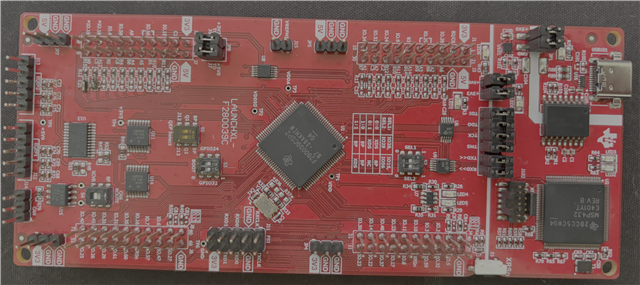
    Then this is very much likely a board configuration issue. I took a picture of my launchpad (click to full size):

    This works for me using the onboard XDS110 with cJTAG 2-pin mode using CCS 20.5.0 on my macBook Air M1 running Tahoe 26.3.

  • ok, perhaps it's just my board that doesn't work with JTAG2-pin mode. I have to use SCI to flash it, (S3 0,1), then reset S3 to 1,1 when ready to run. Either way, i'm new to TI products and may be ill-equipped to debug this further. The unit works and it's only used to prototype a PCB we're working on so it's good enough. I just thought it was worth mentioning that this particular board with my Mac Mini M4 Pro won't work with JTAG. 


    p.s. I'll try to flash it on an iMac (x86) and see what that gives, though it'll have to wait as i need to do this at a different office.

  • The only difference in our screenshots is the setting for S4. I had it match yours are tried again. I still did not have any issues. It should not matter if you are an Mx or x86. Both should work. Most of us here are using Apple Mx processors for our macs. 

    I'm not sure what the issue could be. I can reproduce the -2131 error if I don't set the JTAG mode to cJtag 2-pin. Once I do so, the error goes away. Can you attach your ccxml file that you are using?

    Thanks

    ki

  • sure thing, here you go. let me know what you come up with.TMS320F280039C_LaunchPad.ccxml.zip

  • sure thing, here you go. let me know what you come up with.TMS320F280039C_LaunchPad.ccxml.zip

    Thanks. I was able to use it to launch a debug session and flash my blinky program on my LaunchPad

    I'm wondering if there could be any issue with your launchpad. Have you tried using it with any other machine?

  • Not yet, i plan to test it on an iMac at the office next week... no big deal, like i said i'm able to flash it without issues and it's sufficient for the firmware work i'm doing. I'll let you know what comes of it.

    Thank you