This thread has been locked.

If you have a related question, please click the "Ask a related question" button in the top right corner. The newly created question will be automatically linked to this question.

TMS320C28346: Pin assignment for C28 Dual-core chip

Part Number: TMS320C28346
Other Parts Discussed in Thread: SYSCONFIG, C2000WARE

Hi,

My DSP is  TMS320F28P650DK9. There are very limited examples for Dual-core scenario and hardware pin assignement. In fact, the only one I know about is LED. 

The quesiton is - when you use Sysconfig in a multi-core (dual-core) enviornment, each CPU project has a sysconfig file.  Based on my research it looks like that these sysconfig files are internconnected. 

When I look them within SysConfig utility (within CCS IDE), each one has  CPU1 and CPU2 sections. Hence, there are 4 places where one can assign a hardware pins (think GPIO or SCI port).

The question is if I am trying to segregate hardware resources between two cores with assumption that no hardware peripheral will be accessed in cross-core fashion (e.g. a GPIO owned by CPU2, but toggled by CPU1),  how do I go about setting up sysconfig files?

A straighforward option would be  -

CPU1 project

Syconfig - CPU1 area assign pins/peripherals that will be used by CPU1 (do nothing for CPU2 portion)

CPU2 project

Sysconfig - CPU2 area assign pins that will be used by CPU2 (nothing within CPU1).


However, it did not work for SCI for example. Can you recommend a correct approach?


Thanks.


  • Hi Jwalant, 

    It is not possible for CPU2 to assign its own peripherals or GPIO's. This is all done by CPU1. CPU1 is the system manager and owns all peripheral, GPIO's, etc at startup, CPU1 has to explicitly transfer ownership of these resources. 

    A good example to follow can be found within C2000ware/driverlib/f28p65x/examples/c28x_dual/flash_kernel/flash_kernel_c28x_dual_ex1_c28x1 and look at the file flash_kernel_c28x_dual_ex1_sci_get_function_cpu1.c. This file shows an example of how you can assign the SCIA module to CPU2 without using syscfg. 

    Additionally, for future reference, please make sure you are adding the correct and full GPN to the TI part number field within E2E, as this will help us filter the query to the correct expert. 

    Kind regards,
    AJ Favela 

  • AJ,

    Thanks for the response. I will look at the example and see if it resolves my issue. By the way, we are using syscfg. So, are you saying that my CPU2 project's syscfg should be empty and all settings/actions are within CPU1's syscfg?

  • I reviewed the specific example and flash_kernel_c28x_dual_ex1_sci_get_function_cpu1.c. I could see that at link 967, the CPU1 assigns SCIA ownership to CPU2. However, I am finding this example sort of incomplete. To understand the usage properly, I tried to look for how and when CPU1 calls this function and how CPU2 coordinates it. But this example has no code related to CPU2 that I could find. Secondly, when I searched for assignSciaCPU2 calls, I got nothing.

    I guess let me paraphrase my original question into multiple ones-

    1. SCIA section in Syscfg editor does not show any setting that allows assignment of core. Also, the example you are suggesting is without syscfg. So, are we alluding to the fact that syscfg cannot be used for dual core scenario?

    2. Ideally I would like to see a clear example with CPU1, CPU2 and 1+2 projects containing sycfg or devicelib calls. It should be able to clearly show how to use SCIA module and other HW peripherals.

    Thank you.

  • Hi Jwalant, 

    I apologize for the confusion,

    It is possible to use syscfg for a dual core application. Specifically if you go to the CPU1 section of syscfg, select the sysctl module -> CPU select for Peripherals, you can assign SCIA to CPU2 by setting the correct value in the drop down. 

    Do note that by doing this you need call board_init(); to initialize this transfer within your main() code for CPU1.

    You can double check that this transfer has occurred by viewing the CPUSEL5 register under the DevCfgRegs and looking at bit 0 or bit 1 depending on the SCI module used. 

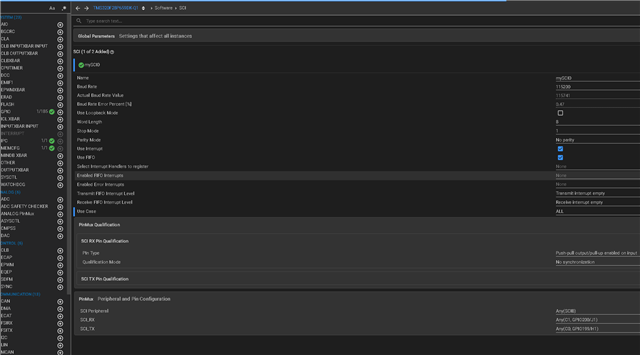
  • This is my project Sysconfig view for CPU1, as you can see that it does not have any selection for SCI's assignment to a core, this is  CCS 20.04

    What am I missing?

  • Hi Jwalant, 

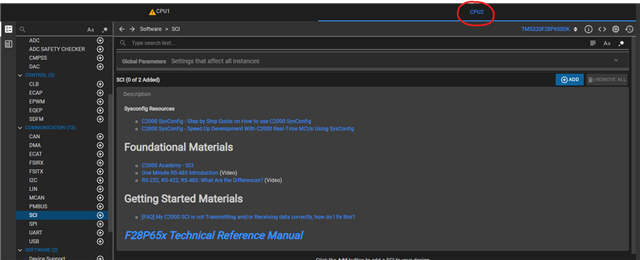
    Within syscfg please go to the SYSCTL module as seen below. Here you can assign the peripheral to CPU1 or CPU2 as desired. As I mentioned before please make sure you are calling Board_init(); within your main code as this is the function call that will transfer the ownership after you have selected this in syscfg. 


    To double check that this ownership transfer has occurred, you can view the CPUSEL registers within DEVCFGREGs and step through the code. Once Board_init(); has been called you should see the transfer occur.  

    Kind regards,
    AJ Favela 

  • AJ,

    Thanks for the reply! I ensured that on CPU1 side when I have Board_init() is called, the CPUSEL5 register at CPU1 does set the SCI_A bit. Hence, the ownership must be getting transferred. However, it still does not work. Here are my two questions:

    1. I need to enable RX interrupt and register a handler using Syscfg, currently, For CPU1 and CPU2 project, I am adding SCI A entry in syscfg - CPU1 sections in both  projects. But how do I register RX interrupt handler to be on CPU2 side?

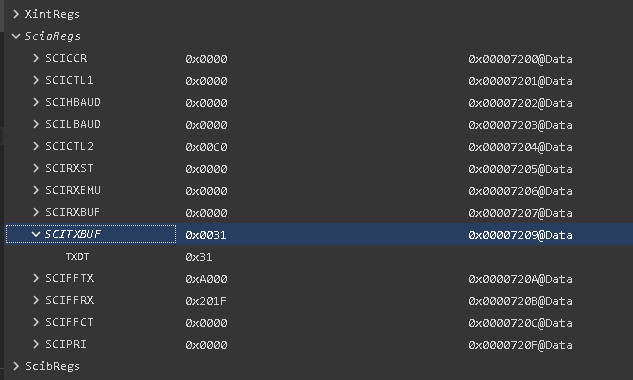
    2. Apart from the handler, when I step through the code which loads a byte inside SCI TX Buf register, I noticed that from CPU1 registers that the SCI A port seems to be configured correctly. However, looking at CPU2 registers, SCI A does not seem to be configured at all! So, when CPU2 side routine, tries to load a byte, it does not work! What am I missing? Below is the snapshot of CPU 2 register view.

  • Hi Jwalant,

    1. Have you attempted to configure the interrupt and handler on the CPU2 side of syscfg?


    2. Are you attempting to use SCIA on both CPU1 and CPU2 at the same time? 

  • My goal it to have SCIA used by CPU2 exclusively. 

    Apart from that, just to make sure that I understand your comment about interrupt, what you are suggesting is 

    1. setup SCI on CPU1 side and through SYSCTL assign it to CPU2 (my use case)

    2. Enable RX interrrupt (my use case), register it at CPU1 side

    3. Enable interrupt and register the same handler on CPU2 side.

    Did I get that right? Thank you.

  • Hi Jwalant,

    Thank you for your explanation, I understand your goal now. 

    Step 1 is correct, you do need to transfer ownership of the SCI module via CPU1 to CPU2.

    However once that ownership has been transferred, all configurations for that SCI module need to come from CPU2 as it now has ownership of the module. Any changes made to that SCI module in the CPU1 syscfg file won't be reflected as the CPU does not have ownership anymore. 

    Once you have made the correct configurations within the CPU2 syscfg file, please make sure that you again have Boardinit(); called on the CPU2 side as this will be what initializes the changes you made within CPU2's syscfg. 

  • AJ,

    Thanks for the reply, meantime after some fiddling, I have the SCIA working. However, now I see another issue related to RX interrupt. 

    Specifically, when the CPU2 program runs, it prints a string through SCIA. That works perfectly. However, RX interrupt is not triggered when a character is sent to SCIA. 

    I compared my single core version of the project against the dual core version (where I am having the issue).  What I noticed is that it looks like that CPU Interrupt registers are not set right. Both IER and IFR show 0x0000 at runtime. On the single core version it was enabling the interrupts correctly. I believe this is the reason of RX interrupt not working.

    When I compared syscfg files for single vs. dual core, they match perfectly for SCIA config. The other observation is that board.c generated by syscfg utility also match closely (except in dual core, the pinmux for SCI is listed under CPU1, but SCI config is listed  CPU1.

    So, I wonder if that is causing the issue. Thanks again.

  • Jwalant,

    Let me redirect this question to an SCI expert, as the interrupt issue looks to be more at the peripheral level rather then a multi-core level. Please give them some time to respond. 

    Kind regards,
    AJ Favela 

  • Hi Jwalant,

    Apologies for my delayed response. Do you have the below lines in your CPU2 main code?

    If so, can you try stepping through these lines on CPU2 to see if the PIE initializations are set correctly? 

    Best Regards,

    Delaney

  • That for the tip! I found something strange here. As I try to step into Interrupt_initModule on CPU2 side, it throws an error with path that is never specified in the project. It almost looks like that it is a hard-coded TI's internal path! 

    Maybe this the issue. 

  • Hi Jwalant,

    This error is just with CCS not being able to locate the source file, it shouldn't have an effect on the programmed into the device. To resolve this, can you click "Browse" and navigate to the [C2000ware install]\driverlib\f28p65x\driverlib\interrupt.c file in your local install?

    Best Regards,

    Delaney

  • I did that, but it did not change anything. I still end up with the same error and  IER does not get set correclty. Do you want to have a live call?

  • I dug further. It appears that specifically Interrupt_initVectorTable() throws exception and it gets trapped within illegal operation handler.

  • Hi Jwalant,

    Just to verify, you are connecting, loading and running the code on CPU1 first, right? Before connecting to CPU2?

    Also, which linker cmd file are you using on the CPU2 project? Is it one made for CPU2 (for example: 28p65x_generic_flash_lnk_cpu2)?

    Can you check in your .map file to see where in memory the PIE vector table is placed for the CPU2 project? It seems that the CPU2 hasn't been given proper access to that location by the time it runs Interrupt_initVectorTable().

    Best Regards,

    Delaney