This thread has been locked.

If you have a related question, please click the "Ask a related question" button in the top right corner. The newly created question will be automatically linked to this question.

UNIFLASH: Concern about accidental OTP programming via UniFlash (DCSM Zone 1 Password)

Part Number: UNIFLASH
Other Parts Discussed in Thread: TMS320F28P650DK

Hello,

I have a question about using UniFlash with TMS320F28P650DK regarding DCSM (Dual Code Security Module).

Our setup:

  • We use DCSM Zone 1 only.
  • The 128-bit CSM password (CSMPSWD0–3) is programmed into the OTP area at the factory during initial production.
  • After installation in the field, we use UniFlash to unlock the device by entering the correct password (see attached image).

My understanding:

  • UniFlash has four buttons: "Program", "Lock", "Unlock", and "ECSL Unlock".
  • For our intended use case, we only need to use the "Unlock" button.
  • The "Program" button writes to the DCSM OTP area.

Question: If the "Program" or "Lock" button is accidentally clicked in UniFlash, could unintended values be written to the OTP area (CSMPSWD0–3)?

Since OTP is one-time programmable, we are concerned that an accidental operation could permanently corrupt the password and lock us out of the device.

Please clarify the behavior of these buttons and whether there is any protection against accidental OTP programming.

Thank you.
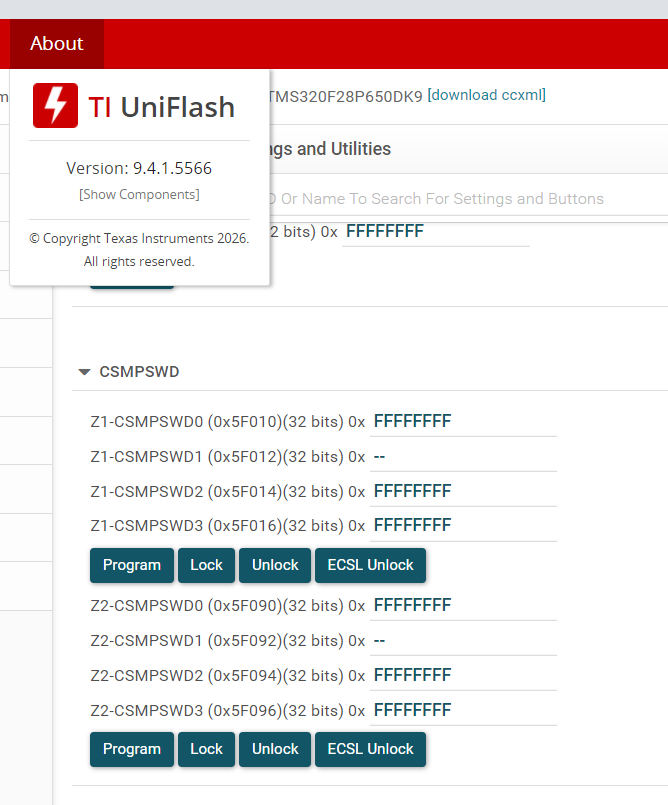
image.png

  • Hi Tomomi,

    Let me loop DCSM experts for more details.

    Thanks

    Aswin

  • Hello Tomomi,

    Thank you for your question about UniFlash and DCSM OTP programming protection. This is an excellent concern, as OTP memory is indeed one-time programmable and accidental overwrites could permanently lock out the device.

    Yes, if the "Program" button is accidentally clicked in UniFlash with the DCSM OTP region selected, it COULD write unintended values to the OTP areaHOWEVER, there is a hardware-level protection mechanism that can prevent this once properly configured.


    The Protection Mechanism: Zx-PSWDLOCK

    The key to protecting your factory-programmed password from accidental overwrites is the Zx-PSWDLOCK (Password Lock) word in the DCSM OTP region.

    How It Works:

    Feature
    Behavior
    Zx-PSWDLOCK
    Can be programmed only once in the device's lifetime
    When locked
    The entire OTP region (including CSMPSWD0–3) becomes read-only permanently
    Protection
    Once locked, even if you click "Program" in UniFlash, the hardware will ignore any write attempts to the OTP region
    UniFlash behavior
    Will report a "write protection" error if you attempt to program a locked OTP region


    Your Factory Setup Should Include:

    At your factory during initial production, you should be programming both:

    1. CSMPSWD0–3 (the 128-bit password)
    2. Zx-PSWDLOCK (the password lock word) — This is critical!

    If the lock word is NOT programmed at the factory:

    • The OTP is vulnerable to accidental overwrites
    • Clicking "Program" in UniFlash could permanently corrupt the password
    • This would brick the device

    If the lock word IS programmed at the factory:

    • The OTP is hardware-protected
    • Accidental "Program" clicks will be rejected by the hardware
    • UniFlash will show a write protection error, but no damage will occur


    Recommended Factory Programming Workflow

    To ensure protection, your factory process should follow this sequence:

    Step
    Action
    Purpose
    1
    Program CSMPSWD0–3 with your 128-bit password
    Set the security password
    2
    Verify the password was written correctly
    Ensure no programming errors
    3
    Program Zx-PSWDLOCK as the final OTP write
    Lock the OTP region permanently
    4
    Verify the lock word is set
    Confirm protection is active

    Critical: The Zx-PSWDLOCK word must be programmed last because once it's set, no further OTP writes are possible.


    Field Use with UniFlash

    For your field deployment scenario:

    What you're doing (Unlock only)

    • Correct approach — Using only the "Unlock" button is safe
    • The "Unlock" button reads the password you enter and compares it to the OTP
    • It does not write to OTP memory

    If someone accidentally clicks "Program" or "Lock":

    • If Zx-PSWDLOCK is set (recommended): Hardware blocks the write → No damage
    • If Zx-PSWDLOCK is NOT set: OTP could be corrupted → Device bricked️


    How to Verify Your Devices Are Protected

    You can check if your factory-programmed devices have the lock word set:

    1. In UniFlash, connect to the device
    2. Navigate to the DCSM OTP memory view
    3. Check the Zx-PSWDLOCK register value
      • If it's programmed (non-0xFF...FF), you're protected
      • If it's all 0xFF (unprogrammed), you're vulnerable️


    Additional Safeguards for Field Use

    Even with hardware protection, consider these operational safeguards:

    1. Create separate UniFlash profiles:

      • Field profile: Only includes "Unlock" capability, OTP region deselected
      • Factory profile: Includes OTP programming (restricted access)
    2. User training:

      • Educate field technicians to use only "Unlock"
      • Explain the consequences of using "Program"
    3. Access control:

      • Restrict access to factory programming tools/profiles
    4. Documentation:

      • Clearly label which UniFlash configurations are safe for field use

    Best Regards,

    Zackary Fleenor

  • Thank you very much for your prompt and detailed explanation.

     Your answer clarified my concerns, and I now understand the behavior correctly. I appreciate your support and the clear guidance.

     Best regards,