CCSTUDIO-THEIA: During debug, CIO appear to always be enabled.

Part Number: CCSTUDIO-THEIA
Other Parts Discussed in Thread: TMS320F2800157-Q1

The project I'm working on uses the F2800157, and are executing (and debugging) from flash.

We are using the Texas Instruments XDS110 USB Debug Probe.

In the code we can optionally use CIO to output to the CIO terminal in CCS, but since it uses up 1 (sometimes 2) of the available 2 breakpoints, we usually have this code path disabled just as we have disabled the CIO setting in the Debug section of the project settings.

However as far as I have read and tested in the past, it's perfectly okay to use the CIO code path as the code itself can not enable CIO and make the debugger snatch up the breakpoint needed for it, as the breakpoint(s) are only allocated for CIO usage when I enable the CIO setting in the Debug section of the project settings. Please confirm that this understanding is correct.

Lately, with CCS 20.4.1 and CCS 20.5.0.28, regardless if CIO is enabled or not in the settings, I find that I never have more than max one breakpoint available, and single stepping in the debugger often fails due to missing available breakpoints.

Looking at the .\.theia\launch.json, the configuration changes as expected:

When disabled it's <property id=\"AddCIOBreakpointAfterLoad\">\n <curValue>0</curValue>\n </property> 

When enabled it's <property id=\"AddCIOBreakpointAfterLoad\">\n <curValue>1</curValue>\n </property> 

I have verified that the .out file does not change when I change the CIO setting in the properties - which is expected as it's a debugger configuration only.

So how can I verify that the configuration is correctly picked up by the debugger?

And especially, how can I again disable the CIO setting at will, and get back all the breakpoints?

 

  • Hi Flemming,

    Yes, your understanding is correct. CIO (Console I/O) breakpoint allocation is controlled entirely by the debugger configuration, not by your application code. The debugger sets breakpoints at two special labels — C$$IO$$ (in writemsg) and C$$EXIT (in abort) — only when the "Enable CIO function use" option is enabled in the debug settings [1]. Having CIO-related code in your application does not cause the debugger to allocate those breakpoints on its own. The .out file is unaffected by this setting, as you've confirmed.

    On the C28x CPU, you have exactly two hardware analysis units (AU1 and AU2) available for breakpoints [2]. CIO can consume 1–2 of these when enabled, which is why disabling it is critical when debugging from flash. Single-stepping also requires a hardware breakpoint, which explains why it fails when breakpoints are exhausted.

    The Problem: CCS Theia May Not Be Respecting AddCIOBreakpointAfterLoad

    Unfortunately, I was unable to find a documented known issue or fix for this specific regression in CCS Theia 20.4.1/20.5.0.28. However, the evidence strongly suggests the debugger is not correctly applying the AddCIOBreakpointAfterLoad=0 setting from your launch.json, even though the file content changes as expected.

    There is a relevant precedent: in older CCS versions (v11.0 and earlier), the debugger would automatically seize ERAD module ownership for hardware breakpoints when executing from flash, preventing user control — this was fixed in CCS v11.1 [3]. Your issue may be a similar regression in the Theia-based CCS where the debugger allocates CIO breakpoints regardless of configuration.

    What You Can Try

    1. Check for Additional CIO-Related Settings Beyond launch.json

    The launch.json may not be the only place controlling CIO behavior. Also verify:

    • "Halt at program exit for TI compilers (requires a breakpoint)" — this is a separate setting that also consumes a hardware breakpoint. Ensure it is unchecked alongside the CIO setting [1].
    • Check your .ccxml target configuration file for any CIO-related properties that might override launch.json.

    2. Verify via Program/Memory Load Options in Debug View

    During an active debug session in CCS Theia, try accessing the debug properties directly:

    • Right-click on the core in the Debug view → PropertiesDebugProgram/Memory Load Options
    • Confirm that "Enable CIO function use (requires setting a breakpoint)" is unchecked [4]
    • Also confirm "Halt at program exit for TI compilers (requires a breakpoint)" is unchecked

    This runtime check can reveal whether the debugger actually applied the launch.json setting.

    3. Verify ERAD Module State

    Since the F2800157 has ERAD capabilities, check whether the debugger or your application code is claiming ERAD ownership, which could consume additional breakpoint resources [2][3]. If your application configures ERAD, it may conflict with the debugger's breakpoint management.

    4. Place CIO Code in RAM (If CIO Is Needed)

    When you do need CIO, placing the CIO-related RTS sections in RAM allows the debugger to use software breakpoints instead of hardware ones, freeing up your two hardware breakpoints [1]:

    SECTIONS
    {
    .text:cio : { rts*.lib<trgmsg.obj exit.obj>(.text) } > RAM
    .text:rts : { rts*.lib(.text) } > ROM
    .text > PMEM
    }

    5. File a Bug Report

    Given that the launch.json correctly reflects your setting but the debugger doesn't honor it, this appears to be a CCS Theia regression. I'd recommend filing a bug on the TI E2E CCS forum with your launch.json content, CCS version details, and the observed breakpoint behavior.


    To help refine this recommendation, it would be helpful to know:

    • Whether the .ccxml target configuration contains CIO-related settings that could override launch.json
    • Whether your application code configures the ERAD module, which could consume breakpoint resources independently

    1. TI SDK - CIO Breakpoint Requirements and Printf Tips
    2. C2000 ERAD - Hardware Breakpoint Resources
    3. E2E FAQ - ERAD Ownership Seized by CCS Debugger (Fixed in CCS v11.1)
    4. E2E FAQ - Disabling CIO in Debug Properties for XIP Debugging

    Best Regards,

    Zackary Fleenor

  • Thank you for the detailed answer, Fleenor.

    In my original question I didn't state very strongly, is that if I execute code the use CIO, while the CIO is set as disabled in the Debug Properties, then the CIO output did appear in the CIO Console. In other words, I'm convinced the debugger is always having CIO active.

    Answering your bullets one at a time:

    1. All other settings I can find that use breakpoints have been verified to be disabled.

    2. When checking the running setting (Right-click on the core in the Debug view → Properties  Debug  Program/Memory Load Options) I see that the  "Enable CIO function use (requires setting a breakpoint)" is checked - which is unexpected.

    Testing further I find that if I have a breakpoint at main(), then go to the core and disable CIO at runtime (and press save), then my CIO debug text does not appear in the CIO console, and I'm allowed to set two breakpoints.  So for now, this can be a temporary workaround, albeit an annoying extra manual step on every debug run.

    3.  As far as I can see, none of the linked resources, including [4], is relevant to this issue. I did read through it all, and found no conflicts. We do not use the ERAD.

    4. Please elaborate on this. Are you saying what I think I read, that it's possible to execute normal code from flash, and only place the functions that actually use CIO in ram, and thereby free up both hardware breakpoints? This would be really helpful, not only for our people but for all of your users.

    I noticed no difference when I tried the below, so I guess I need some special magic to configure CIO without hogging a breakpoint?

    SECTIONS
    {
    codestart : > FLASH_BOOT

    /* Place CIO RTS handlers in RAM so CIO can avoid consuming HW breakpoints. */
    .text:cio : { rts*.lib<trgmsg.obj exit.obj>(.text) } > RAMLS0, ALIGN(8)
    .text:rts : { rts*.lib(.text) } > FLASH_APP, ALIGN(8)
    .text : > FLASH_APP, ALIGN(8)

    (Note, apparently I sometimes can't insert formatted code into this editor)

    5. I believe this is my bug-rapport. I can share the launch.json with TI employes, but not publically. Please let me know how to precede.

  • Hey Flemming,

    Your follow-up testing has essentially confirmed the issue: CCS Theia 20.4.1/20.5.0.28 is not applying the AddCIOBreakpointAfterLoad=0 setting from launch.json at debug session startup. The runtime properties show CIO checked even when your configuration explicitly disables it. This is a debugger-side regression.

    What We Know

    Your understanding is correct — CIO breakpoint allocation is controlled entirely by the debugger configuration, not by application code [1]. The C28x CPU has exactly two hardware analysis units (AU1 and AU2) for breakpoints [2], and CIO can consume 1–2 of these. The launch.json file correctly reflects your setting (AddCIOBreakpointAfterLoad=0), but the debugger ignores it when starting the session.

    The key evidence: when you check the runtime debug properties (Right-click core → Properties → Debug → Program/Memory Load Options), CIO is checked despite being disabled in your project configuration. This confirms the launch.json value is not being propagated to the active debug session.

    Your Temporary Workaround Is Valid

    Your discovered workaround — setting a breakpoint at main(), then manually unchecking CIO in the runtime core properties and pressing save — correctly frees both hardware breakpoints for the remainder of that session. This is consistent with how the debugger manages CIO: the breakpoints at C$$IO$$ and C$$EXIT are removed when you disable CIO at runtime [3].

    Regarding Placing CIO Code in RAM

    The suggestion to place CIO RTS handlers in RAM is based on the principle that software breakpoints can be used for code in RAM (since RAM is writable), whereas flash requires hardware breakpoints (since flash cannot be written with breakpoint instructions at runtime) [3]. In theory, if the CIO trap functions (trgmsg.obj, exit.obj) reside in RAM, the debugger could use software breakpoints for CIO instead of consuming hardware breakpoint resources

    However, I was unable to confirm this actually works for C2000/F2800157 CIO specifically — the debugger's CIO mechanism may still require hardware breakpoints regardless of where the code resides, since it uses a specific trap mechanism rather than a standard code breakpoint. Your test showing no difference when placing those sections in RAM is consistent with this possibility.

    Recommended Next Steps

    1. Continue using the manual workaround (disable CIO at runtime each debug session) until a fix is available.

    2. I will file this as a formal bug. To share your launch.json privately you can use the "Send a private message" option on the TI E2E forum or email me directly at fleenor@ti.com. Please include the following:

      • Your launch.json content
      • CCS versions affected (20.4.1 and 20.5.0.28)
      • The exact steps to reproduce (disable CIO in settings → start debug → check runtime properties → CIO is still enabled)
      • Confirmation that the workaround of manually disabling at runtime resolves it
    3. Verify your .ccxml target configuration does not contain CIO-related properties that might override launch.json — though given the runtime behavior, this is almost certainly a CCS Theia bug rather than a configuration conflict.


    To help TI narrow down the regression, it would be helpful to know:

    • Whether this issue reproduces with a minimal project (e.g., empty main() with a single printf) to isolate it from application-specific factors
    • The exact CCS Theia build numbers (full version strings) for both 20.4.1 and 20.5.0.28
    • Whether earlier CCS Theia versions (e.g., 20.3.x) exhibited the same behavior, which would help identify when the regression was introduced

    1. C2000 ERAD — Hardware Breakpoint Resources
    2. C2000 ERAD — Analysis Units AU1 and AU2
    3. XIP Debug — Disabling CIO and Program Exit Breakpoints

    Best Regards,

    Zackary Fleenor

  • Hi Zackary,

    I sent the requested files to you by private message last week.

    Please provide a link to your public tracker where we can follow and vote for this issue.

  • Hi Flemming,

    The ticket can be found here: https://sir.ext.ti.com/jira/browse/EXT_EP-13385

    Best Regards,

    Zackary Fleenor

  • Hey Flemming,

    A few follow up questions from our SDTO team:

    • Does the launch.json file set the AddCIOBreakpointAfterLoad property for the same cpu core that is being used for debug?
    • How is the debug session being launched? Is this done by right-clicking on the project and selecting "Debug Project", or is the ccxml file being selected and then "Start Project-less Debug" being selected?

    They also provided the following clarification regarding C$$EXIT:

    C$$EXIT is not related to CIO. There is a separate setting to configure the use of a hardware breakpoint at C$$EXIT. It is immediately above the CIO setting "Halt at program exit for TI compilers (requires a breakpoint)".

    Best Regards,

    Zackary Fleenor

  • Thank you.

    I have just resend the TMS320F2800157-Q1.ccxml and launch.json files as private mail to you, this time with a .txt extension, as the files apparently was just deleted without warning otherwise.

    Regarding the questions.

    1. As far as I can see it's the same cpu core - it's all written by CCS. If you can not verify this in the files I've shared, please let me know how to verify/set this.

    2. Debug session is launched by right-clicking on the project and selecting "Debug Project".

    Regarding C$$EXIT, the "Halt at program exit for TI compilers (requires a breakpoint)" is unchecked - thus no breakpoint is allocated.

    Also thank you for the tracking number.

    Best regards,

    Flemming

  • Hi Flemming,

    Thank you, I have received the files and we are reviewing the issue with the SDTO team. Please follow along with the ticket for feedback/progress moving forward.

    In the meantime, I will go ahead and close this ticket. Please feel free to create another thread to discuss further issues or to escalate if you haven't seen any progress on the ticket.

    Thanks for your patience.

    Best Regards,

    Zackary Fleenor

  • Hi Flemming,

    Please see below comment from SDTO team:

    Thanks for providing the files.

    We will find a hardware device to do a proper test next week.
    In the meantime, we copied the DCMAxX configuration from the launch.json file and modified it a bit to launch a debug session without hardware and we can see the the CIO setting as disabled when I check the C28xx_CPU1 properties. (This is with CCS 20.4.1 and CCS 20.5.0.)

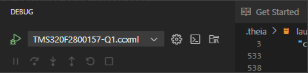
    We noticed that the second configuration in the launch.json file is set to launch a debug session with the specific ccxml file from the DCMaxX project, but without any of the custom settings.

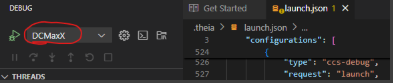
    We want to confirm that you are launching a debug session for the DCMaxX configuration and not the TMS320F2800157-Q1.ccxml configuration.
    This is what the configuration should be set to:

    If it looks like this, then the default setting (CIO enabled) will be used since the launch.json file does not specify any settings for this configuration:

    Best Regards,

    Zackary Fleenor

  • Just for public completeness. Since the thread was temporary locked for me for several days, I wrote this to   as private message:

    When debugging the project is set to DCMaxX (DCmax) :

    The TMS320F2800157-Q1.ccxml (DDmax) configuration is available, together with the static libraries in the same workspace.

    I've never seen the TMS320F2800157-Q1.ccxml configuration chosen, but as a debug the files in the project, I can see the chosen configuration sometimes change to some of the static libraries. Due to this, I have made it a habbit to always start a debug session by right clicking on the main project I want to debug.

    Feature request: It would be REALLY nice if it was possible to blacklist projects from the available debug targets.

  • Yes your latest feedback has been added to the bug report. Thank you

    ki