This thread has been locked.

If you have a related question, please click the "Ask a related question" button in the top right corner. The newly created question will be automatically linked to this question.

F28377D-SEP: CPU usage of syscfg file

Part Number: F28377D-SEP
Other Parts Discussed in Thread: TMS320F28388D, C2000WARE, SYSCONFIG

Hi, 

I'm using TMS320F28388D MCU for my project. I understand that there is syscfg file present in empty example project which can help me write the driver level code by using GUI. It creates the below files.

  • board.c
  • board.h
  • device.h
  • device.c
  • board.cmd.genlibs
  • board.opt
  • board.json
  • pinmux.csv
  • c2000ware_libraries.cmd.genlibs
  • c2000ware_libraries.c
  • c2000ware_libraries.h
  • c2000ware_libraries.opt
  • clocktree.h
  • example.syscfg.

My question is that, how much of RAM space do these generated code take? I understand it is relative to the code that I write, but how much impact does it have on RAM space utilization?

Few of these files are empty (for example, c2000ware_libraries.cmd.genlibs) - why are they generated when they output empty or only commented file? Do they also take up space?

The Device_init() and Device_initGPIO() initialized all the ports and pins and clocks in one strech despite it being used in the code. I understand that without unlocking those ports, no code will let it work normally and it is a safe protection to ensure the same. However, it does take up more cpu cycles than necessary right? What line of code should I handpick from both the functions (especially device_init()) to ensure that only the ports that I want to use will be enabled?

Regards,
Reshma.

  • Hi Reshma 

    The actual RAM impact is minimal for an empty project, and it scales entirely with what you configure in SysConfig.
    The best way to measure your specific build is to look at the .map file after building, CCS generates it alongside the .out. Check the board.obj and c2000ware_libraries.obj sections there for exact figures.

    Files like c2000ware_libraries.cmd.genlibs are scaffolding/placeholders for optional features. They exist so the build system can unconditionally reference them without errors. Empty files consume zero memory the compiler and linker simply process them as no-ops. They do not contribute to your Flash or RAM footprint.

    You're correct that Device_init() enables clocks for all peripherals by default and Device_initGPIO() unlocks all GPIO ports, which consumes more CPU cycles than strictly necessary at startup. However, this is a one-time startup cost, not an ongoing runtime penalty.

    If you still want to optimize, here's what to selectively keep from Device_init()  

    // 1. Disable watchdog (or conifgure it)
    SysCtl_disableWatchdog();

    // 2. Set system clock (mandatory)
    SysCtl_setClock(DEVICE_SETCLOCK_CFG); // your PLL config

    // 3. Flash wait states (if running from flash)
    Flash_initModule(FLASH0CTRL_BASE, FLASH0ECC_BASE, DEVICE_FLASH_WAITSTATES);

    // 4. Instead of Device_enableAllPeripherals(), call only what you need. e.g.:
    SysCtl_enablePeripheral(SYSCTL_PERIPH_CLK_TIMER0); // if using CPU Timer0
    SysCtl_enablePeripheral(SYSCTL_PERIPH_CLK_EPWM1); // if using ePWM1
    SysCtl_enablePeripheral(SYSCTL_PERIPH_CLK_SCIA); // if using SCI-A
    // ... add only what your application needs

    For Device_initGPIO(), it simply calls GPIO_unlockPortConfig(GPIO_PORT_A, 0xFFFFFFFF) (and B, C, etc.) to remove the write lock on all GPIO configuration registers. If you only use ports A and B, you can call:

    GPIO_unlockPortConfig(GPIO_PORT_A, 0xFFFFFFFF);
    GPIO_unlockPortConfig(GPIO_PORT_B, 0xFFFFFFFF);
    // Skip C, D, E, F if unused

    If you hand-edit device.c, SysConfig will overwrite your changes the next time it regenerates files. To preserve your optimizations:
    Copy the relevant initialization code into your own main.c or a custom init file
    Remove the SysConfig-generated device.c from your build

    or

    Accept the default Device_init() as-is  , the extra CPU cycles are a one-time startup cost measured in microseconds, which is negligible unless you have strict boot-time requirements


  • Hi,

    Thank you for your quick response.

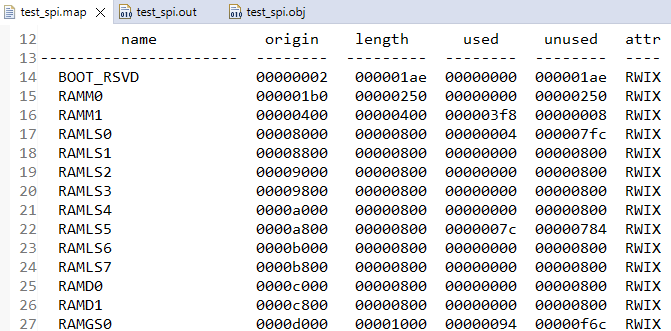
    I was checking the .map file and it mentions the usage of RAM and FLASH along with the application layer code right? I think even the memory allocation tab also gives the same info in picture format. However, .out and .obj files are binary files, I'm not able to make much of those files? Is there something specific to look for in it? I have attached the screenshots for confirmation if I'm looking at the right files for a sample spi project.


    If the same SPI-based project is configured manually (without SysConfig) versus configured using SysConfig, what is the difference in RAM usage?

    Does the presence of a SysConfig file itself introduce any additional RAM overhead at runtime?

    Is it possible to create an empty project without including a SysConfig file, generate the configuration code using the standalone SysConfig tool, and then copy only the generated files:

    • board.c
    • board.h
    • device.c (optional)
    • device.h (optional)
    • If this approach is used, will the resulting RAM usage be the same as when using the integrated SysConfig within the IDE?

    What is the recommended procedure from TI regarding the use of SysConfig?

    Regards,

    Reshma.


  • You should look at module summary section of the  map file.


    Zero difference at runtime. SysConfig is purely a code generation tool. It writes board.c / board.h at build time. Once compiled, the resulting object code is functionally identical to what you’d write by hand. The compiler doesn’t know or care whether the source came from SysConfig or was hand-written. There is no SysConfig “runtime” it doesn’t exist in your final binary at all.

    Does the .syscfg file itself add RAM overhead?
    No. The .syscfg file is consumed entirely by the SysConfig tool during the pre-build step. It produces .c/.h files, then it’s done. Nothing from the .syscfg file ends up in your binary.

    Can you use the standalone SysConfig tool and copy only the generated files?
    Yes you can do it. Generate the files using sysconfig ,  then copy those files from Sysconfig folder in the main directory where other c fiiles are .
    Then you can disable sysconfig from generation , when you will build next time it wont generate code.


    The RAM usage will be identical , the generated board.c, board.h, device.c, device.h are the same files regardless of whether SysConfig ran inside CCS or as a standalone CLI tool. The binary output  should be same.

    We recommends using SysConfig integrated within CCS as the primary workflow, because it auto-regenerates the board files on every build when you modify the .syscfg. The standalone approach works but requires you to manually re-run the tool and re-copy files whenever your configuration changes which is error-prone. For a production project, integrated SysConfig is cleaner. The standalone copy approach is reasonable for fixed, finalized configurations or when working outside CCS.

  • Thanks Lakshya!