This thread has been locked.

If you have a related question, please click the "Ask a related question" button in the top right corner. The newly created question will be automatically linked to this question.

LAUNCHXL-F28P55X: External Supply instead of USB

Part Number: LAUNCHXL-F28P55X
Other Parts Discussed in Thread: LAUNCHXL-F28E12X

Hi Everyone,

I’m planning to power my launchpad (LAUNCHXL-F28P55X) using an external 5V supply through a DC-DC converter that steps down high voltage to 5V (https://www.digikey.com/en/products/detail/dcomponents/AM15W-80005SJZ/28314623).

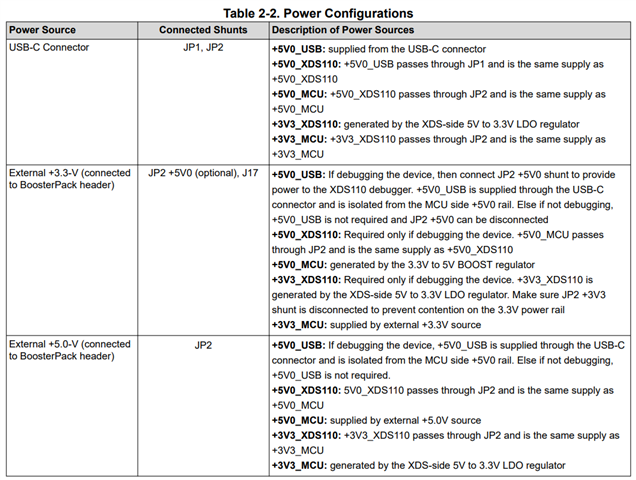
My question is: which pins on the launchpad should I use to supply this external 5V? I attempted to connect the 5V to the JP1 pins based on the user manual, but it did not work.

Is any software configuration or modification required to enable external power input?

Thanks in advance for your help.


Regards,

Amir

  • Hi Amir,

    You can supply 5V through the booster pack headers noted with 5V silkscreen (J3 or J7). Then it will utilize the onboard LDO to generate the 3.3V rail. You should disconnect JP1 and only have JP2 connected in order to isolate your USB from the LaunchPad power since you are not powering through USB. This is more clearly explained in the LAUNCHXL-F28E12X user guide which uses the same power scheme as LAUNCHXL-F28P55X


    Regards,

    Peter