This thread has been locked.

If you have a related question, please click the "Ask a related question" button in the top right corner. The newly created question will be automatically linked to this question.

TMS320F280039C: How to do a static library for CLA?

Part Number: TMS320F280039C

Hi champs,


I am asking this for our customer.

The user has used F28003x CLA codes.

Now, they want to make some of CLA functions/tasks into a static library like we usually do for C28x (like driverlib.lib).

  1. Can they make some of CLA functions/tasks into a static library for CLA?
  2. If so, how does the user do it? Would you please show us explicitly?


  • Hi Wayne,

    Yes, this should be possible. We do a similar thing for the CLA math library, it's pre-compiled for the CLA and included as a .lib file in the CCS projects. 

    I am working on putting together a simple example so I can describe the steps. I will update again in 1-2 days time.

    Best Regards,

    Delaney

  • Hi Delaney,

    YES.

    That will be good.

    Wayne

  • Hi Wayne,

    To update, I'm still working on this but should have a response ready tomorrow.

    Best Regards,

    Delaney

  • Hi Wayne,

    Apologies for the delay. The steps for creating a static library for the CLA are below:

    1. Add new .h and .cla files into your project that will make up the library content, for example my_lib.h and my_lib.cla
    2. Inside the .cla file, have a #include "my_lib.h"
    3. Inside the .h file, add guardrails so that the file is only compiled for the CLA 
      #ifdef __TMS320C28XX_CLA__ // only compile for the CLA
      // my_lib.h file content, usually externs for all the functions in my_lib.cla
      #endif
    4. Verify that this code works with your existing project by calling the functions from CLA tasks
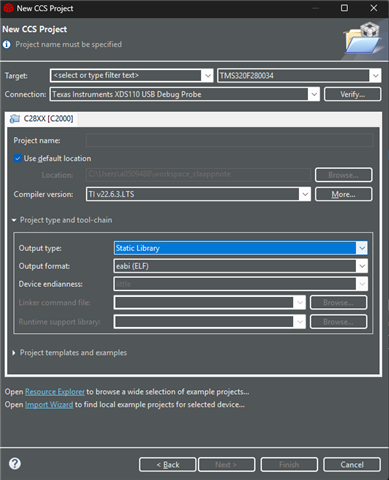
    5. Create a new project in CCS and select the output type as "Static Library"
    6. Copy all .h and .cla files over to this secondary project. Right-click on the main.c file and click "Exclude from Build"
    7. Build the secondary project like normal
    8. Copy over the generated .lib file from the secondary project (usually output to Debug/my_lib.lib for example) into your original project
    9. Right-click on .h and .cla files from the original project and "Exclude from Build"
    10. Rebuild original project with .lib added in
    11. Test out project with static library added

    Let me know if they have any other questions and/or want me to share the example project(s) I made to try this out. They can verify after step 10 that the build is using the lib file by seeing if it is present in the .map output file. 

    Best Regards,

    Delaney

  • Hi Delaney,

    Did you use CCS Eclipse like CCS 12.8.1?

    Are the steps above (especially Step 5) work on CCS Theia like CCS 20.5.1?

    That is, does Step 5 work on CCS 20.5.1?

  • Hi Wayne,

    I used an eclipse version of CCS. It looks like this feature through UI is not supported on CCS Theia. They will have to switch to an eclipse version to build the .lib file, or create the secondary project from the command line, as described here.

    Let me know if there are any other questions. 

    Best Regards,

    Delaney