Because of the Thanksgiving holiday in the U.S., TI E2E™ design support forum responses may be delayed the week of November 23.

This thread has been locked.

If you have a related question, please click the "Ask a related question" button in the top right corner. The newly created question will be automatically linked to this question.

TMS320F280039C: LFU:Run error with the memcpy

Part Number: TMS320F280039C

I found that after defining multiple RAM segments in the program to load structures, abnormal program behavior occurs when switching to the new firmware during LFU upgrade testing. Preliminary troubleshooting revealed that an exception is triggered when executing memcpy(&RamfuncsRunStart, &RamfuncsLoadStart, (size_t)&RamfuncsLoadSize); inside the init_lfu function.

for the init_lfu:

image.png

old project define:

image.png

new project define:

image.png

Several regular ISRs (which are disabled prior to LFU switching) and Flash operation functions execute within the .TI.ramfunc section.

Multiple RAM segments are defined in both the old and new projects for loading structures.
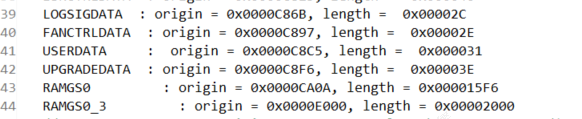
image.png

If these RAM segments are not defined, the program runs normally after LFU switching. However, once these RAM segments are defined, the program malfunctions after LFU switching. What potential issues could cause this phenomenon?

  • Hi Yuan,

    Can you explain what you mean by abnormal behavior/ program malfunctions? Can you share the debug view screenshot if possible?

    The following could be the possible causes

    The user guide suggests the following

    Can you make sure that there are no RAM overlaps with SCI Flash Kernel

    Thanks,

    Ira

  • Hi Yuan,

    Is it possible to share the .map file for both the cases?

    1. When program works correctly after LFU switchover (when RAM sections are not defined)

    2. When program does not work correctly after LFU switchover (when RAM sections are defined)

    Thanks,

    Ira

  • Hi Ira

    The MAP files for both scenarios have been forwarded to you by the FAE.

  • Hi Ira

    I don’t know the specific manifestation of the fault. I only detected an abnormality via output signals after this line of code ran; the subsequent codes failed to execute. It is highly likely that the program got stuck or ran wild at this point.

  • Ira,

    Thank you for supporting. please allow me to clarify the Yuan's issue. The customer's problem is not related to removing RAM segment definitions from the project. In fact, both the working and non-working projects have the same RAM segment definitions. The key difference is that the abnormal behavior disappeared after she removed certain struct variables that were previously stored in those RAM segments.

    To be more specific:

    • RAMGS0_3 is defined and used in both projects (before and after the fix) to run the.TI.ramfunc section.
    • The distinction between the two projects, as observed by comparing the map files, is that the used size of these RAM segments is non-zero in the abnormal project and zero in the normal project.

    BR

  • Hi Bliss,

    Thank you for the clarification. I get the issue now. I will provide my analysis soon.

    Thanks,

    Ira

  • Hi Bliss,

    Sorry for the late reply, thank you for your patience.

    I notice that in the work abnormally folder, in the new project I see this struct/function at location 0x00009000

    However I don't see this in the working correctly project, I only see App_IsrCtrlInit, no App_IsrCtrl.

    This is the function that lives in the address of RAMLS23 which

    1. is zero usage in the work normally project

    2. non zero usage in work abnormally folder

    Can you please check this particular function? 

    It lives in 0x00009c00 in the work normal project but 0x00009000 in the work abnormally project. Can you check why that is? This function is likely causing an issue

    Thanks,

    Ira