F29H859TU-Q1: CPU3 run ADCA in multi-application

Part Number: F29H859TU-Q1
Other Parts Discussed in Thread: SYSCONFIG

Hi all,

In a multi-core application where CPU1 runs MCAL and CPU2 runs the SDK, I moved ADCA, which was originally assigned to CPU1, to CPU3. I encountered the following issues:

  1. Clock error due to a duplicate name: There was a clock naming conflict with the CPUTimer clock. After I renamed it, the error disappeared. Is this modification acceptable and safe?
  2. Initialization location conflict: The tool indicates that all of this initialization code is executed on CPU1. Does this mean I am strictly required to initialize ADCA within CPU1? Can CPU3 directly use ADCA without performing any initialization?
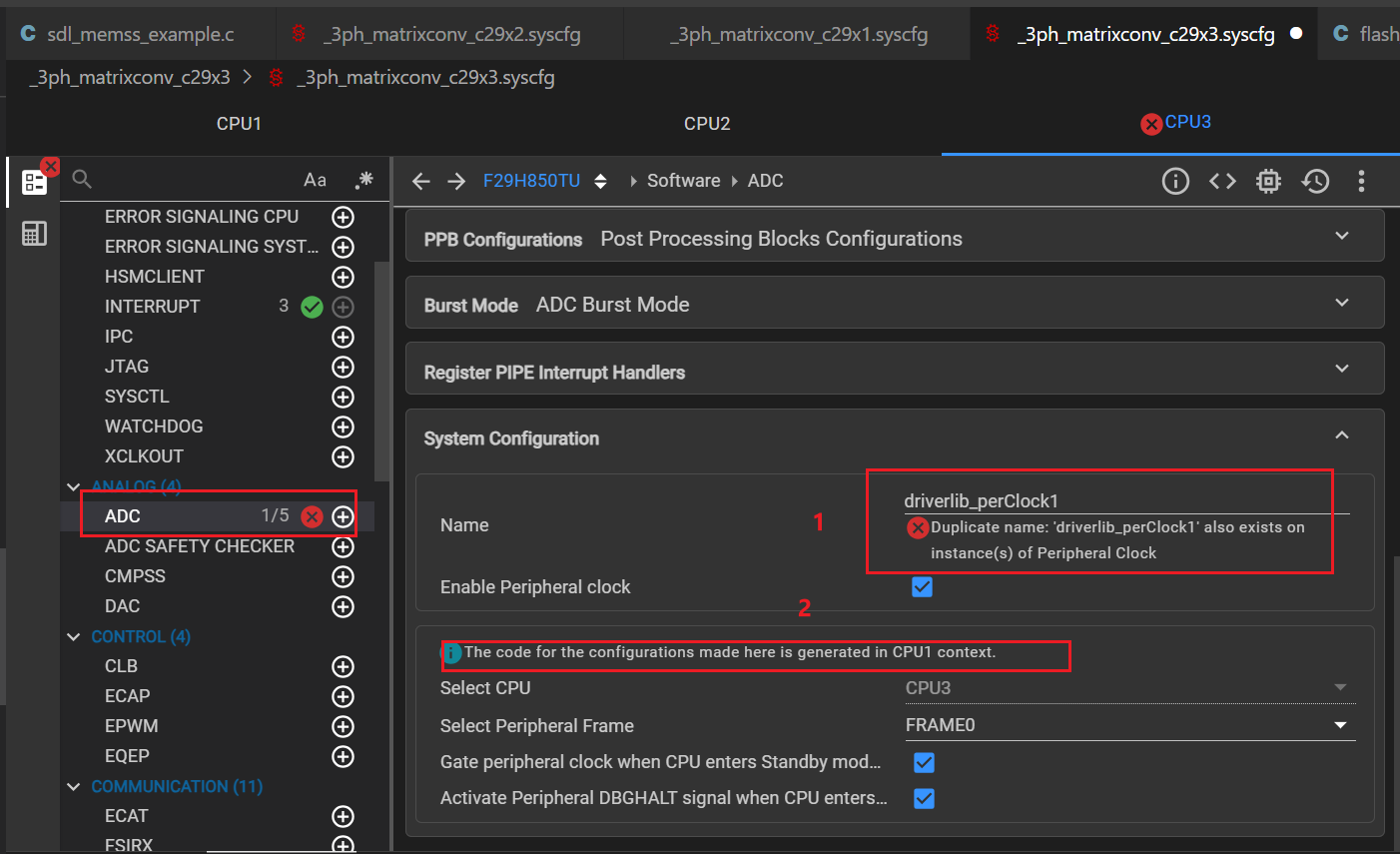
image.png

Regards,

Jenney

  • Hi Jenney,

    For the first item, the peripheral clocks are assigned exclusive CPU ownership during initialization.  If it has already been assigned to CPU1, then only CPU1 can enable the peripheral clock during initialization, and no need to re enable the peripheral clock again for CPU3.  For the second item, the short answer is that CPU1 is the only core that is allowed to initialize ADCA if the ownership has been assigned to it and any CPU (CPU3 included) can be used to read the ADCA result registers as soon as conversion is successfully carried out.

    Regards,

    Joseph


  • Hi Joseph,

    For the first item, do you mean the clock with this name has already been initialized by CPU1, so CPU3 does not need to initialize it again? But I got an error saying there is a duplicate name, and there is also a CPUTimer with the same name on CPU3. I don't quite understand your point. Actually, when configuring on CPU1, there is no such option, and then I move ADCA to CPU3, this option appeared . After I renamed it, the error and this option disappeared. Is it OK if it just disappears?

    For the second item, I want to assign ADCA to CPU3 for initialization as well as start/end of conversion control, and I have not configured ADCA on CPU1. I have currently assigned it to CPU3. But why does the note remind me that all code is executed on CPU1? Do I need to modify anything, or can I just ignore this note?

    Regards,

    Jenney

  • Hi Jenney

    Once CPU1 initializes ADCA, it also initializes is peripheral clock and CPU3 should not initialize it again.  If you want to let CPU3 initialize ADCA, then remove the initialization in CPU1 so there will not be a duplication conflict.  Point is, peripherals can only be initialized by one CPU.  Renaming the clock is not a proper solution.

    On second question, can you specify where that reminder is coming from?  Is it from SysConfig or in the debug window?

    Thanks,

    Joseph