LAUNCHXL-F28P65X: Error during flashing UART code

Part Number: LAUNCHXL-F28P65X

Hello Team,

i am getting below error while flashing the UART code.
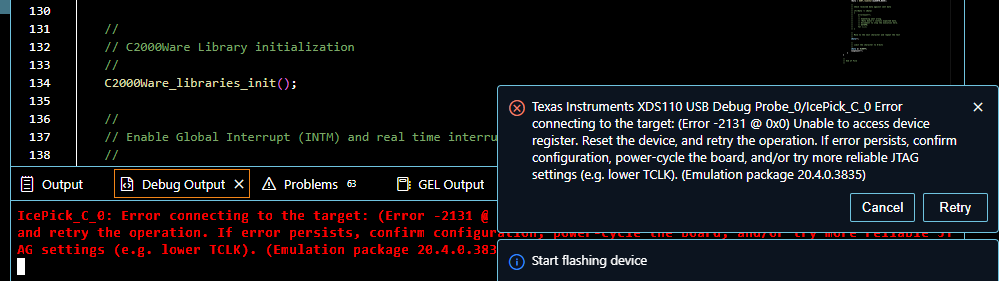
image.png

Please suggest if any changes needs to do in hardware.


Regards!!

Sayali

  • Hello Sayali,

    The error you are encountering (Error -2131) indicates that the XDS110 debug probe on your LAUNCHXL-F28P65X is unable to establish a stable JTAG connection to the device. This is often a communication synchronization issue rather than a permanent hardware failure.

    To resolve this, please try the following troubleshooting steps:

    • Power Cycle and Reset: Disconnect the USB cable from the LaunchPad, wait a few seconds, and reconnect it. Press the "RESET" button on the board before attempting to flash again.
    • Check Debug Probe Configuration: In Code Composer Studio (CCS), ensure your target configuration file (.ccxml) is set to use the "Texas Instruments XDS110 USB Debug Probe."
    • Adjust JTAG Clock (TCLK): Sometimes the JTAG clock frequency is too high for the current environment. In your target configuration file, go to the "Advanced" tab, select the XDS110 probe, and try manually setting the "JTAG TCLK Frequency" to a lower value (e.g., 1 MHz or 500 kHz) to see if the connection stabilizes.
    • Hardware Check: Ensure that no external devices are connected to the JTAG/GPIO pins that could be interfering with the signal integrity. Verify that all jumpers on the LaunchPad are in their default factory positions as shown in the LAUNCHXL-F28P65X User's Guide.

    If the issue persists, could you let me know if you have made any modifications to the default jumper settings on the board, or if this error occurs with other projects (like a simple LED blinky example)? This will help us determine if the issue is specific to your UART code configuration or the board hardware itself.

    1. LAUNCHXL-F28P65X Tool Folder
    2. TMS320F28P65x LaunchPad Development Kit User's Guide
  • Hi Sayali,

    Any update on this query? Stevan is out of office so I am now supporting the query. For LAUNCHXL-F28P65X, only 4-pin JTAG is supported so be sure this is configured in the target configuration file (.ccxml)

    Regards,

    Peter