This thread has been locked.

If you have a related question, please click the "Ask a related question" button in the top right corner. The newly created question will be automatically linked to this question.

TMDSPLCKIT-V3 G3 demo application compiling problem

Other Parts Discussed in Thread: AFE031, CONTROLSUITE, AFE032

I need some help as I am most probably missing something obvious but I am stuck.

I want to be able to compile the code of the demo running on the TMDSPLCKIT-V3.

1. Can someone confirm that "TI_G3_PHY_EXAMPLE -> test_tx_rx project" from the TexasInstrumentsG3DevelopmentPackageV5_2_1_0 is the correct project and code for what is "g3_plc_F2806x_AFE031.out"  the compiled version of the G3 demo?

If not, where can I find the correct project?

2. The instructions in the documentation indicate for this project to do an import of the project (project->import existing CCS eclipse project) in a new workspace and than hit project -> Build Project. This is where it goes wrong. After copying some more files from the package to the workspace and setting the paths for a few variables in the build properties of the project, I got to the point where the code compiles. But at the linking stage I get the error: 

./test_tx_rx_f2806xcfg.cmd undefined symbol "_UserInit" used test_tx_rx line 11 C/C++ Problem

So here I am missing something. Any suggestions please?

I am using CCSv5.2.0.00069 with the free XDS100 license.

  • By the looks of it this one has to do with the DSP/BIOS (or SYS/BIOS as it is called now). Currently I have version 5.41.13.42.

    Is there a way to know what version the G3 example has been build with?

    Would upgrading to the latest version solve my problem?

  • Seems like I was already running the latest v5 version.

    I found out a setting in the DSP/BIOS to solve the problem of the _UserInit (just disabled it) but I still have a number of unresolved symbols:

    Please some tips, i am trying to compile/run this example project for days now. It shouldn't be that hard, does it? What am I missing here?

    rgds,

    Wim

  • As for now I have started all over again. Took the G3 package from the latest controlsuite. There I noticed a ccs setup dir (I missed this one on my previous attempts), so I followed the readme-file. I am using ccs5 so the paths are a bit different but set to the standard c:\ti\ccsv5 install dir.

    Then I imported the project as described in the documentation from the archive phy example. After this I still saw a number of unresolved links. This forced me to unpack the phy example zip and add the PLC_COMMON_ROOT variable pointing to “C:\Texas Instruments\G3DevelopmentPackageV5010\F2806x\SW\TI_G3_PHY_EXAMPLE\TI_G3_PHY_EXAMPLE\dsp_c28x”.

    As this solved a few of them I still have some unresolved links left:


    The reason probably being in projectproperties->build->dependencies:


    I have no idea what variable(s) I have to put to resolve the links. Any suggestion?

  • Yet another step in this HORROR experience:

    After reading many more posts in this forum I see many people having the same issues trying to build and running TI examples but all seem to have different problems with different solutions.

    As I discovered in one of them that you can import an example project in different ways (why?) I started over once again.

    Previously I did project->import existing ccs project. After reading a post I tried file->import->code composer studio->existing CCS eclipse projects (search directory, copy into workspace, NOT importing referenced projects; actually tried both situations but didn't help) and hey, some of the previous issues were suddenly solved (PLC_COMMON_ROOT which couldn't be resolved), unfortunately not all of them :-(

    Duplicate path?

    Referenced project (which I DIDN'T select while importing)?

    If i want to add (try to solve it) I get an empty list.

    If I try to build it this way (project->build project) it stops on an error to this referenced project.

    so only thing left is to remove the dependencies. Build again, then this happens, there are the unresolved symbols again:

    Starting to get a real headacke from it. This should be an example!

    I have worked with CCS before (with the MSP430) so I know a bit of it but what an experience this must be for a newbie!

    What am I missing? Come on guys, anyone suggestions? I need to get this fixed ASAP, I am loosing precious project time! No reaction from plc_support@list.ti.com either.

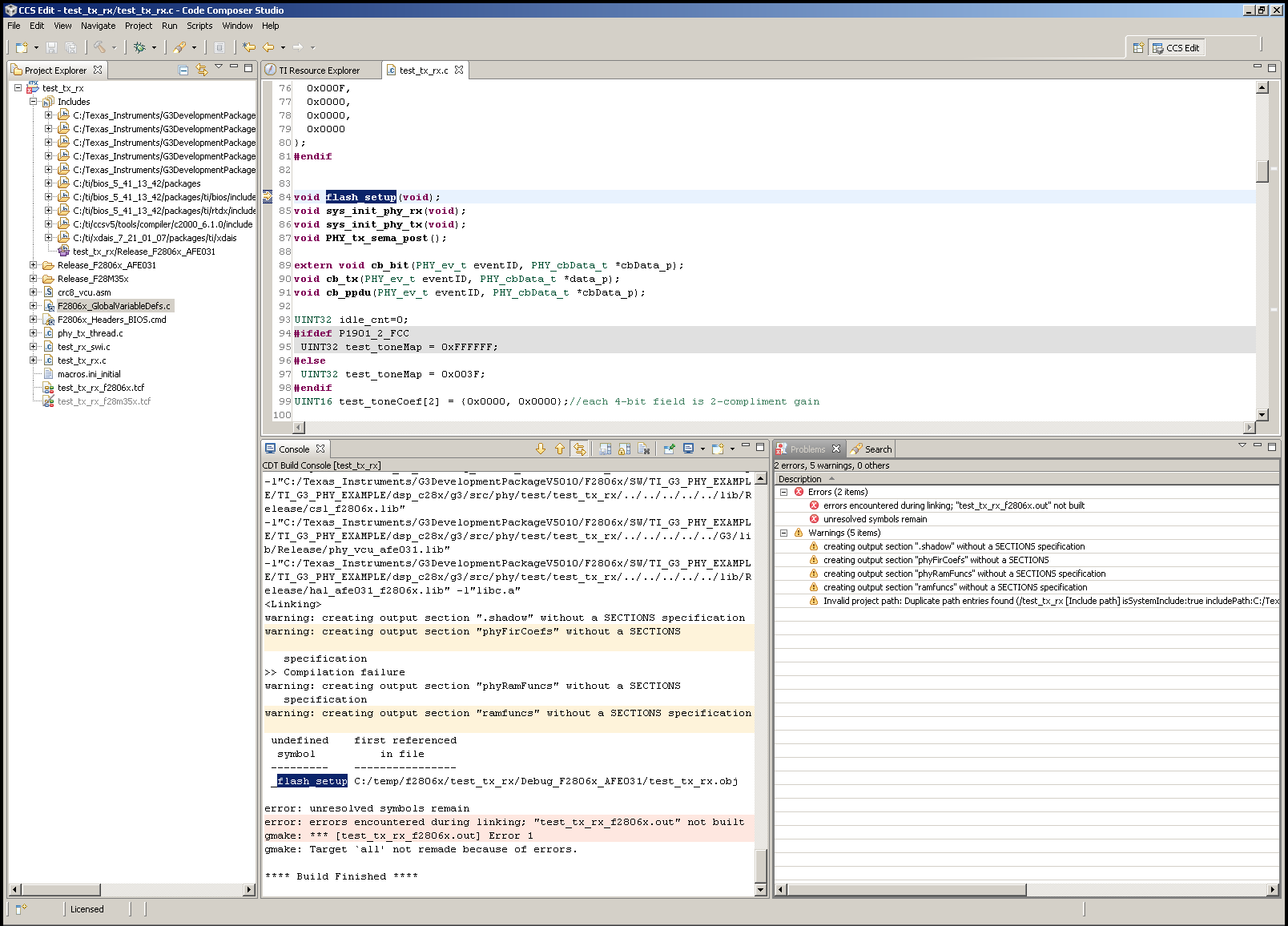
  • After adding F2806x_GlobalVariableDefs.c to the project and an include path to the accompanying header files I am left with one unsolved symbol: _flash_setup :

    Any suggestions where to find it?

  • adding picture seems to have failed, new try:

  • Hi Wim,

    Our PLC project examples can be compiled with CCS 4.2.5. In addition, to compile the project, please use the CGT v6.1.0A11101 included in C:\Texas Instruments\G3DevelopmentPackageV5210\ccs_setup\cgtools. 

    Regards,

    Wonsoo


  • Many Thanks Wonsoo!

    I can now build the project. (#solvedmyheadache)

    To summarize:

    1. Install CCS v4.2.4 {download from wiki (setup_CCS_4.2.4.00033)}

    2. Install CCS v4.2.5 update {download from wiki (CCS4.2.5.00005_update)}

    3. Install CGT v6.1.0A11101 {included in C:\Texas Instruments\G3DevelopmentPackageV5210\ccs_setup\cgtools (from ControlSuite)}

    4. Use File->Import->CCS->Existing CCS/CCE Eclipse Projects

    5. Use Project->Build Project


  • Hi Wonsoo,

    Which of the included code examples with the TMDSPLCKIT_V3 is the correct one to use with the zero configuration GUI? So the code corresponding to g3_plc_F2806x_AFE031.out?

    Thanks

  • Hi Wim,

    There are no code examples to use the zero-configuration GUI. The purpose of the code examples is to let customers to access to our APIs for their own usage. We are providing two examples:

    1. ADP example (including up to ADP layers): You can call APIs directly to add your code lines on top of our ADP layer.

    2. PHY example (includes up to PHY): You might want to have PHY library only and add their own protocol stacks on top of that.   


    To use the zero-configuration GUI, you need to use our complete build in SW/bin directory.

    Regards,

    Wonsoo

  • Wim P, thank you for writing about all your findings on this. I am indeed a beginner with all types of TI equipment and this was very helpful. 

  • Did you have any problemts updating to 4.2.5? I get the errors posted here : http://e2e.ti.com/support/development_tools/code_composer_studio/f/81/p/231158/813482.aspx#813482

    Do you remember if you had any special settings applied? 

  • No, I can't recall having problems with the update. I am running it on WinXP though, maybe there may be a clue?

  • Hi Wonsoo,


    I have compiled and flashed one of the example projects and now I would like to flash again the original version to user Zero Configuration GUI. But to flash the original program, I have to user the Intermediate GUI and this doesn't run anymore because it can not communicate with the PLC Modem.

    I tryed to import the executable file into CCS and run it, but when I click on "connect to target", I can see a window with this message:

    Error connecting to the target:
    (Error -151 @ 0x0)
    One of the FTDI driver functions used during
    the connect returned bad status or an error.
    The cause may one or more of: invalid emulator serial number,
    blank emulator EEPROM, missing FTDI drivers, faulty USB cable.
    Use the xds100serial command-line utility in the 'common/uscif'
    folder to verify the emulator can be located.
    (Emulation package 5.1.232.0)

    How can I do to user again the Zero Configuration GUI Software?

  • Hi,

    try reinstall XDS100 driver. Also, if you have .hex version of original TI firmware, you can use C2Prog Code Skin application for loading flash memory 1512.Flashing_TMDSPLCKIT-V3_1v1.pdf.

    Regards,

    Igor

  • Ok thanks,

    it runs again. I have now a 2nd question.there must be two example projects for Code Composer Studio:

    "PHY Example Project" and "G3 Host Application Example".

    - So I used the "import" function of Code Composer Studio.

    - As search directory, I chose the "G3DevelopmentEvalPackageV6010" and there are no CCS Porjects to import.

    Where can I find this mentionned sample projects?

  • @Micha��l BOUR

    Hello,

    unfortunately, G3DevelopmentEvalPackageV6010 contains Host Application Example only. PHY Example Project there is not . You can download these PLC materials  and you will find you need at G3DevelopmentPackageV5210. If you will have additional questions, then you are welcome to our merry PLC company http://e2e.ti.com/support/microcontrollers/c2000/f/171/t/254032.aspx?pi269061=1  ;-)

    Regards,

    Igor 

  • Hi,

    Could you please email to plc_support@list.ti.com for the request. We will send you DDK package including the PHY example project.

    Regards,

    Wonsoo

  • @Wonsoo Kim

    Hello!

    Could you please comment on the prospects for support and development of this direction for the near future. We can expect that PLC direction does will not die at near 3 years, for example? How about solutions based on AFE032+M35? Can we expect that there will be access to open source code of PLC API libraries?

    Many thanks.

    Regards,

    Igor

  • Ok,

    Now I've got the right examples. But CCS can't build the phy_tx_rx project.


    I've got flollowing error message:

    Build-configuration 'Release_F2806x_AFE031' does not exist in the referenced project 'hal_afe'

    What should I select and configure as a build configuration for the project 'hal_afe'


    thanx

  • @Micha��l BOUR

    Well, I forgot to warn you that there are some problems when you do import of phy_tx_rx project into your CCS workspace. Take please the example g3_1.zip from here:

    plc_arj\TMDSPLCKIT-V3\CCS_EXAMPLES\

    This example is original phy_tx_rx project from G3_5210 development package, but I did a rebuild for compiling would be successful. Before import into CCS workspace read please file "readme".

    Regards,

    Igor

    P.S. This thread is closed. If you will have new questions, then open please new own thread (NEW POST button) or welcome to my thread mentioned above.

  • I have now unzipped the files in g3_1.zip and imported the project.


    But when I build the project, I get following errors:

    Description    Resource    Path    Location    Type
    #1965 cannot open source file "phy_tx.h"    phy_tx_thread.c    /g328069_2    line 25    C/C++ Problem
    #1965 cannot open source file "DSP28x_Project.h"    main.c    /g328069_2    line 29    C/C++ Problem
    #1965 cannot open source file "hal_afe.h"    test_rx_swi.c    /g328069_2    line 38    C/C++ Problem
    #1965 cannot open source file "DSP28x_Project.h"    flash_init.c    /g328069_2    line 21    C/C++ Problem
    #1965 cannot open source file "F2806x_Device.h"    F2806x_GlobalVariableDefs.c    /g328069_2    line 14    C/C++ Problem

  • @Micha��l BOUR

    Micha��l BOUR said:

    I have now unzipped the files in g3_1.zip and imported the project.

    You should not unzip at first step. Did you follow this instruction when import?

    1 Project -> Import Existing CCS/CCE Eclipse Project
    2 Change the radio button selection at the top to "Select archive file"
    3 Browse to and select your archive file
    4 It will list all of the projects found in the archive. The are all selected by default. Select the ones you want and click "Finish"

    Regards,

    Igor

  • Yes,

    I've imported a project, whose name is "g328069_1".

    After some configuration changes, I can now compile, but there is no ".out" file created.

    I get following message:

    "Description    Resource    Path    Location    Type
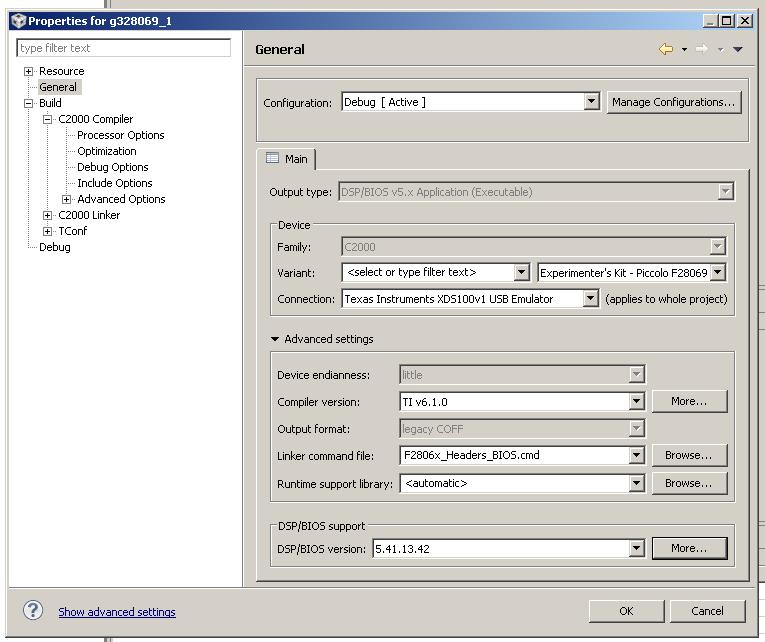
    This project was created using a version of DSP/BIOS tools that is not currently installed: 5.41.13.42. Please install the DSP/BIOS tools of this version, or migrate the project to one of the supported versions.    g328069_1        g328069_1    Problems"


    Is it possible to make migrate the project to the good version? Or is there an other solution?

  • @Micha��l BOUR

    What version of CCS do you use?

  • I use the version 5.5.

    I have installed the version 6.1 in CCS/CGTools foder. This has created a lot of files, but I haven't got the 6.1 version.


    What shoult I do?

    Best regards

  • @Micha��l BOUR

    This is a poblem of current DSP/BIOS version, not Code Generation Tools (compiler). Try to do migrating to your current DSP/BIOS through this menu (change DSB/BIOS version):

    Igor

  • I have got now this warning:

    "Description    Resource    Path    Location    Type
    This project was created using a version of DSP/BIOS tools that is not currently installed: 5.41.13.42. Please install the DSP/BIOS tools of this version, or migrate the project to one of the supported versions.    g328069_1        g328069_1    Problems"

  • @Micha��l BOUR

    This thread is closed.

    Let's go, please, to Code Composer Studio Forum (http://e2e.ti.com/support/development_tools/code_composer_studio/f/81.aspx).

    Open please new thread through "NEW POST" button (with topic, for example, "DSP/BIOS migration problem") and copy text of  your last post in it.

    And then we will continue. Thus I will wait for you at Code Composer Studio Forum... 

    Good luck,

    Igor