This thread has been locked.

If you have a related question, please click the "Ask a related question" button in the top right corner. The newly created question will be automatically linked to this question.

Piccolo Control Card

Other Parts Discussed in Thread: CONTROLSUITE, SN74LVC2G07

Hello, 

I wonder where can I find the schematic of Piccolo Control card. Indeed, I want to design a PCB which uses Piccolo TMS320F28069PZP. I want to include the Isolated JTAG of Piccolo ControlCard in my design to be compatible with code composer. I will appreciate, if someone gives me a link to find the schematic of a design which uses Piccolo TMS320F28069PZP (preferably Piccolo ControlCard).

Thanks in advance,

Masoud.

  • 8054.F2806XISO-CONTROLCARDR0.3-SCH.pdf

    Hi , Masoud,

           See the attachment, also you can get the schematic of piccolo control card by installing controlSUITE software.

    Eric

  • Hi Eric,

    Thanks a lot.

    Best regards,
    Masoud. 

  • Hi,

    The Schematic was very useful, however I have a question about that I will appreciate any guide.

    Attached, is a part of design in page 1, it is not clear why GPIO31 and GPIO34 are buffered and connected to LED?

    Thanks in advance.  

  • Masoud,

            This buff here can enhance the driver ability of GPIO, as you can see the datasheet of SN74LVC2G07, it's output driver can be +- 24mA at 3.3V. Also, this buffer can apply a level swith from 3.3V to 5V, which do not used here.

    Eric

  • Eric,

    Thanks for explanation. Indeed, I knew that SN74LC is a buffer which enhances driver. But my question is why these two GPIO need buffer, I read datasheet but I could not found any specific thing about these GPIOs which necessitates buffer. On the other hand, GPIO 34 is boot mode selection pin. Is there any specific reason to buffer these GPIO?

    Thanks again.

    Masoud.

  • Masoud,

             As you can see in the electrical specifications of datasheet, the typical current consumption of a GPIO is 2mA. and the LED typical current cunsumption is about 5mA, so it need to enhance driver. It is nothing about the boot mode, because in reset the GPIO34 pull up is enable. If you want to remove this buffer, make sure the current consumption is not greater than 2mA.

    Eric

  • Eric,

    Thanks. Would you please correct me if I am wrong, the LEDs are just for showing that the board is powered or similar indications. In other words, there is no need for LED and removing the LEDs does not affect the overall functionality. I can remove LEDs in my design and as a result I can remove buffer without affecting the boot operation.

    Masoud.

  • Masoud,

           You are correct! You can remove it if you don't need it.

  • Thanks a lot Eric,

    One more question. The GPIO 28 and GPIO 29 are used in Isolated JTAG to provide UART (SCI) communication. On the other hand, in datasheet it is mentioned, these two GPIO are used when we want to boot from UART (SCI).

    I wonder can I use the Isolated JTAG for Boot from UART? I mean, I set the boot mode for boot from SCI and then use the Isolated JTAG (USB) for connecting to laptop for booting? 

    I really appreciate your helps.

    Masoud.

  • Masoud,

            The control card have a on-board emulator XDS100, that is the FTD2232, it have SCI function too, that is to say, if your design is the same as this, you can use this SCI, and you should enable the vitrual COM of the XDS100, then it can boot from SCI through the USB.

           The detail to use the XDS100 virtual COM in the control card  is as below:


    • Ensure that there is a physical connection between the FTDI Port B TX and RX pins and your target serial device and then follow these steps:

    1.Click Start, Right click on My Computer, and select Properties

    2.Navigate to the Hardware tab of the System Properties dialog box and select Device Manager

    3.In the list of devices, expand the group titled Universal Serial Bus controllers and look for a device named TI XDS100 Channel B

    4.  Right click on this device and select Properties

    5.On the Advanced tab of this dialog box, ensure that the box labeled "Load VCP" (virtual COM port) is checked. Click OK when you are done.

    6.Unplug and replug the XDS100v2

    7.After the XDS100V2 has been re-connected, look for a group called Ports (COM & LPT) in Device Manager. Expand this group and look for an entry labaled USB Serial Port (COMXXX).

    8.The COM number associated with this port is the one you want to use in Hyperterminal, PuTTy, or your favorite terminal application. 


  • Dear Eric, 

    Thanks a lot for comprehensive guide.

    I am using exactly the same design as Isolaed JTAG USB of the controlcard. In our design we want to use it to be compatible with Code Composer in our prototype boards. But, for the final product we will remove JTAG. But we want to keep boot from UART and the corresponding materials to make sure in future we can boot from UART, and for that  we do not need to change the PCB.

    So, it seems if we have the same design we can have the option of boot from UART, but later on we can remove the JATG and corresponding connections, but we can keep the USB to UART option if we keep FTDI with UART connections (RX and TX), but removed JTAG and corresponding connections.. Am I right?

    Best regards,

    Masoud.

  • Masoud,

            You are right! You can see the FTDI datasheet for more information when you want to remove JTAG connection.

    Eric

  • Eric,

    Thanks a lot for all your comprehensive guides in this regard.

    Best regards,

    Masoud.

  • Hello,

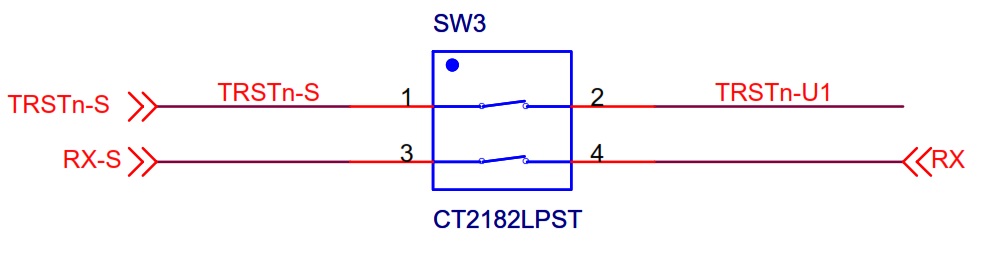
    Attached, please find a part of design of Piccolo Control card. In this design Isolated JTAG/USB is used. However, in the design a switch is used on the path of Reset and RX signal. I will appreciate if someone let me know what is the purpose of using this switch.

    Thanks in advance.

    Best regards,

    Masoud.


  • Masoud,

    The reason that this switch is needed, is that the ISO chips will always output a signal. This means that the MCU would, if SW3 didn't exist, always be sent some signal.

    TRSTn - We must allow the connection to be broken so that the device can boot up and run from FLASH, SCI, or some other peripheral.  If the switch is 'ON'/enabled, then JTAG access via xds100v1 is allowed.

    SCI-RX - If the switch is 'ON', then SCI signals received by the FTDI chip will be sent on to the C2000 MCU.  If the switch is 'OFF', then GPIO-28 is free to be used however the user wishes through the cCARD DIM100 interface with no potential contention. 


    Thank you,
    Brett

  • Hi Brett,

    Thanks again for all your comprehensive answers.

    Best regards,

    Masoud.

  • I also have a question about the isolated JTAG in the Piccolo Control Card, specifically the 28069M InstaSpin version.   The FTDI FT2232H is used on the card, but in other TI isolated JTAG designs, such as the TI HV Motor Control Kit, the FT2232D is used, with the advantage of a smaller package.   Is there a specific feature or compatibility issue that requires the 2232H  with the 28069M, or is the more compact 2232D also usable?

  • the latest controlCARDs (69, 69M, 55) have XDS100v2, a faster version of the XDS100V1, which requires a faster version of the FTDI chip.

    if you don't care about the JTAG download speed you can use the 2232D/XDS100v1


  • BTW - most people just put the JTAG header on their board and use an external emulator. That way they don't have to worry about not populating the FTDI chips and any isolation, etc. It's probably a better strategy.


  • Thanks Chris.   
    In this case, I need the serial link on the second channel of the FTDI chip for manufacturing test/calibration, and it's in a high voltage application so I do need the isolation.  
    The JTAG is for development, and also  used once for production code load.  
    I don't think I care about JTAG speed, do I?  Everything functions correctly, but less quickly on the 2232D?  
    In other words, with the 69M, was there a technical reason that faster JTAG became necessary, or was it just a case of faster is better because we can? 
  • Lindon,

    Lindon Baker said:
    I don't think I care about JTAG speed, do I?  Everything functions correctly, but less quickly on the 2232D?  

    Correct.

    Lindon Baker said:

    In other words, with the 69M, was there a technical reason that faster JTAG became necessary, or was it just a case of faster is better because we can?


    On C2000-only devices (non-Concerto), the 2232D version is often adequate.  However, its slower speed can be noticed in some cases:  watching a large number of variables in a watch window, loading large .out files, trying to do high speed serial, or bootloading code via serial.  If you've used both emulators, and it seems like you may have, then you're probably informed well enough to make a good decision in your project.

    FYI, the 2232D version of emulator is known as xds100v1 and the 2232H version is known as xds100v2.  You can find more details on both at the following:
    http://processors.wiki.ti.com/index.php/XDS100

    As Chris mentions, you could also place a JTAG connector (and use an isolation adapter if you need to debug while the system is running) and create an isolated UART interface.  The choice is up to you.


    Thank you,
    Brett