This thread has been locked.

If you have a related question, please click the "Ask a related question" button in the top right corner. The newly created question will be automatically linked to this question.

XDS100v1 USB Emulator problem

Other Parts Discussed in Thread: TMS320F28035, CONTROLSUITE

Hello !

I am working with the "TMDS1MTRPFCKIT" kit from Texas Instruments which has the "Piccolo TMS320F28035" microcontroller and "Anaheim BLY172S-24V-4000" motor included. I am trying to run the project from the "development_kits" folder in Control Suite, called "LVMultiAxis+PfcKit_v1.4" with Code Composer v5.2.

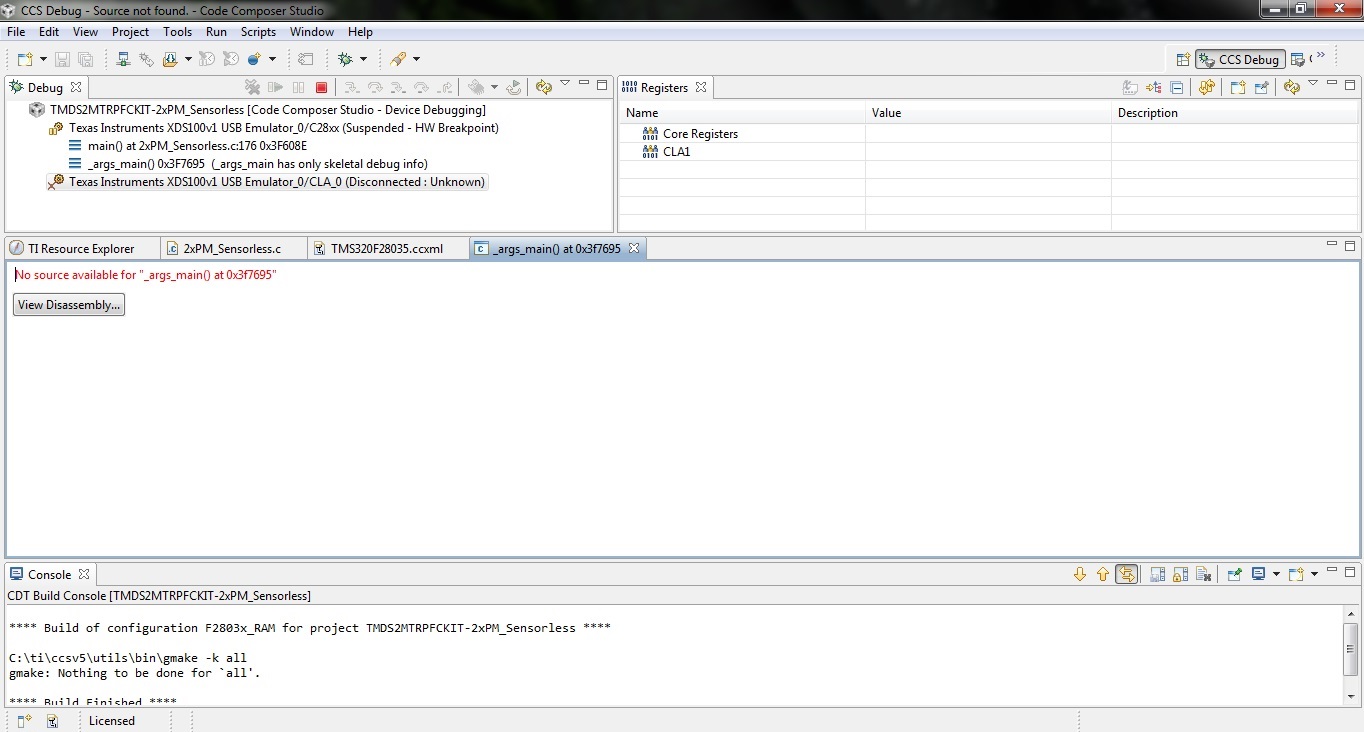
I followed the instructions provided in the "LVMultiAxis+PfcKit_HowToRunGuidev1.1" pdf file but when I reached step 16 ( The debugging of the project) I've received an error in the debug window saying that "Texas Instruments XDS100v1 USB Emulator_0/CLA_0 (Disconnected : Unknown)" . I've attached a snapshot of this error in this post. I believe that there is a problem with this emulator and that's why the program can't see the controller.

Do you have a solution please ?

Thank you.

  • Hi Dragos,

    Did you try restarting the pc && re-installing ccs && re-loading the drivers. Once check with these.

    Regards,

    Gautam

  • Hi,

    Thank you for your reply. I restarted the PC but the same thing happened. I've tried today to run it again with Code Composer v4.2.4 because the tutorial was made for this version but it still didn't work. It now shows this error:

    Description Resource Path Location Type
    gmake: *** No rule to make target `C:/ti/ccsv5/eclipse/CONTROLSUITE_LVMOTOR_ROOT/device_support/f2803x/v121/DSP2803x_common/source/DSP2803x_CodeStartBranch.asm', needed by `DSP2803x_CodeStartBranch.obj'. CONTROLSUITE_LVMOTOR_ROOT Unknown C/C++ Problem

    Also after debugging this error message appeared: Could not open the editor: Must specify a URI scheme:CONTROLSUITE_LVMOTOR_ROOT/libs/math/IQmath/v15c/lib/IQmath.lib

    I will try reinstalling CCV 5 but with this I will only go to the point I started.

  • Hi Dragos,

    After installing CCS v5, create the respective target configuration and go through the same doc "LVMultiAxis+PfcKit_HowToRunGuidev1.1" for configurations.


    Regards,

    Gautam

  • Dragos,

    The F28035 MCU has two computing engines which CCS can connect to: a C28xx core and a CLA core.  When you click on the 'bug' button, the IDE connects only to the C28x core and then loads code to this C28x core.  The CLA is left as-is.  This is why the CLA is shown as disconnected.  Note that this project does not have any code written for the CLA and doesn't use it.

    From where you're at currently, just click on the C28x core in the Debug subwindow and continue the procedure.

    (in your picture the red lines of text that talk about "no source available..." occurs because _args_main() is located inside a library and therefore the IDE can't view the source directly)

    (if you're interested in learning more about the CLA look here: http://processors.wiki.ti.com/index.php/Control_Law_Accelerator_%28C2000_CLA%29_FAQ)


    Thank you,
    Brett

  • Hi Brett and thanks for your reply.

    So are you saying that the program should work even with these errors ? What about this error:

    gmake: *** No rule to make target `C:/ti/ccsv5/eclipse/CONTROLSUITE_LVMOTOR_ROOT/device_support/f2803x/v121/DSP2803x_common/source/DSP2803x_CodeStartBranch.asm', needed by `DSP2803x_CodeStartBranch.obj'. CONTROLSUITE_LVMOTOR_ROOT Unknown C/C++ Problem

    Thank you.

  • Dragos,

    Sorry, I only read your first post.  Therefore my answer may not have been comprehensive enough.

    I believe the following happened:
    -You imported the controlSUITE project (built around CCS4) into CCS5.1.  This changes the project and after you move to CCS5 you cannot move the project back to CCS4.
    -You ran into an error in Step 16 that you could have ignored.
    -You were confused and changed to CCS4
    -Errors occurred when building the project.  This was because you converted the project to CCS5.

    If the above is correct, you have two options:
    1) Retry with CCS5.  The things you saw relating to Step 16 can be ignored.
    2) Redownload controlSUITE (or at least a portion of controlSUITE) and import this project directly into CCS4 if you wish to use CCS4.

    (note that because you tried to open a CCS5 project in CCS4, you may have to redownload this project from controlSUITE either way)

    Hopefully this makes sense.


    Thank you,
    Brett