This thread has been locked.

If you have a related question, please click the "Ask a related question" button in the top right corner. The newly created question will be automatically linked to this question.

debug error in TMS320F28335

Other Parts Discussed in Thread: TMS320F28335, UNIFLASH


Hi 

I am using TMS320F28335 delfino controller while debugging the below warning and error are getting

so how to eliminate these error.

C28xx: GEL Output:

ADC Calibration not complete, check if device is unlocked and recalibrate.C28xx: Failed Softwa

re Reset: (Error -1137 @ 0x0) Device is held in reset. Take the device out of reset, and retry the operation. (Emulation package 5.0.520.0)

C28xx: Trouble Reading PC Register: (Error -1137 @ 0x0) Device is held in reset. Take the device out of reset, and retry the operation. (Emulation package 5.0.520.0)

C28xx: Trouble Reading Register ST1: (Error -1137 @ 0x6) Device is held in reset. Take the device out of reset, and retry the operation. (Emulation package 5.0.520.0)


C28xx: GEL: Error while executing OnReset(1): target access failed.


Regards

Patil


  • Patil,

    You left out a lot of information:

    1) Is this your own board, or a TI development board?

    2) What emulator are you using?

    3) Have you ever been able to connect to this board?

    4) Have you tried a different board?

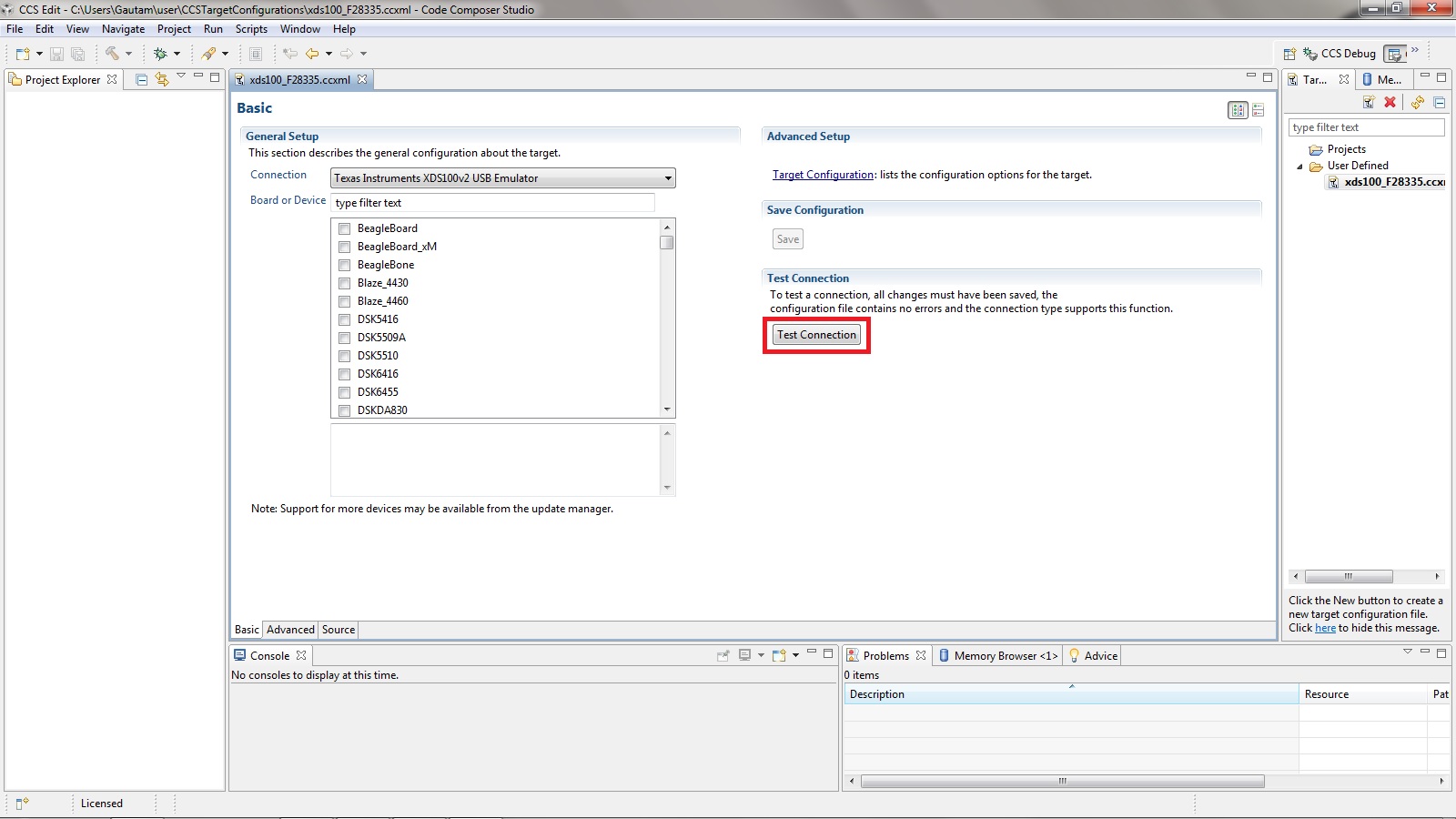
    If you are using CCSv5, try running the "Test Connection" on the target configuration properties screen.  That may tell us what is going on.  It seems to me that you have a JTAG signal problem.

    Regards,

    David

  • Hi David,

     I am using our own board ,&  for debugging using JTAG emulator ,

    and also I have tried in development board this error I have not seen .

    how can I test the JTAG signal problem ?


    Regards

    Patil

  • Hi,

    You can  check the JTAG signal problem using JTAG Integration test as David has mentioned by:

    Run the "Test Connection" on the target configuration properties screen

    Paste the results.

    Regards,

    Gautam

  • Hi ,

    I am unable to find the "test connection" option on target configuration properties screen

    is it available in CCSv5.1.0


    Regards

    Patil

  • Hi,

    Open CCS -> Connect the JTAG emulator to PC and your custom board. Click on your target configuration file as follows:

    Regards,

    Gautam

  • Hi,


    7242.test_connection.docx

    Plz find the attached file


    Regards

    Patil

  • Hi,

    when I click on the test connection I got following information :


    [Start]

    Execute the command:

    %ccs_base%/common/uscif/dbgjtag.exe -f %boarddatafile% -rv -o -F inform,logfile=yes -S pathlength -S integrity

    [Result]

    -----[Print the reset-command software log-file]-----------------------------

    This utility has selected a 100- or 510-class product. This utility will load the adapter 'jioserdesusb.dll'. The library build date was 'Oct 27 2011'. The library build time was '17:12:35'. The library package version is '5.0.520.0'. The library component version is '35.34.38.0'. The controller does not use a programmable FPGA. The controller has a version number of '4' (0x00000004). The controller has an insertion length of '0' (0x00000000). This utility will now attempt to reset the controller. This utility has successfully reset the controller.

    -----[Print the reset-command hardware log-file]-----------------------------

    The scan-path will be reset by toggling the JTAG TRST signal. The controller is the FTDI FT2232 with USB interface. The link from controller to target is direct (without cable). The software is configured for FTDI FT2232 features. The controller cannot monitor the value on the EMU[0] pin. The controller cannot monitor the value on the EMU[1] pin. The controller cannot control the timing on output pins. The controller cannot control the timing on input pins. The scan-path link-delay has been set to exactly '0' (0x0000).

    -----[The log-file for the JTAG TCLK output generated from the PLL]----------

    There is no hardware for programming the JTAG TCLK frequency.

    -----[Measure the source and frequency of the final JTAG TCLKR input]--------

    There is no hardware for measuring the JTAG TCLK frequency.

    -----[Perform the standard path-length test on the JTAG IR and DR]-----------

    This path-length test uses blocks of 512 32-bit words.

    The test for the JTAG IR instruction path-length succeeded. The JTAG IR instruction path-length is 38 bits.

    The test for the JTAG DR bypass path-length succeeded. The JTAG DR bypass path-length is 1 bits.

    -----[Perform the Integrity scan-test on the JTAG IR]------------------------

    This test will use blocks of 512 32-bit words. This test will be applied just once.

    Do a test using 0xFFFFFFFF. Scan tests: 1, skipped: 0, failed: 0 Do a test using 0x00000000. Scan tests: 2, skipped: 0, failed: 0 Do a test using 0xFE03E0E2. Scan tests: 3, skipped: 0, failed: 0 Do a test using 0x01FC1F1D. Scan tests: 4, skipped: 0, failed: 0 Do a test using 0x5533CCAA. Scan tests: 5, skipped: 0, failed: 0 Do a test using 0xAACC3355. Scan tests: 6, skipped: 0, failed: 0 All of the values were scanned correctly.

    The JTAG IR Integrity scan-test has succeeded.

    -----[Perform the Integrity scan-test on the JTAG DR]------------------------

    This test will use blocks of 512 32-bit words. This test will be applied just once.

    Do a test using 0xFFFFFFFF. Scan tests: 1, skipped: 0, failed: 0 Do a test using 0x00000000. Scan tests: 2, skipped: 0, failed: 0 Do a test using 0xFE03E0E2. Scan tests: 3, skipped: 0, failed: 0 Do a test using 0x01FC1F1D. Scan tests: 4, skipped: 0, failed: 0 Do a test using 0x5533CCAA. Scan tests: 5, skipped: 0, failed: 0 Do a test using 0xAACC3355. Scan tests: 6, skipped: 0, failed: 0 All of the values were scanned correctly.

    The JTAG DR Integrity scan-test has succeeded.

    [End]

  • Ok, now try programming the same custom board using CCS Uniflash.

    Regards,

    Gautam

  • Hi,


    I don't have uniflash software ,is there any alternative solution ?


    Regards

    Patil


  • Patil,

    Uniflash is available here: http://www.ti.com/tool/uniflash.  You could also have clicked any of the words "Uniflash" in this thread.  This is a keyword recognized by the TI system, and it converts them to Hyperlinks automatically (that's why they are underlined and blue in color in the posts).

    Personally, I don't think Uniflash will have any different results than CCS.  The problem in my opinion is not the software.  There is something wrong on your board, either signal connections (most likely) or manufacturing.

    Regards,

    David