This thread has been locked.

If you have a related question, please click the "Ask a related question" button in the top right corner. The newly created question will be automatically linked to this question.

[Repost#2][F28M35x] "adc_soc_c28" example code problem

Other Parts Discussed in Thread: CONTROLSUITE, UNIFLASH

I experience same problem that below post by "Mitch Hanks"


http://e2e.ti.com/support/microcontrollers/c2000/f/171/t/286817.aspx

-------------------------------------------------------------------------------------------------------------------------------------------------------

Posted by Mitch Hanks on Nov 11 2013 12:29 PM

If I reprogram the C28's flash memory with the Flash version of adc_soc_c28 and run out of flash, the jump to boot code does not happen. Also, when I go back and load the Ram version of adc_soc_c28 and run it, no jump. When I load my code again and run it, the problem starts happening again. Something is apparently getting programmed in non-volatile memory that creates this situation and then continues to affect whatever code is running (at least it affects my code, and the controlSuite adc_soc_c28 code) until it is overwritten.

I am apparently using 'experimental' parts. Not sure why that is what I am getting when I purchase an F28M35 ControlCard but that is what I got both times.

----------------------------------------------------------------------------------------------------------------------------------------------------

Posted by Mitch Hanks on Nov 11 2013 18:12 PM

The adc_soc_c28 example code is v201.

I don't have a consistent cause and effect relationship tracked down, but did see the following:

When I am seeing the problem regularly (a few seconds into runtime), I can put a while(1) statement a few lines past the start point of my code. When it is after an InitAdc1() call, I see the jump to boot rom. When I put the statement before that call, I don't see the problem. That is why I chose to run the controlSuite example code adc_soc_c28 and verified that I would see the problem with that code running. This is all with code running out of RAM. When I load adc_soc_c28 into flash and run it, the problem goes away (no jump to boot rom). When I switch back to RAM with adc_soc_c28, I still don't see the problem (as if writing to Flash memory got rid of whatever my code did). When I run my code again (out of RAM), it soon starts exhibiting the problem again.

Thanks for your help,

  • Hi,

    Did you check your linker file? Also check this doc out: (just for reference)

    7484.Running from Internal Flash.pdf

    Regards,

    Gautam

  • Thank you for reply.

    I read the "7484.Running-from-Internal-Flash.pdf"

    There state

    [Non-DSP/BIOS Projects] or [DSP/BIOS Projects]

    [FLASH] or [RAM]

    But, my code is just use F28M35x_examples/adc and I make some modify.

    Test condition is following

    C:\ti\controlSUITE\device_support\f28m35x\v201\F28M35x_examples_Control\adc_soc

    in RAM : Running

    in FLASH : NOT running. (maybe infinitely reboot)

    if i remove InitAdc1() that is run, but it is not working properly.

    http://e2e.ti.com/support/microcontrollers/c2000/f/171/t/286817.aspx <== here discuss this problem detail

    Is this F28M35x MCU problem? (ADC Subsytem and Control Subsytem)

  • if i remove InitAdc1() that is run, but it is not working properly.

    This seems to be very strange. According to me the cmd file has to be configured properly for the flash execution.

    Why don't you try the flash based cmd file available here?
    C:\ti\controlSUITE\device_support\f28m35x\v201\F28M35x_common\cmd

    Regards,

    Gautam

  • Of course I use based cmd file and I tested.

    -----------------------------------------------------------------------------------------------------

    C:\ti\controlSUITE\device_support\f28m35x\v201\F28M35x_common\cmd

    -----------------------------------------------------------------------------------------------------

    in RAM : Running (F28M35x_generic_C28_RAM.cmd, F28M35x_generic_wshared_C28_RAM.cmd)

    in FLASH : NOT running (F28M35x_generic_C28_FLASH.cmd, F28M35x_generic_wshared_C28_FLASH.cmd)

    -----------------------------------------------------------------------------------------------------

    M3 side code is "setup_m3"  and i open c28 execution function "IPCMtoCBootControlSystem(CBROM_MTOC_BOOTMODE_BOOT_FROM_FLASH)"

    -----------------------------------------------------------------------------------------------------

    It might be that is error [ADC Subsystem Colck Setting] from [Control Subsystem] 

    So, I can't go further step.

    Tank you :)

  • Can you give me the complete part number on the device? F28M35xxxxx?

    Regards,

    Gautam

  • I use "H52C1 Concerto Experimenter Kit"

    http://www.ti.com/tool/tmdsdockh52c1

    My "Concerto Kit" printed symbol on MCU following

    ----------------------------------------------------------------------------------

    X                            980

    F28M35H52C1RFPT

    YF-16A8HEW

                          G4

    -----------------------------------------------------------------------------------------

    Tank you.

  • Hi,

    Check with this cmd file:

    4705.F28M35H52C1_c28.zip

    Regards,

    Gautam

  • Hi  :)

    Thank you for your continuously interest.

    ------------------------------------------------------------------------------------------------

    I have test your "F28M35H52C1_c28.cmd"

    The test result is same before. The code is NOT run in FLASH.

    ------------------------------------------------------------------------------------------------

    I attach my code that make zip file

    ------------------------------------------------------------------------------------------------

    0636.rom_adc_c28.zip

  • Hi,

    Ok, now the best way of testing your flash is; check with the project found here:

    C:\ti\controlSUITE\device_support\f28m35x\v201\F28M35x_examples_Dual\flash_exe\c28

    Check whether the ePWM is working fine from flash. Do update me.

    Regards,

    Gautam

  • Hi.

    I have test following code.

    C:\ti\controlSUITE\device_support\f28m35x\v201\F28M35x_examples_Dual\flash_exe\c28

    in RAM : Running

    in FLASH : NOT running.

    -----------------------------------------------------------------------------------------------------------------------------------------

    There look like similar problem. What's happening?

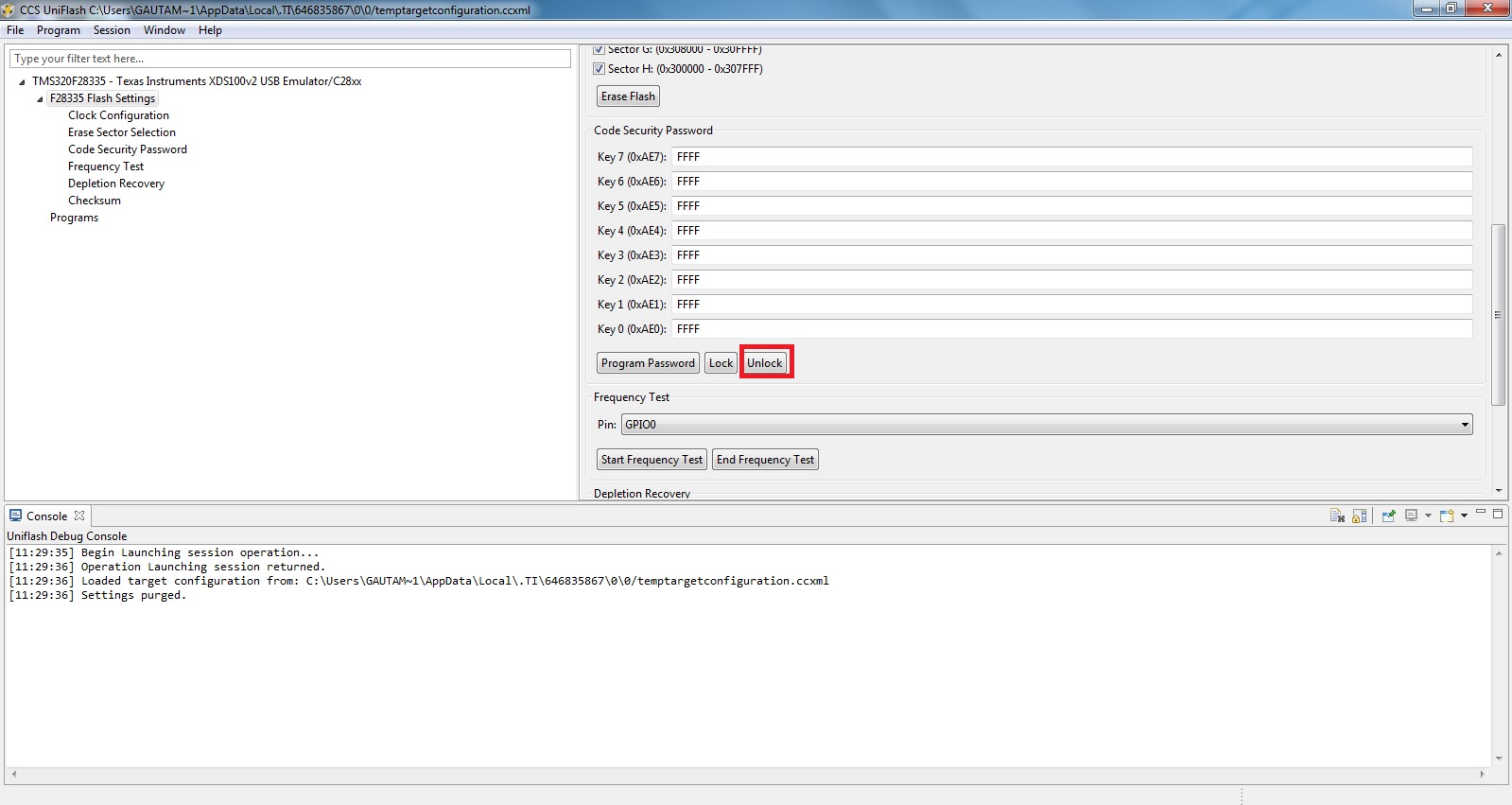
  • There seems to be some issue accessing the flash. Can you try unlocking the same using CCS Uniflash tool?

    Regards,

    Gautam

  • Hi

    I try to download by using Uniflash tool.

    The test result is same before. The code is NOT run in FLASH.

    -----------------------------------------------------------------------------------------------------------------------------

    I try to another test that I add simple blinkly code at [example adc_soc_c28].

    I want to know that the code is run or not.

    The test result is same before. The code is NOT run in FLASH after power off.

    if i remove InitAdc1() that is run, that is blinking.

    //###########################################################################
    // FILE:   adc_soc_c28.c
    // TITLE:  ADC1 Start-Of-Conversion (SOC) Example Program.
    //
    //! \addtogroup control_example_list
    //! <h1> ADC1 Start of Conversion (adc_soc)</h1>
    //!
    //! This ADC example uses ePWM1 to generate a periodic
    //! ADC SOC - ADCINT1. Two channels are converted,
    //! ADC1A0 and ADC1A2.
    //!
    //! \b Watch \b Variables \n
    //! - Voltage1[10]    - Last 10 ADCRESULT0 values
    //! - Voltage2[10]    - Last 10 ADCRESULT1 values
    //! - ConversionCount - Current result number 0-9
    //! - LoopCount       - Idle loop counter
    //
    //###########################################################################
    // $TI Release: F28M35x Support Library v201 $
    // $Release Date: Fri Jun  7 10:51:13 CDT 2013 $
    //###########################################################################
    
    #include "DSP28x_Project.h"       // Device Headerfile and Examples Include File
    #include <string.h>
    
    #define  DUTY_CYCLE_A   500
    #define  DUTY_CYCLE_B   500
    #define  PERIOD         1000
    
    // Prototype statements for functions found within this file.
    __interrupt void adc1_isr(void);
    void Adc_Config(void);
    
    // Global variables used in this example:
    Uint16 LoopCount;
    Uint16 ConversionCount;
    Uint16 Voltage1[10];
    Uint16 Voltage2[10];
    
    main()
    {
        unsigned short analoginit;
    
    // Step 1. Initialize System Control for Control and Analog Subsytems
    // Enable Peripheral Clocks
    // This example function is found in the F28M35x_SysCtrl.c file.
        InitSysCtrl();
        
    // If project is linked into flash, copy critical code sections to RAM.    
    #ifdef _FLASH
       memcpy(&RamfuncsRunStart, &RamfuncsLoadStart, (size_t)&RamfuncsLoadSize);
    #endif    
    
    // Step 2. Initialize GPIO:
    // This example function is found in the F28M35x_Gpio.c file and
    // illustrates how to set the GPIO to it's default state.
    // InitGpio();  // Skipped for this example
        EALLOW;
        GpioG1CtrlRegs.GPADIR.bit.GPIO0      = 1;       //Set as output
        GpioG1CtrlRegs.GPADIR.bit.GPIO8      = 1;       //Set as output
        GpioG1CtrlRegs.GPAMUX1.bit.GPIO0       = 1;     //Set mux to EPWM1A
        GpioG1CtrlRegs.GPAMUX1.bit.GPIO8       = 3;     //Set mux to ADCSOCAn
    
        //##############################################################
    	GpioG1CtrlRegs.GPCDIR.bit.GPIO70 = 1; //set PC6_GPIO70 as output
    	//##############################################################
    
        EDIS;
    
    // Step 3. Clear all interrupts and initialize PIE vector table:
    // Disable CPU interrupts
        DINT;
    
    // Initialize the PIE control registers to their default state.
    // The default state is all PIE interrupts disabled and flags
    // are cleared.
    // This function is found in the F28M35x_PieCtrl.c file.
        InitPieCtrl();
    
    // Disable CPU interrupts and clear all CPU interrupt flags:
        IER = 0x0000;
        IFR = 0x0000;
    
    // Initialize the PIE vector table with pointers to the shell Interrupt
    // Service Routines (ISR).
    // This will populate the entire table, even if the interrupt
    // is not used in this example.  This is useful for debug purposes.
    // The shell ISR routines are found in F28M35x_DefaultIsr.c.
    // This function is found in F28M35x_PieVect.c.
        InitPieVectTable();
    
    // Interrupts that are used in this example are re-mapped to
    // ISR functions found within this file.
        EALLOW; // This is needed to write to EALLOW protected register
        PieVectTable.ADCINT1 = &adc1_isr;
        EDIS;   // This is needed to disable write to EALLOW protected registers
    
    // Step 4. Initialize all the Device Peripherals:
    // This function is found in F28M35x_InitPeripherals.c
    // InitPeripherals(); // Not required for this example
        InitAdc1(); // For this example, init the ADC
    
    // Step 5. User specific code, enable interrupts:
    
    // Enable ADCINT1 in PIE
        PieCtrlRegs.PIEIER1.bit.INTx1 = 1;  // Enable INT 1.1 in the PIE
        IER |= M_INT1;                      // Enable CPU Interrupt 1
        EINT;                               // Enable Global interrupt INTM
        ERTM;                               // Enable Global realtime interrupt DBGM
    
        LoopCount = 0;
        ConversionCount = 0;
    
    // Configure ADC
        EALLOW;
        Adc1Regs.ADCCTL2.bit.ADCNONOVERLAP = 1;     // Enable non-overlap mode i.e.
                                                    // conversion and future
                                                    // sampling
                                                    // events dont overlap
        Adc1Regs.ADCCTL1.bit.INTPULSEPOS   = 1;     // ADCINT1 trips after
                                                    // AdcResults latch
        Adc1Regs.INTSEL1N2.bit.INT1E       = 1;     // Enabled ADCINT1
        Adc1Regs.INTSEL1N2.bit.INT1CONT    = 0;     // Disable ADCINT1 Continuous
                                                    // mode
        Adc1Regs.INTSEL1N2.bit.INT1SEL     = 0;     // setup EOC0 to trigger ADCINT1
                                                    // to fire
        Adc1Regs.ADCSOC0CTL.bit.CHSEL      = 0;     // set SOC0 channel select to
                                                    // ADC1A0
        Adc1Regs.ADCSOC1CTL.bit.CHSEL      = 2;     // set SOC1 channel select to
                                                    // ADC1A2
        AnalogSysctrlRegs.TRIG1SEL.all     = 5;     // Assigning EPWM1SOCA to
                                                    // ADC TRIGGER 1 of the ADC module
        Adc1Regs.ADCSOC0CTL.bit.TRIGSEL    = 5;     // Set SOC0 start trigger to
                                                    // ADC Trigger 1(EPWM1 SOCA) of the
                                                    // adc
        Adc1Regs.ADCSOC1CTL.bit.TRIGSEL    = 5;     // set SOC1 start trigger to
                                                    // ADC Trigger 1(EPWM1 SOCA) of the
                                                    // adc
        Adc1Regs.ADCSOC0CTL.bit.ACQPS      = 6;     // set SOC0 S/H Window to 7 ADC
                                                    // Clock Cycles, (6 ACQPS plus
                                                    // 1)
        Adc1Regs.ADCSOC1CTL.bit.ACQPS      = 6;     // set SOC1 S/H Window to 7 ADC
                                                    // Clock Cycles, (6 ACQPS plus
                                                    // 1)
        EDIS;
    
    //// Assumes ePWM1 clock is already enabled in InitSysCtrl();
    
        //Set event triggers (SOCA) for ADC SOC1
        EPwm1Regs.ETSEL.bit.SOCAEN         = 1;      // Enable SOC on A group
        EPwm1Regs.ETSEL.bit.SOCASEL = ET_CTRU_CMPA;  // Select SOC from CMPA on
                                                     // upcount
        EPwm1Regs.ETPS.bit.SOCAPRD         = 3;      // Generate pulse on every 3rd
                                                     // event
    
        // Time-base registers
        EPwm1Regs.TBPRD = PERIOD;                   // Set timer period, PWM
                                                    // frequency = 1 / period
        EPwm1Regs.TBPHS.all = 0;                    // Time-Base Phase Register
        EPwm1Regs.TBCTR = 0;                        // Time-Base Counter Register
        EPwm1Regs.TBCTL.bit.PRDLD = TB_IMMEDIATE;   // Set Immediate load
        EPwm1Regs.TBCTL.bit.CTRMODE = TB_COUNT_UP;  // Count-up mode: used for
                                                    // asymmetric PWM
        EPwm1Regs.TBCTL.bit.PHSEN = TB_DISABLE;     // Disable phase loading
        EPwm1Regs.TBCTL.bit.SYNCOSEL = TB_SYNC_DISABLE;
        EPwm1Regs.TBCTL.bit.HSPCLKDIV = TB_DIV1;
        EPwm1Regs.TBCTL.bit.CLKDIV = TB_DIV1;
    
        // Setup shadow register load on ZERO
    
        EPwm1Regs.CMPCTL.bit.SHDWAMODE = CC_SHADOW;
        EPwm1Regs.CMPCTL.bit.SHDWBMODE = CC_SHADOW;
        EPwm1Regs.CMPCTL.bit.LOADAMODE = CC_CTR_ZERO; // load on CTR=Zero
        EPwm1Regs.CMPCTL.bit.LOADBMODE = CC_CTR_ZERO; // load on CTR=Zero
    
        // Set Compare values
    
        EPwm1Regs.CMPA.half.CMPA = DUTY_CYCLE_A;     // Set duty 50% initially
        EPwm1Regs.CMPB = DUTY_CYCLE_B;               // Set duty 50% initially
    
        // Set actions
    
        EPwm1Regs.AQCTLA.bit.ZRO = AQ_SET;           // Set PWM2A on Zero
        EPwm1Regs.AQCTLA.bit.CAU = AQ_CLEAR;         // Clear PWM2A on event A, up
                                                     // count
    
        EPwm1Regs.AQCTLB.bit.ZRO = AQ_CLEAR;         // Set PWM2B on Zero
        EPwm1Regs.AQCTLB.bit.CBU = AQ_SET;           // Clear PWM2B on event B, up
                                                     // count
    
    // Wait for ADC interrupt
        for(;;)
        {
            LoopCount++;
            if(LoopCount>0x7FFF)
    		{
    			GpioG1DataRegs.GPCSET.bit.GPIO70=1;
    		}
    		else
    		{
    			GpioG1DataRegs.GPCCLEAR.bit.GPIO70=1;
    		}
        }
    
    }
    
    __interrupt void  adc1_isr(void)
    {
        Voltage1[ConversionCount] = Adc1Result.ADCRESULT0;
        Voltage2[ConversionCount] = Adc1Result.ADCRESULT1;
    
        // If 20 conversions have been logged, start over
        if(ConversionCount == 9)
        {
            ConversionCount = 0;
        }
        else ConversionCount++;
    
        Adc1Regs.ADCINTFLGCLR.bit.ADCINT1 = 1;  //Clear ADCINT1 flag reinitialize
                                                // for next SOC
        PieCtrlRegs.PIEACK.all = PIEACK_GROUP1; // Acknowledge interrupt to PIE
    
        return;
    }


    -----------------------------------------------------------------------------------------------------------------------------

    1. InitAdc1()  function problem.

    2. FLASH download problem.

    3. ePWM problem.

    4. or mixed problem. 


  • Hi,

    Using this tool did you first unlock the device?

    Regards,

    Gautam

  • Hi

    I don't know that "first unlock the device". Can you explain detail?

    -------------------------------------------------------------------------------------------

    I just do two process.

    1. [File]>[New Target Configuration] : Select my device

    2. [Program]>[Load Program] : rom_adc_c28.out

    First I check that it is possible to run in FLASH by using blinkly_c28,out and it's work.

    --------------------------------------------------------------------------------------------

    http://processors.wiki.ti.com/index.php/UniFlash_Quick_Start_Guide

    Do you mean "Debug Port Unlock"?

    I try to find this option in my UniFlash, but there doesn't exist this menu.

    ---------------------------------------------------------------------------------------------

    C:\ti\uniflashv3\eclipse\uniflash.exe

    CCS UniFlash Version: 3.0.0.00031

  • Nope, its called flash unlock. Here's the screenshot:

    Regards,

    Gautam

  • Hi

    Tank you for explain. So, I do first flash unlock and I download. 

    -----------------------------------------------------------------------------------------------------------------------

    Following code is NOT run in FLASH at standalone mode (power off and power on)

    rom_adc_c28.out

    flash_exe_c28.out

    -----------------------------------------------------------------------------------------------------------------------

    Following code is run in FLASH at standalone mode 

    blinky_c28.out


  • Choi, I guess cmd file seems to incorrectly configured. Check with this cmd file... (Last try)

    8686.F28M35H52C1_c28.zip


    Also go through this doc too, if th4e above does not solve your issue.

    6683.2465.F28M35x_Workshop_2-0.pdf

    Regards,

    Gautam

  • Hi

    I tested your "F28M35H52C1_c28.cmd" file. There occur some error when build.

    -----------------------------------------------------------------------------------------------------------------------

    undefined first referenced
    symbol in file
    --------- ----------------
    _RamfuncsLoadSize ./main.obj

    error #10234-D: unresolved symbols remain

    error #10010: errors encountered during linking; "rom_adc_c28.out" not built
    >> Compilation failure

    -----------------------------------------------------------------------------------------------------------------------

    So, I change the [Ramfunction Load Section]

    --------------------------------------------------------------------------------------------------------------------- before cmd file line 116

    RUN = RAML0,
    LOAD_START(_RamfuncsLoadStart),
    LOAD_END(_RamfuncsLoadEnd),
    RUN_START(_RamfuncsRunStart),
    PAGE = 0

    --------------------------------------------------------------------------------------------------------------------- after change

    RUN = RAML0,
    LOAD_START(_RamfuncsLoadStart),
    LOAD_SIZE(_RamfuncsLoadSize),
    LOAD_END(_RamfuncsLoadEnd),
    RUN_START(_RamfuncsRunStart),
    RUN_SIZE(_RamfuncsRunSize),
    RUN_END(_RamfuncsRunEnd),
    PAGE = 0

    ---------------------------------------------------------------------------------------------------------------------

    and I build successfully.

    But [the rom_adc_c28 code] is NOT run in FLASH at standalone mode both CCS_V5 and UniFlash.

    ---------------------------------------------------------------------------------------------------------------------

    At present, I requested help TI-Korea some days ago and TI-engineer tested rom_adc_c28 code.

    He get the same result that the example adc_c28 code is NOT run in FLASH and I wait answer from TI.

    If I get the answer, I feedback here. 

    ---------------------------------------------------------------------------------------------------------------------

    I really appreciate your help, Gautam :) 

  • Sure sure, that would be great because this is for the first time I'm finding someone who's struggling to run a program from flash; and you might be knowing that its very simple. There seems to be some issue with the chip or so. Lets wait and do share the solution.

    Good luck and Regards,

    Gautam

  • Hi.

    The problem seem to solved. I get the answer form TI-engineer.

    InitAdc1() is define by following at "C:\ti\controlSUITE\device_support\f28m35x\v201\F28M35x_common\source\F28M35x_Adc.c"

    ------------------------------------------------------------------------------------------------------------------------------------------

    void InitAdc1(void)
    {
            extern void DSP28x_usDelay(Uint32 Count);

            // To powerup the ADC1 the ADC1ENCLK bit should be set first to enable
            // clocks, followed by powering up the bandgap, reference circuitry, and
            // ADC1 core.
            // Before the first conversion is performed a 5ms delay must be observed
            // after power up to give all analog circuits time to power up and settle

            // Please note that for the delay function below to operate correctly the
            // CPU_RATE define statement in the F28M35xA_Examples.h file must
            // contain the correct CPU clock period in nanoseconds.
            EALLOW;
            Adc1Regs.ADCCTL1.bit.ADCBGPWD = 1; // Power ADC1 BG
            Adc1Regs.ADCCTL1.bit.ADCREFPWD = 1; // Power reference
            Adc1Regs.ADCCTL1.bit.ADCPWDN = 1; // Power ADC1
            Adc1Regs.ADCCTL1.bit.ADCENABLE = 1; // Enable ADC1
            Adc1Regs.ADCCTL1.bit.ADCREFSEL = 0; // Select interal BG
            EDIS;

            DELAY_US(ADC_usDELAY); // Delay before converting ADC1 channels
    }

    ------------------------------------------------------------------------------------------------------------------------------------------

    DELAY_US(ADC_usDELAY);

    This macro function make trouble. That is not work properly in FLASH at standalone mode.

    [The DELAY_US function] use "long double" variable that make long delay in FLASH at standalone mode.

    So, initial watchdog make reboot the MCU. Um, the cause is not exact.  

    if you remove  the [DELAY_US function] that work properly.

    I modify InitAdc1()

    ------------------------------------------------------------------------------------------------------------------------------------------

    void InitAdc1(void)
    {
            unsigned int i=0;

            //extern void DSP28x_usDelay(Uint32 Count);

            // To powerup the ADC1 the ADC1ENCLK bit should be set first to enable
            // clocks, followed by powering up the bandgap, reference circuitry, and
            // ADC1 core.
            // Before the first conversion is performed a 5ms delay must be observed
            // after power up to give all analog circuits time to power up and settle

            // Please note that for the delay function below to operate correctly the
            // CPU_RATE define statement in the F28M35xA_Examples.h file must
            // contain the correct CPU clock period in nanoseconds.
            EALLOW;
            Adc1Regs.ADCCTL1.bit.ADCBGPWD = 1; // Power ADC1 BG
            Adc1Regs.ADCCTL1.bit.ADCREFPWD = 1; // Power reference
            Adc1Regs.ADCCTL1.bit.ADCPWDN = 1; // Power ADC1
            Adc1Regs.ADCCTL1.bit.ADCENABLE = 1; // Enable ADC1
            Adc1Regs.ADCCTL1.bit.ADCREFSEL = 0; // Select interal BG
            EDIS;

            //DELAY_US(ADC_usDELAY); // Delay before converting ADC1 channels
            for(i=0;i<100;++i)        asm (" nop");
    }

    ------------------------------------------------------------------------------------------------------------------------------------------

  • That's great news.

    Good luck and Regards,

    Gautam