This thread has been locked.

If you have a related question, please click the "Ask a related question" button in the top right corner. The newly created question will be automatically linked to this question.

HV Motor control + PFC development kit problems

Other Parts Discussed in Thread: TMS320F28035

I'm having trouble getting off the ground with this kit.  It is version 1.7 and I'm using the supplied F28035.

First, I can't connect the GUI.  It always responds with "Could Not Connect: Please Check Connections".  It connected one time yesterday after multiple tries but I could never connect again.  When I plugged in the USB connection, my PC generated 2 COM ports, COM5 and COM6.  Neither will connect.  When I actually did connect the one time, it connected on COM6 after COM5 came back with a connection denied error.

Next, going through the steps in the How to Run Guide and I get to step 14 in the Build and Load the Project section.  It states to confirm the Datalog buffers are pointing to the right variables. 

  1) There is no listing of what are the right variables.  The listed variables are stated to be an example.

  2)  The code has no such variables in the Buildlevel 1 section.

Next, the project compiles without error and loads without error but when the run button is selected, it immediately stops at estop.

Finally, am I supposed to have two instances loaded (see debug window)? Only one seems to be connected.
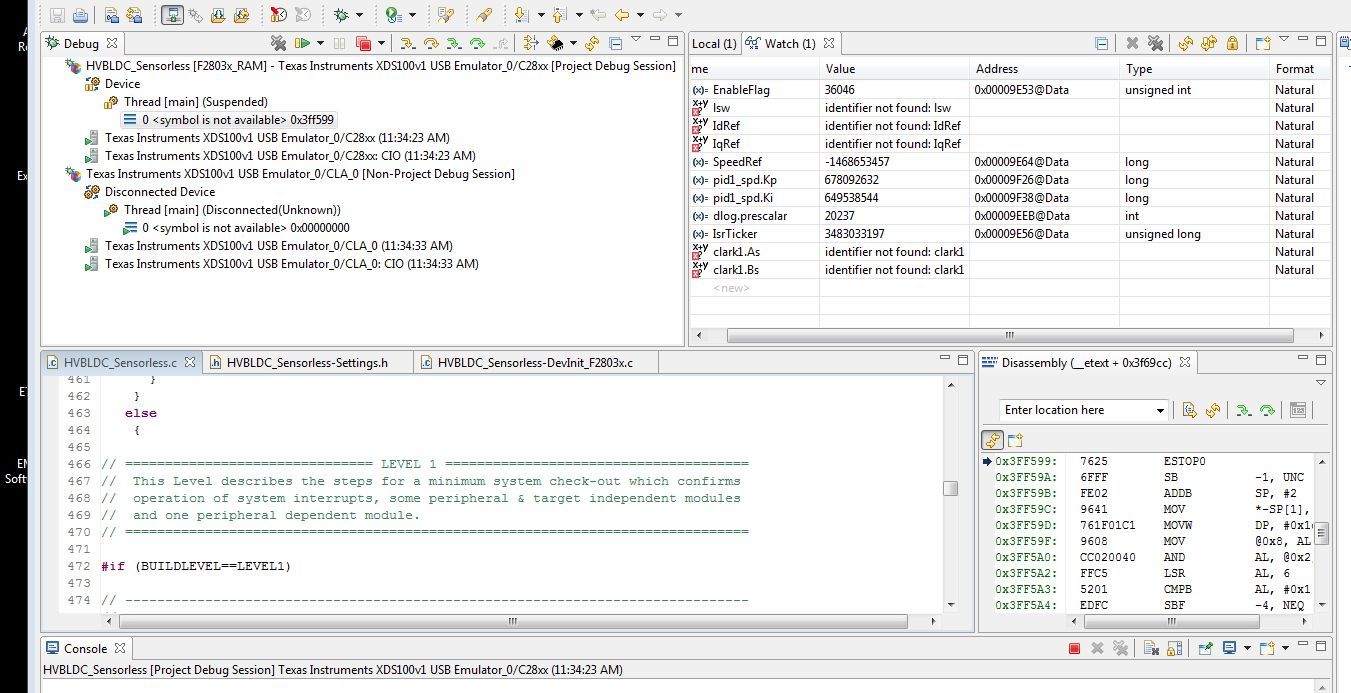
  • I found links to discussion about setting region to US English to solve the GUI issue but that is what my PC is set to so that isn't it for my case.  I'll keep digging for any info I can find on this.

  • Hi Richard,

    Three questions:
    1) In device manager do you see an entry for TI XDS100 Channel A/B under "Universal Serial Bus controllers"?
    2) What is your Code Composer Studio target configuration consist of?  XDS100v1 and TMS320F28035?
    3) What version of CCS are you using?


    Thank you,
    Brett

  • Hi Brett,

    I just noticed your response.  It was buried in a subdirectory of my email inbox.  Anyway, I found out what the problem was.  If I plug the USB connection in last, the unit works fine and I can communicate.  Plug in the USB before turning on power and setting switch 1 and the unit will not communicate.  I got the same behavior with our application engineer's unit.

    The instructions clearly tell you to connect the USB and then turn on power, set SW1, etc.