This thread has been locked.

If you have a related question, please click the "Ask a related question" button in the top right corner. The newly created question will be automatically linked to this question.

CLA math trigonometry issue

Other Parts Discussed in Thread: CONTROLSUITE, HALCOGEN, EK-TM4C123GXL, SW-EK-TM4C123GXL

Hi,

I can't seem to get the CLA math library to work properly.

I have started my project by using an IIR filter example in the CLA F2803x v126 folder as a template.

Later on I realised that you have to include the CLA math library if you want trigonometric functions.

So I followed the instructions on the CLA math v400 and added the include options and search paths for linker. (Also did a #include CLAmath.h in the CLA file)

But the issue is, if I use CLA divide function, it works fine but if I do any of the trigonometric functions, the code doesn't seem to execute at all.

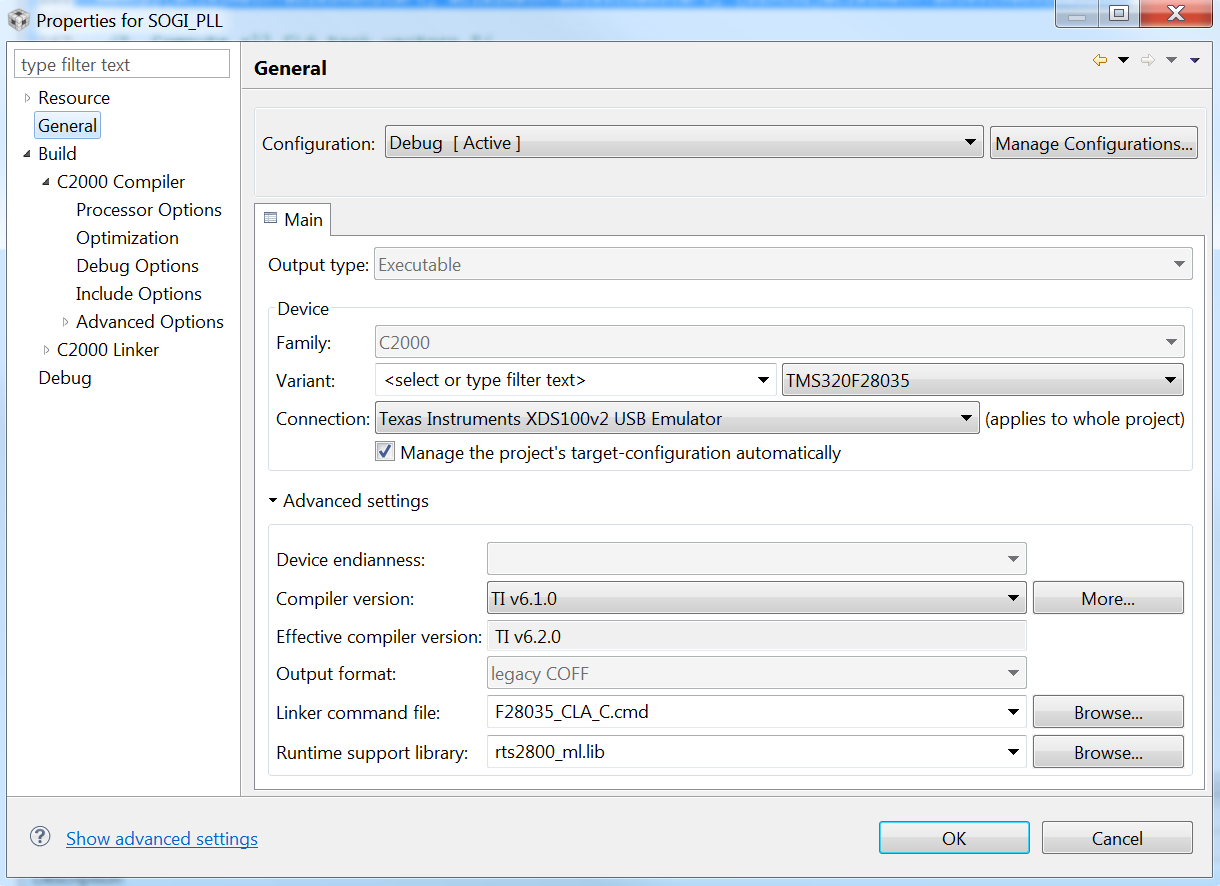
I  suspected that it was CLA math table issue and I have copied the "F28035_CLA_C.cmd" file to "C:\ti\ccsv5\ccs_base\c2000\include" and set the linker command file as "F28035_CLA_C.cmd" (If I didn't copy it over, I get loads of errors on compile)

Also, my main code has the following 2 lines as well. (was also present in the CLA IIR example)

memcpy(&Cla1funcsRunStart, &Cla1funcsLoadStart, (Uint32)&Cla1funcsLoadSize);

memcpy(&Cla1mathTablesRunStart, &Cla1mathTablesLoadStart, (Uint32)&Cla1mathTablesLoadSize);

But still it's not working.

Please help!
  • Hi KC1,

    Did you refer this doc:

    8345.CLA-MATH-LIB-UG.pdf

    Regards,

    Gautam

  • Hi,

    Yes I looked at it and that's how I got started with the CLA math library. But it doesn't say anything about the tables or copying them to memory. (I found out that you have to do it after reading ti e2e forums)

    That document is very basic and doesn't say how to set up a project for CLA math properly.

    The only example for CLA math v400 in the controlsuite folder was for F2806x. (I use F28035)

    I'm getting fed up of CCS, I find myself digging through forums at every turn :(

  • Yep, it looks like it has to do with the tables. What RAM block did you copy the tables over to ? and did you set the MEMCFG bit for the RAM (to transfer control over to the CLA) after the copy?

    Also, Id like your feedback on what can be added to the documentation. Ill file an enhancement request against it for the next revision.

  • Hi,

    I'm not sure what ram banks. I'm using F28035_CLA_C.cmd and I have uncommented the "-l DSP2803x_Headers_nonBIOS.cmd" line.

    It has the following inside it (amongst other code):

       Cla1Prog            : LOAD = FLASHD,

                             RUN = RAML3,

                             LOAD_START(_Cla1funcsLoadStart),

                             LOAD_SIZE(_Cla1funcsLoadSize)

                             RUN_START(_Cla1funcsRunStart),

                             LOAD_SIZE(_Cla1funcsLoadSize),

                             PAGE = 0


       Cla1ToCpuMsgRAM     : > CLA1_MSGRAMLOW,   PAGE = 1

       CpuToCla1MsgRAM     : > CLA1_MSGRAMHIGH,  PAGE = 1

       Cla1DataRam0   : > CLARAM0,   PAGE = 1

       Cla1DataRam1   : > CLARAM1,   PAGE = 1


       CLA1mathTables   : LOAD = FLASHB,

                             RUN = CLARAM1,

                             LOAD_START(_Cla1mathTablesLoadStart),

                             LOAD_END(_Cla1mathTablesLoadEnd),

                             RUN_START(_Cla1mathTablesRunStart),

                             LOAD_SIZE(_Cla1mathTablesLoadSize),

                             PAGE = 1


       CLAscratch          : 

                             { *.obj(CLAscratch)

                             . += CLA_SCRATCHPAD_SIZE;

                             *.obj(CLAscratch_end) } > CLARAM1,

        PAGE = 1

    Everything else is the default setup from the iir2p2z example.

    Where and how do I set the MEMCFG?

    These are the things missing in the document. It should tell you exactly how to start a project from scratch and how to get CLA math working. It's very vague. And I'm new to C2000.

    Thanks.

  • there should be a little block of code in there that sets the MMEMCFG bits

    EALLOW;
    Cla1Regs.MMEMCFG.bit.PROGE = 1;
    Cla1Regs.MCTL.bit.IACKE = 1;
    Cla1Regs.MMEMCFG.bit.RAM0E = CLARAM0_ENABLE;
    Cla1Regs.MMEMCFG.bit.RAM1E = CLARAM1_ENABLE;
    EDIS;

    You just have to make sure that CLARAM1_ENABLE is set to 1 at the top of the file

    Ok, Ill assume for the time being that it is set to 1. You can open up a memory browser in CCS, go to the address for RAM1 (which i think is 0x008C00) and check to see if the table values are in there. So if you were using the CLAsin(), check that the first three values are 

    0.0,  0.04906767432742, 0.09801714032956

    you will find the table values in the \controlSUITE\libs\math\CLAmath\v400\source\CLAMathLib folder. I got these from the CLASinCosTable.asm file. If all of this is in order and it still doesnt work, Id suggest posting your project (whatever parts of code you can share) and I can take a look at it.

    The doc cant be exhaustive with respect to project creation. The assumption is that you have an existing project that you would then like to beef up with the CLA. But Ill look into expanding that chapter a bit more. If you are interested in debugging on the CLA, there is a video:

    http://focus.ti.com/general/docs/video/Portal.tsp?lang=en&entryid=0_dm3z6wz1

    It was on CCSv4, but the same procedure applies to CCSv5

  • Hi,

    Thanks for the info. I checked the memory window and I can see that the tables gets loaded.

    Eventually I got the sin function to work.

    But now the problem is that it seems to break every time I change a bit of the code.
    And even when it works, if I do a reset from the debugger, it don’t work for 2nd time.

    I have attached a zip file with my project.

    In the SOGI_PLL_2.cla source file, there are 2 lines that I’ve commented (lines 81 and 90)
    If you uncomment them, the code doesn’t run anymore.

    (The code I’ve written so far is just some CLA tests and it may not make any sense from an optimisation/functional standpoint)


    These intermittent breaks in the program are very frustrating.

    I’m on the verge of switching back to Cortex M4. I’m trying to decide whether I can make up the time of doing the PCB and hardware changes with the smoother workflow on Keil compiler.

    Also, CSS crashes quite often. Maybe due to the eclipse, I’m not sure.

    Thanks

    6507.SOGI_PLL_2.zip

  • Hi,

    Just an update, I have bought a TMS570LS12 (Cortex R4) control card and working with Keil compiler.

    So far it has been pretty smooth, no more CLA coding and CCS crashes to deal with. (and about 5x faster FP ops by comparison as expected)

    Hopefully I can finish the project now without asking so many questions :)

    Thanks.

  • I dumped the generated assembly and it looks to be doing the right thing. Ive put in my comments below:

    ;----------------------------------------------------------------------
    ; 81 | SOGI_integrator_3_z_2 = 656.86*xn[1]; // doesn't work!
    ; 88 | temp1 = (((xn[1]*0.0008954)-1)*2048)*0.00048828125;
    ;----------------------------------------------------------------------

    MMOVIZ MR1,#17444 ; [CPU_] |81|              ; MR1 = 0x44240000
    MMOV32 MR0,@_xn+2 ; [CPU_] |81|           ; MR0 = xn[1]
    MMOVXI MR1,#14090 ; [CPU_] |81|              ; MR1 = 0x4424370A (656.86)
    MMPYF32 MR1,MR1,MR0 ; [CPU_] |81|       ; MR1 = 656.86 * xn[1]
    MMOV32 @_yn+18,MR1 ; [CPU_] |81|         ; yn[9] = MR1

    ;----------------------------------------------------------------------
    ; 89 | yn[10] = temp1;
    ; 90 | temp1 = temp1*10*SOGI_integrator_3_z_2; // doesn't work!
    ;----------------------------------------------------------------------

    MMOVIZ MR1,#14954 ; [CPU_] |89|                         ;
    MMOVXI MR1,#47431 ; [CPU_] |89|                         ; MR1 = 0.0008954
    MMPYF32 MR0,MR1,MR0 ; [CPU_] |89|                  ; MR0 = MR0(xn[1]) * 0.0008954
    MADDF32 MR0,MR0,#49024 ; [CPU_] |89|             ; MR0 = MR0 + -1.0
    MMPYF32 MR0,MR0,#17664 ; [CPU_] |89|             ; MR0 = MR0 * 2048
    MMPYF32 MR0,MR0,#14848 ; [CPU_] |89|             ; MR0 = MR0 * 0.00048828125
    MMOV32 @_yn+20,MR0 ; [CPU_] |89|                    ; yn[20] = MR0 


    ;----------------------------------------------------------------------
    ; 91 | temp1=CLAsin(temp1);
    ;----------------------------------------------------------------------
    MCCNDD #_CLAsin ; [CPU_] |91|                            ; Initiate call to CLAsin here
    MMOV32 MR1,@_yn+18 ; [CPU_] |91|                    ; MR1 = yn[9]
    MMPYF32 MR0,MR0,#16672 ; [CPU_] |91|             ; MR0 = MR0(temp1) * 10.0
    MMPYF32 MR0,MR1,MR0 ; [CPU_] |91|                  ; MR0 = MR0 * yn[9]  (argument to the sine function)

                                                                                     ; CLAsin() starts executing 3 cycles after it is called

    Was the sine function breaking when you ran this portion of code?? 

  • Hi!

    Sorry for the off-topic but I'm stucked programming with Keil environment. I find some interesting code for Code Composer Studio (CSS) but I can't use it in Keil, could you give me some tips to do so? Thanks!

    Specifically it's about this Labs at TM4C123G_LaunchPad_Workshop:

    http://processors.wiki.ti.com/index.php/Getting_Started_with_the_TIVA%E2%84%A2_C_Series_TM4C123G_LaunchPad

    and the labs that are inside:

    http://software-dl.ti.com/trainingTTO/trainingTTO_public_sw/GSW-TM4C123G-LaunchPad/TM4C123GLaunchPadWorkshopSetup.exe

    I'm trying to use the PWM code in Keil but I can't use it. Thanks!

    Francisco

  • Hi,

    I haven't worked with the Tiva series, but I am using TI Hercules RM4.

    From my experience with the RM4, CCS examples won't work in Keil (Unless you modify large amounts of driver code perhaps)

    I haven't looked at the Tiva resources, but there should be separate Keil example code as is the case with RM4.

    I found the following guide, maybe it's useful:

    http://www.ti.com/lit/ml/spmu355/spmu355.pdf

    As for me, I went back to using CCS for programming the R4 as there seemed to be more examples and support for CCS compiler. Also there seemed to be bugs in the code generated by the HALCOGEN tool for Keil. (I think the newer version is improved a lot though)

    Hope it helps!

  • Thanks K C1 for your fast answer!

    I have checked many Ti webpages but I didn't find any file example for PWM modules for the EK-TM4C123GXL LaunchPad. Do you know who or which email I can contact to ask to Ti technicians so I can have that PWM module example file for Keil? Thanks!


    Francisco

  • Hi,

    I think you need to install the following software (EK-TM4C123GXL-KEIL)

    http://www.ti.com/tool/sw-ek-tm4c123gxl

    And follow the PDF I linked previously. You might have to install ICDI drivers as well.

    If you follow it step by step, you should have the example up and running.