This thread has been locked.

If you have a related question, please click the "Ask a related question" button in the top right corner. The newly created question will be automatically linked to this question.

Get Help with C2000

Other Parts Discussed in Thread: CONTROLSUITE

 
I couldn't understand why it is so difficult to get help with TI, when I look around TI E2E community I found the same issue That I have but without an answer to resolve it, I just want to know a few step to start to use your products on my new design.
1) I have F28027 Launchpad, so I just want to know how download a program and use it standalone, it is so difficult??
2)  The only Lab project that I found to match exactly with my Launchpad F28027 and code composer studio 5.5, it's a document was Gautam send to me "Lab 1: Guide for creating portable projects in C2000" (6840.CreatingProject.pdf) I follow each step in this Lab 1, and I get it at final Led Blinking, but when I push a reset switch the program lost and I have to running again with debug to blinking, This send me back to my first issue.
If you have a Lab 1 I think you have the next ones I mean Lab 2,Lab3, and so on, if so I want it but with this version, how can I get it??.
3) I imported all example from controlSuite and checked, work well, so I wonder if I have to use it and modify them as only way to create my own project or if with the Launchpad I have other way to do my own project?????
 
I would appreciate your assistance as soon as you can.
Juan Miguel Perez
  • Hi,

    Perhaps, you have missed something. Did you add the file CodeStartBranch.asm to your project, for example? Try to go through this AR 8231.TI_Running_from_Flash_spra958l.pdf. I hope this will help.

    Regards,

    Igor

  • I've replied to your previous post. Do check that and yes the doc Igor has mentioned is important too.

    Regards,

    Gautam

  • Hello Juan,

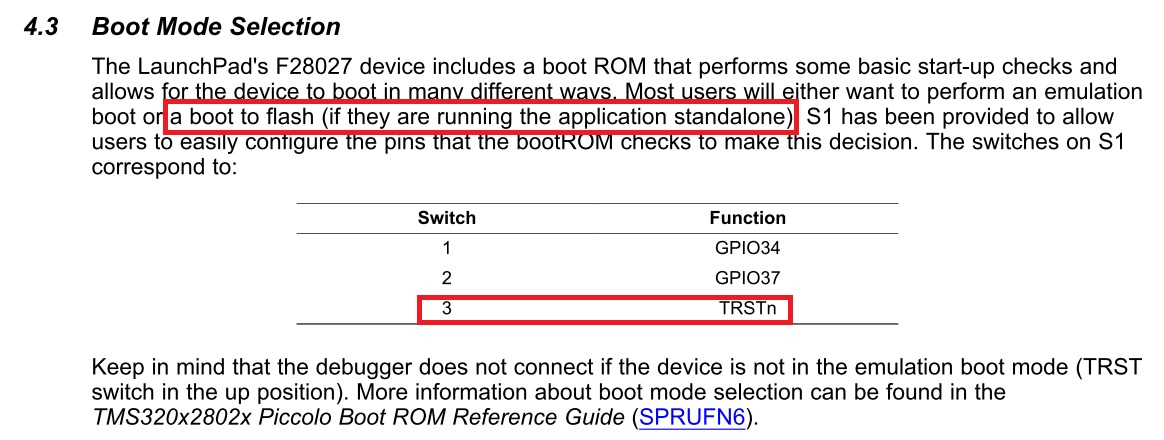
    FYI, F28027 Launchpad has switch for standalone/debug mode.

    SW1 BOOT position 3 has to be OFF if you want to run in standalone mode.

    5141.Launchxl-f28027f-spruhh2.pdf

    You already can run Lab 1 project and the examples from Controlsuite have run well too. I don't understand what else do you need.

    I think if you want to make your own project, better you use one of Controlsuite example so you don't need to do 'hardwork' to link the library, headers, and so on.

    Good luck!

    Best regards,

    Maria

  • Another things about standalone flash project, maybe you can follow these steps below after opening an example from Controlsuite.

    Good luck!

    Best regards,

    Maria

  • Thanks to all for replies,

    Finally with Gautam and Maria suggestions I can put my own project to run standalone, I just linked "F28027.cmd" instead "28027_RAM_lnk.cmd" and it running Ok.

    Yeap, Maria is better to use an example code to skip the hard work, but I'm trying to do some hard work to better understand how this stuff works.

    Anyways, thanks again and we'll in touch

    Juan    

  • Yeap, Maria is better to use an example code to skip the hard work, but I'm trying to do some hard work to better understand how this stuff works.

    That's true and I hope now its crystal clear to you, how things work!

    Good Luck & Regards,

    Gautam

  • Hi Juan,

    Glad to hear the things work.

    Juan M. Perez said:
    Yeap, Maria is better to use an example code to skip the hard work, but I'm trying to do some hard work to better understand how this stuff works.

    I understand that you want to have better understanding. Me too :)

    But my suggestion is before you do the 'hard work', make sure the things work like they should be, and this is by using the examples, and firstly you should understand them well before digging them out, so you don't need to go back to these steps and you can go further on your investigations and learning further.

    Good luck and have nice days and nice learning!

    Best regards,

    Maria