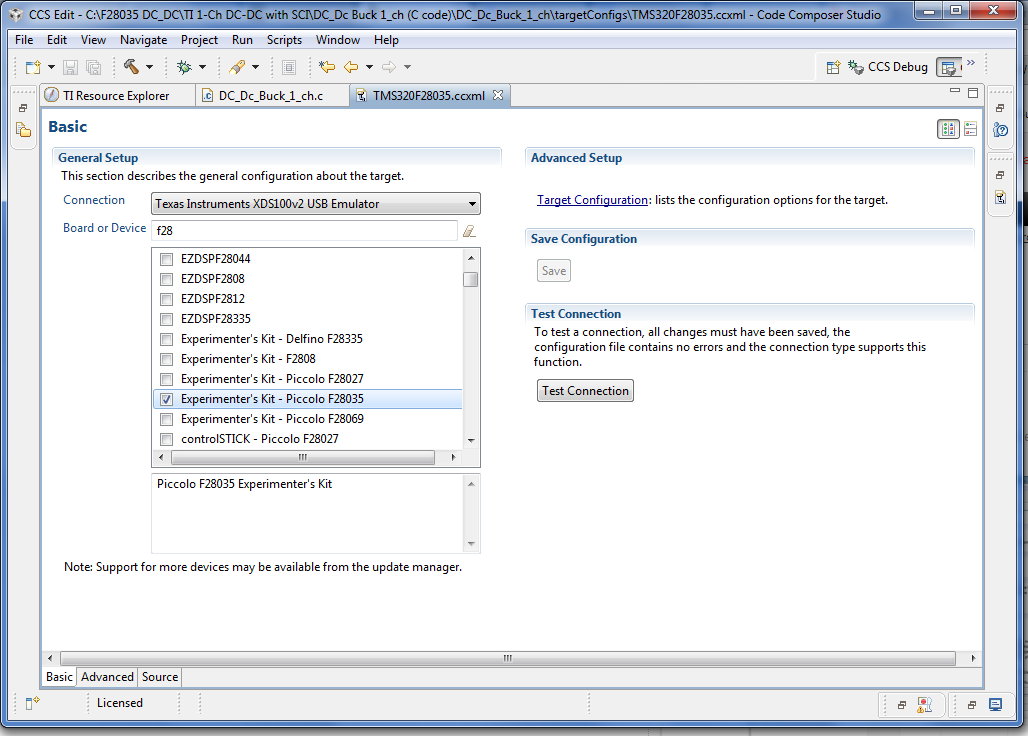
I am trying to program F28035 Piccolo Control Card using a Experimnerter's Kit USB docking station. But I keep getting the following error message while trying to debug the code:
I am using CCS version 5.3 on Windows 64bit system!
This thread has been locked.
If you have a related question, please click the "Ask a related question" button in the top right corner. The newly created question will be automatically linked to this question.
I am trying to program F28035 Piccolo Control Card using a Experimnerter's Kit USB docking station. But I keep getting the following error message while trying to debug the code:
I am using CCS version 5.3 on Windows 64bit system!
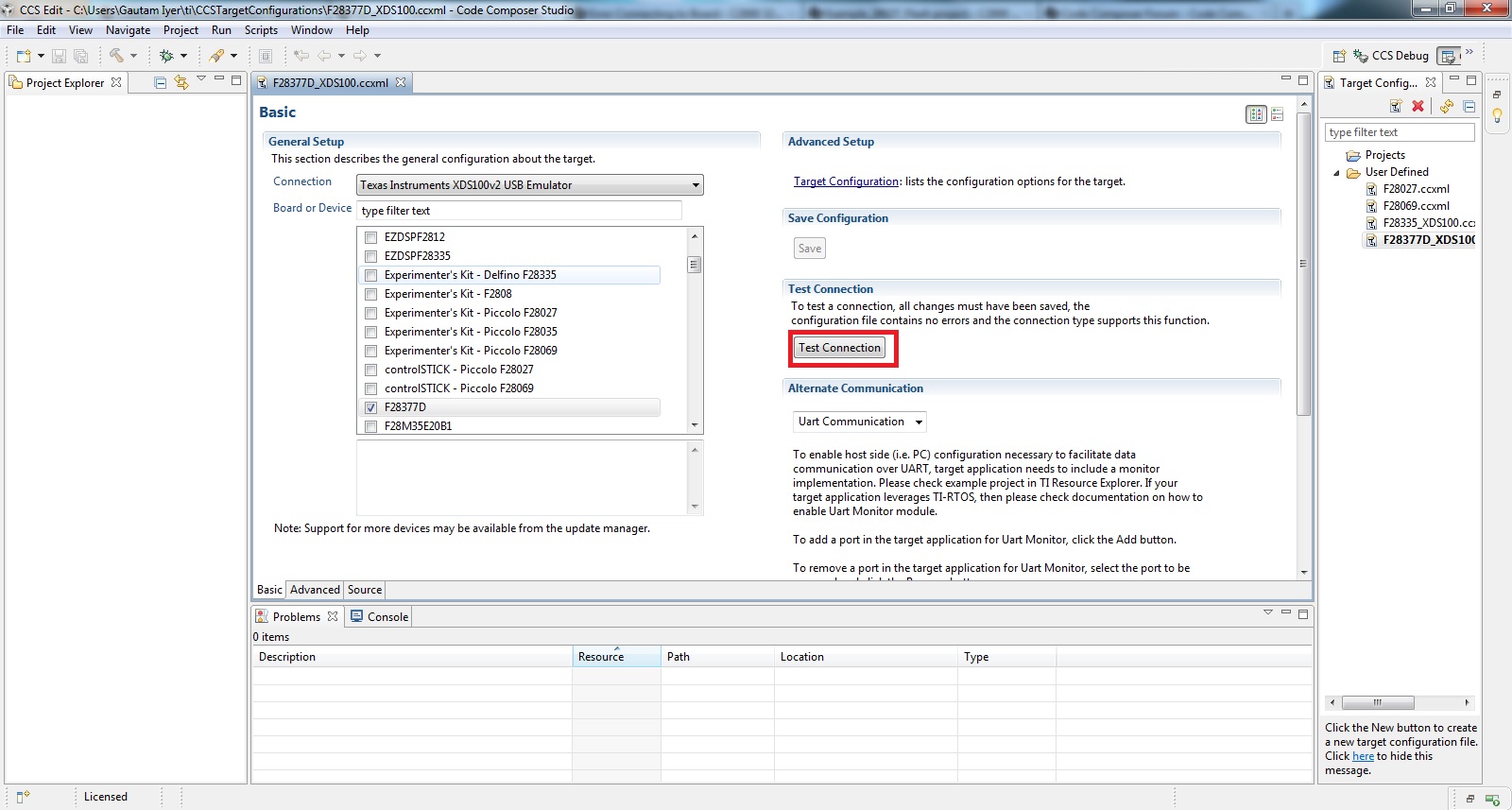
Here is my target configuration settings dialog box:
and the results after running the test connection I have pasted below :
[Start]
Execute the command:
%ccs_base%/common/uscif/dbgjtag -f %boarddatafile% -rv -o -F inform,logfile=yes -S pathlength -S integrity
[Result]
-----[Print the board config pathname(s)]------------------------------------
C:\Users\UJJWOL~1.TAM\AppData\Local\.TI\
2620960987\0\0\BrdDat\testBoard.dat
-----[Print the reset-command software log-file]-----------------------------
This utility has selected a 100- or 510-class product.
This utility will load the adapter 'jioserdesusb.dll'.
The library build date was 'Oct 3 2012'.
The library build time was '21:58:41'.
The library package version is '5.0.872.0'.
The library component version is '35.34.40.0'.
The controller does not use a programmable FPGA.
The controller has a version number of '4' (0x00000004).
The controller has an insertion length of '0' (0x00000000).
This utility will attempt to reset the controller.
This utility has successfully reset the controller.
-----[Print the reset-command hardware log-file]-----------------------------
The scan-path will be reset by toggling the JTAG TRST signal.
The controller is the FTDI FT2232 with USB interface.
The link from controller to target is direct (without cable).
The software is configured for FTDI FT2232 features.
The controller cannot monitor the value on the EMU[0] pin.
The controller cannot monitor the value on the EMU[1] pin.
The controller cannot control the timing on output pins.
The controller cannot control the timing on input pins.
The scan-path link-delay has been set to exactly '0' (0x0000).
-----[The log-file for the JTAG TCLK output generated from the PLL]----------
There is no hardware for programming the JTAG TCLK frequency.
-----[Measure the source and frequency of the final JTAG TCLKR input]--------
There is no hardware for measuring the JTAG TCLK frequency.
-----[Perform the standard path-length test on the JTAG IR and DR]-----------
This path-length test uses blocks of 512 32-bit words.
The test for the JTAG IR instruction path-length failed.
The JTAG IR instruction scan-path is stuck-at-ones.
The test for the JTAG DR bypass path-length failed.
The JTAG DR bypass scan-path is stuck-at-ones.
-----[Perform the Integrity scan-test on the JTAG IR]------------------------
This test will use blocks of 512 32-bit words.
This test will be applied just once.
Do a test using 0xFFFFFFFF.
Scan tests: 1, skipped: 0, failed: 0
Do a test using 0x00000000.
Test 2 Word 0: scanned out 0x00000000 and scanned in 0xFFFFFFFF.
Test 2 Word 1: scanned out 0x00000000 and scanned in 0xFFFFFFFF.
Test 2 Word 2: scanned out 0x00000000 and scanned in 0xFFFFFFFF.
Test 2 Word 3: scanned out 0x00000000 and scanned in 0xFFFFFFFF.
Test 2 Word 4: scanned out 0x00000000 and scanned in 0xFFFFFFFF.
Test 2 Word 5: scanned out 0x00000000 and scanned in 0xFFFFFFFF.
Test 2 Word 6: scanned out 0x00000000 and scanned in 0xFFFFFFFF.
Test 2 Word 7: scanned out 0x00000000 and scanned in 0xFFFFFFFF.
The details of the first 8 errors have been provided.
The utility will now report only the count of failed tests.
Scan tests: 2, skipped: 0, failed: 1
Do a test using 0xFE03E0E2.
Scan tests: 3, skipped: 0, failed: 2
Do a test using 0x01FC1F1D.
Scan tests: 4, skipped: 0, failed: 3
Do a test using 0x5533CCAA.
Scan tests: 5, skipped: 0, failed: 4
Do a test using 0xAACC3355.
Scan tests: 6, skipped: 0, failed: 5
Some of the values were corrupted - 83.3 percent.
The JTAG IR Integrity scan-test has failed.
-----[Perform the Integrity scan-test on the JTAG DR]------------------------
This test will use blocks of 512 32-bit words.
This test will be applied just once.
Do a test using 0xFFFFFFFF.
Scan tests: 1, skipped: 0, failed: 0
Do a test using 0x00000000.
Test 2 Word 0: scanned out 0x00000000 and scanned in 0xFFFFFFFF.
Test 2 Word 1: scanned out 0x00000000 and scanned in 0xFFFFFFFF.
Test 2 Word 2: scanned out 0x00000000 and scanned in 0xFFFFFFFF.
Test 2 Word 3: scanned out 0x00000000 and scanned in 0xFFFFFFFF.
Test 2 Word 4: scanned out 0x00000000 and scanned in 0xFFFFFFFF.
Test 2 Word 5: scanned out 0x00000000 and scanned in 0xFFFFFFFF.
Test 2 Word 6: scanned out 0x00000000 and scanned in 0xFFFFFFFF.
Test 2 Word 7: scanned out 0x00000000 and scanned in 0xFFFFFFFF.
The details of the first 8 errors have been provided.
The utility will now report only the count of failed tests.
Scan tests: 2, skipped: 0, failed: 1
Do a test using 0xFE03E0E2.
Scan tests: 3, skipped: 0, failed: 2
Do a test using 0x01FC1F1D.
Scan tests: 4, skipped: 0, failed: 3
Do a test using 0x5533CCAA.
Scan tests: 5, skipped: 0, failed: 4
Do a test using 0xAACC3355.
Scan tests: 6, skipped: 0, failed: 5
Some of the values were corrupted - 83.3 percent.
The JTAG DR Integrity scan-test has failed.
[End]
Hello,
I'm sorry for the difficulty you've been having. Can you let me know whether your F28035 controlCARD is the:
ISO controlCARD:
http://www.ti.com/tool/tmdscncd28035iso
or the
standard F28035 controlCARD (the controlCARD plugged into the following baseboard):
http://www.ti.com/tool/tmdshvblpfckit
Switch settings and the method of connecting are different between the two options.
---
Either way (and for this particular board+cCARD setup), you should be using xds100v1 as the connection in your target configuration.
Thank you,
Brett
I am using the standard F28035 controlCARD but the baseboard is different from the link you sent me. The base board is a docking station with a USB Connection
Thanks. I mentioned the other kit (BLPFC) because it conveniently had a picture of the correct controlCARD :)
Below are the key things I would recommend looking at:
-SW1 on the controlCARD should be switched toward 'ON' (up)
-The USB connector on the Docking Station should be connected to your computer
-SW1 of the Docking Station should be switched on such that LD1 on the controlCARD comes on.
-J8 on the Docking Station should NOT be jumpered.
-As I mentioned above make sure that you are using an xds100v1 in your CCS target configuration
If all of the above looks correct, can you let us know whether TI XDS100 Channel A and TI XDS100 Channel B show up in Window's Device Manager when the USB is plugged in? Like the 4th picture in this thread:
http://e2e.ti.com/support/microcontrollers/c2000/f/171/t/21086.aspx
(if it doesn't I might recommend reprogramming your xds100v1 emulator by following the instructions in the thread I just listed)
Thank you,
Brett
Hello,
No, you should really only need 'TI XDS100 Channel A'. However, just in case you may want to reprogram the FTDI FT2232D's EEPROM as in the forum post that I linked. Let us know if this helps.
I don't suspect the FTDI drivers at this point. Instead I would suspect CCS settings or jumper/switch settings (as mentioned in my previous post.
Has this controlCARD + Docking Station ever connected to CCS or is this it's first time to be used?
Thank you,
Brett