This thread has been locked.

If you have a related question, please click the "Ask a related question" button in the top right corner. The newly created question will be automatically linked to this question.

Progamming the MAC in Concerto

Hi

I am just starting with Ethernet on the Concerto MCU using the enet_lwip example.

I am going crazy for changing the default MAC number to the real MAC number corresponding to my actual board.

I tried:

- In Propierties->Debug->Flash settings  you can change the MAC but doesn't take effect when you build and execute.

- Use the funcion EthernetMACAddrSet(ETH_BASE, (unsigned char *)pucMAC); doesn´t take effect.

- Directly write

    HWREG(SYSCTL_MWRALLOW) =  0xA5A5A5A5;
    HWREG(0x00680810) = 0x00F263A8;
    HWREG(0x00680814) = 0x00800000;

neither takes effect.

I watch the OTP memory using the Memory browser and the value at 0x00680810 and 0x00680814 is always 0xFFFFFFFF

What is the right way to really change the MAC address at the OTP memory?

Thanks so much

Dionisio

  • Dionsio,

    those two are the userOTP locations and probably share a common ECC. So try programming them with the Flash plugin or using CCS program load (by linking the constant data to those two user OTP locations).


    Best Regards

    Santosh

  • Hi

    Thank you.

    However, I am not able of finding the Flas plugin in Code Composer Studio v5.50.

    I really used the Flash plugin with older versions of CCS but now it seems to be integrated in CCs and also hidden.

    I found this option at the Project propierties, but it doesn´t work:

    On the other hand, for linking the constant data to those two user OTP locations, do I need to do it in the cmd file?

    and to use a Pragma directive for linking the physical address to a memory section?

    Thanks again,


    Dionisio

  • Flashplug-in should be available in CCS tools menu in the debug perspective after you connect to the target.

    and yes you would need to use the #PRAGMA directive to put the constants into a user defined section in the source file and link the section to needed user OTP locations in the linker command file. Inspect the Map file carefully before you load because this is user OTP and is one-time-programmable only.


    Best Regards

    santosh


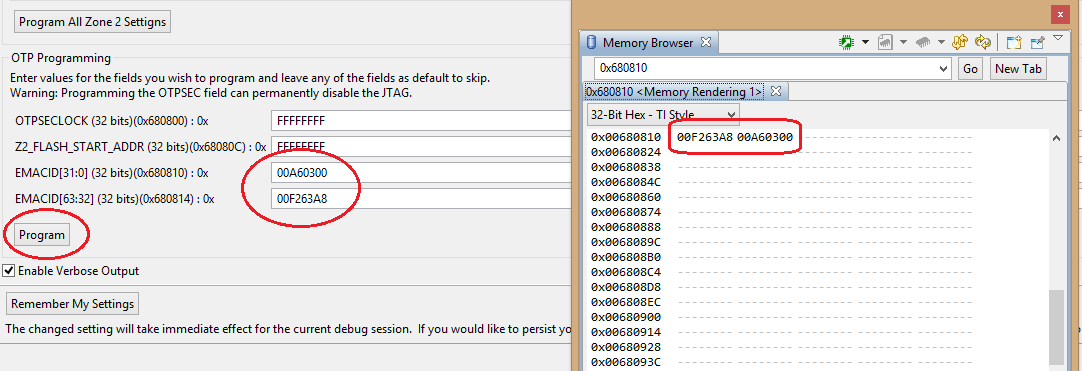
  • It worked! I found the On Chip Flash plugin in the "Debug perspective-Tools-On Chip Flash" and I have already recorded the MAC address in the OTP memory:

    Thank you so much!


    Dionisio