This thread has been locked.

If you have a related question, please click the "Ask a related question" button in the top right corner. The newly created question will be automatically linked to this question.

ControlSuite Installer

Other Parts Discussed in Thread: CONTROLSUITE

Hello all there,

I just tried to install the new ControlSuite, and downloaded the installer.

After starting it and checking a few items, it tried to download content from TI, but after a few seconds following message appeared:
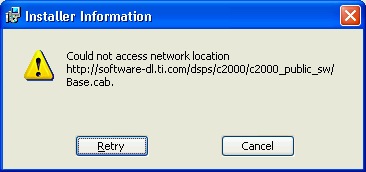
-> Can anyone give mi an advice, what to do

 Is this a problem of the TI server?

Thanks, Kaspar

  • Kaspar,

    This error message seems to appear occasionally. We're looking into the cause of the problem.

    In the meantime, try hitting Retry a couple times and see if it goes through. If not, hit the Cancel button. Does it let you continue with the installation? If yes, then navigate to the folder C:/TI/controlSUITE/development_kits/~controlCARDs. This folder contains the content that Base.cab installs. Do you see anything in there?

    -Michael

  • Hi Michael,
     
    the error seems not toe be occasionally. It is PERMANENT.
     
    -> I can´t install the ControlSuite. If I click cancel, the whole installation process stops. There remains not even the directory C:\TI.

    The error message tells me, that I can´t download the file "Base.cab", so I don´t have this file on my computer.

    do You have any suggestions?

    Thanks,

    Kaspar
  • Hi Kaspar,

    I had the same problem, fought it for a couple of days. Finally I had to get our IT guys involved. I don't fully understand the issue, but it had something to do with the way the proxy server was configured inside Internet Explorer and our firewall. They temporarily changed to a different proxy server and everything worked as advertised. I hope this is useful.

    Jedcon

  • Hi Jedcon,

    I can confirm your suggested solution. When I first tried the ControlSUITE installer I ran into the same error, but when I changed my browser settings to 'Auto-Proxy' it completed successfully.

    Thanks,


    Magnus

  • Kasper,

    Were you able to install controlSUITE by temporarily changing the proxy as Magnus suggested?


    --Michael

  • Hi Michael,

    I didn´t  change the proxy, cause it is not so easy with our IT.

    I´ll try to load down the controlSuite at home this weekend.

    More on monday.


    - Kaspar


  • Hi all there,

    due to my holidays last week I didn´t have online access.

    I solved the problem with my private internet connection at home.

    No everything works fine.

    Thanks to all.

    - Kaspar

  • I am still encountering this issues today.

    We have a proxy server and it requires authentication.
    This is probably the root-cause of the problem.
    I was able to reconfigure to bypass the proxy (we use it for performance not security) and then the installer worked.

    Please ask those responsible for the controlsuite installer to make a complete package that allows you to download a stand-alone installer.
    This will resolve all issues related to download-on-demand cab's.
    This MSI feature is too unreliable for "production use" as demonstrated by this issue.

    "But it will be 300! 400! 500! MB!!!!"
    Don't care. A 1GB installer that works is infinetly better than a 200k installer that doesn't.

    In twenty years when everyone is using IPv6 this feature *might* be viable "in the wild".
    For now this is an "in house" feature only where you have control over the network.

  • I was having the exact same problems installing controlSuite (Win7 Pro, 64 bit OS).  I was able to successfully install controlSuite only after I turned off Windows firewall, and my antivirus program (Kaspersky).

    I agree with Shannon Barber - a full installer should be available as an option, regardless of the size.  Why not include a full installer on the DVDs included in the eval and development kits for the c2k line?


  • within a few days of updating controlSUITE a complete up to date .zip file is available from the 

    controlSUITE product folder

    or directly here

    http://www.ti.com/litv/zip/sprca85