This thread has been locked.

If you have a related question, please click the "Ask a related question" button in the top right corner. The newly created question will be automatically linked to this question.

Launchxl-F28027 w/Boostxl-drv8301 => lab02b won't compile

Other Parts Discussed in Thread: MOTORWARE, LAUNCHXL-F28027F, LAUNCHXL-F28027

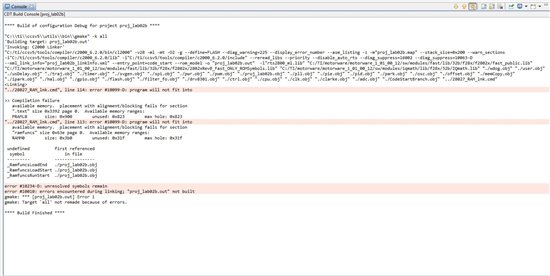
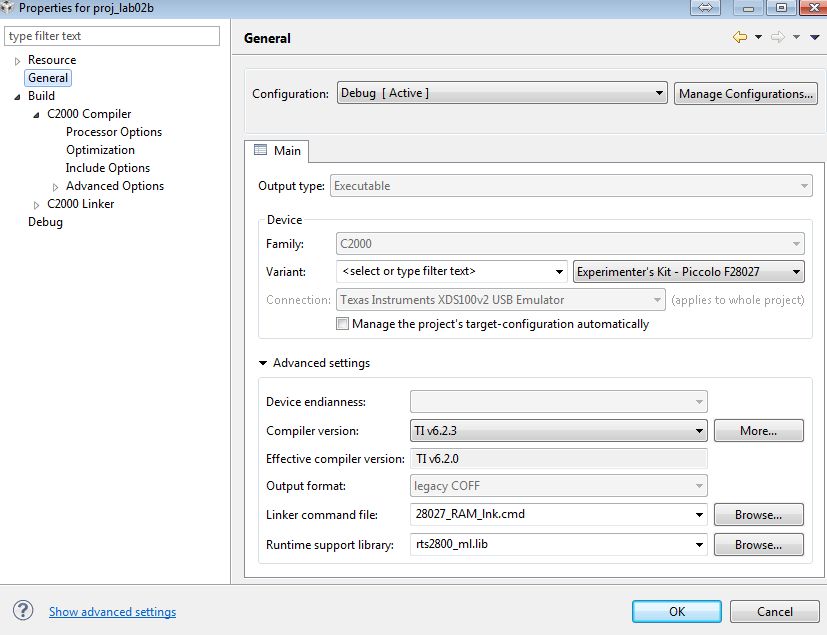
It seems that all my labs in Motorware don't include debug build configurations so I'm having to create them myself.  Also, the kit is not listed in the target configurations so I'm using Experimenters Kit - Piccolo F28027.  I'm not sure if this is the problem or not.

lab01 (although completely useless) compiled and ran.  Incidentally, LED0 is the one that flashes on my kit, not LET2.

Please help.  Dead in the water.
  • What do you mean you are using an Experimenter's kit?


    1. You say you have LAUNCHXL-F28027.  To run InstaSPIN-FOC you need LAUNCHXL-F28027F which has special motor control libraries in ROM.

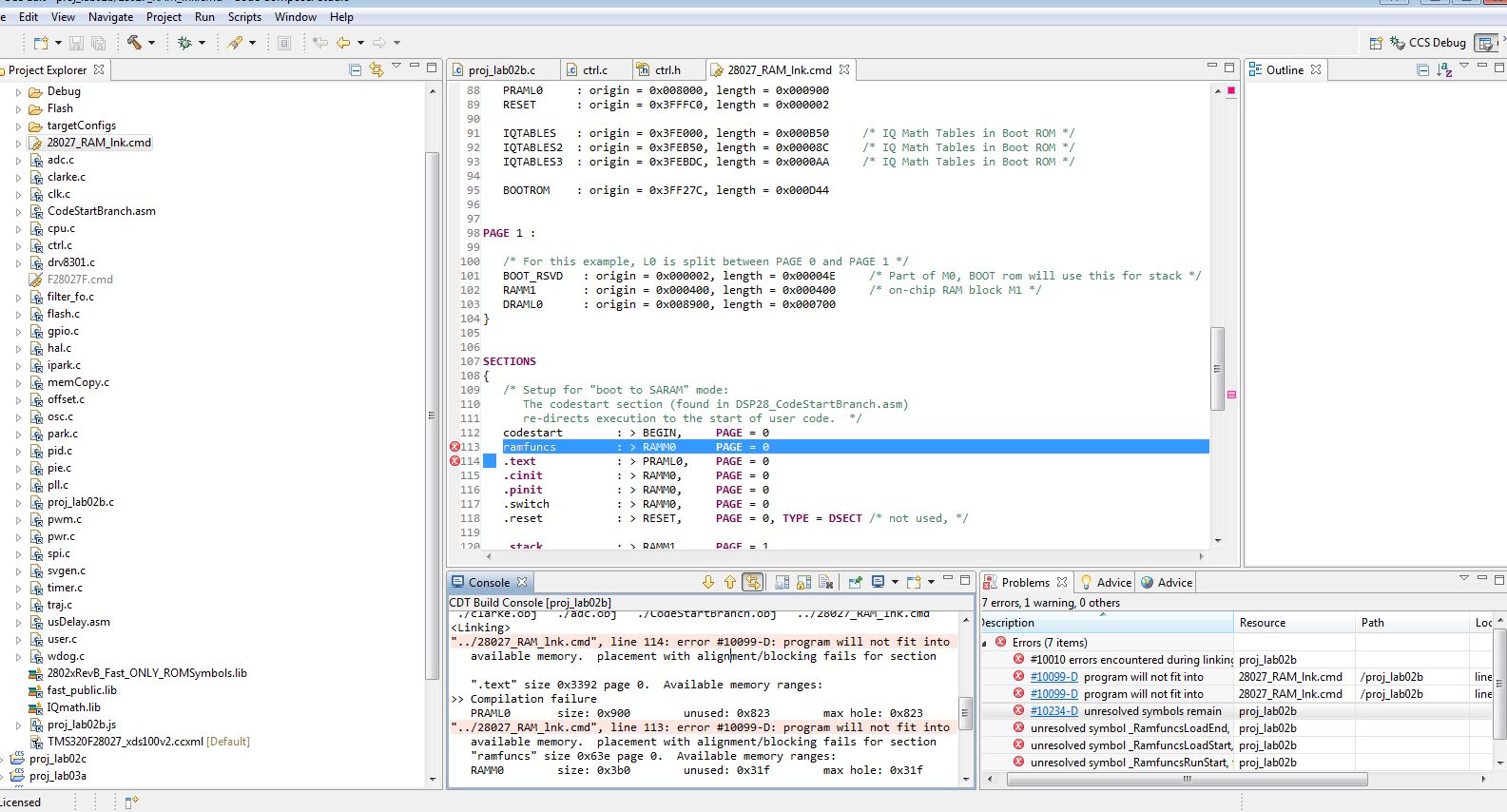
    2. The MotorWare projects for BOOSTXL-DRV8031 + f2802x are set to a Flash build configuration and all work just fine for running and debugging. There is no need to change any settings.  Perhaps you changed to debug which move everythign into RAM. These devices have a minute amount of RAM, so it's not possible to debug an entire application in RAM>


  • Hi Chris,

    It appears this is yet another documentation problem.  First, the attachments below are what I mean by "using Experimenter's Kit.   

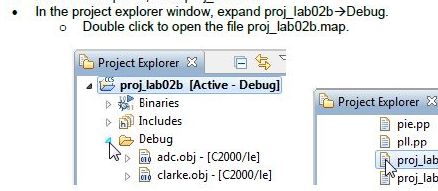
    Second, here is a screenshot of the instructions from TI.  Note it shows and states to use debug.

    Chris,

    You guys have some excellent tools and some excellent software.  I have only found one bug in your demo code in the last 4 years.  However, your docs are full of errors and completely misleading.  I strongly recommend TI vet their documentation using unskilled labor to follow the instructions step by step. 

    It is a complete shame to waste all the hard work used to develop these tools with misleading and erroneous instructions.  I purchased this kit with my own money because my Director of Engineering won't spend any more money on your tools as he feels they don't work.  Arrrgggghhh!!!!!  You know as well as I that your tools/kits kick butt.  You also know as well as anyone who has ever used your kits that your documentation (not YOURs specifically) suck butt.

    Thanks.  I think I can move forward from here.

    Correction:  I should have stated your, er, THE instructions suck, not the documentation.  All the datasheets, etc. are great.  It's only the kit instructions that suck. 

  • Richard,

    On your first topic, you don't have to set-up a Target Configuration. They are provided for you in MotorWare.  However, what you did should work fine.

    FOLLOWING THE DOCUMENTATION you have cited

    instaspin_labs.pdf

    Page 21 tells you to simply launch the debug session. You never have to set this up manually (although I do, just from habit).


    For your second topic, the title of the lab is

    Using InstaSPIN out of User RAM and/or FLASH

    I agree that the write-up is the same as when we first released the solution for F2806x (which has plenty of RAM) and ideally should be updated to show the differences when using F2802x (which has almost no RAM).

    I will file this  as a bug for an update.


  • One more bone to pick on lab02b.  It keeps referring back to lab02a as if everyone has experienced lab02a.  Unfortunately, the folks who purchased the InstaSPIN-FOC don't do lab02a so all this referencing is just adding to the confusion.

  • Agreed, I'll add this note as well.


  • Hi Chris,

    Let me focus in a little closer for the debug instructions.  If I don't compile in debug configuration, I'm not going to get a debug directory.  This is why I thought I needed to create a debug configuration.

    Also, I never knew that you could launch a debug session without having a debug configuration.

  • Thanks Chris.  Actually, you should feed back my comments about the instructions overall and the recommendation to debug the instructions with someone who doesn't know the tools.  This would give you guys much more time to spend on the real technical questions from your customers.

    Have a great day!

  • The folder is just named "Debug" because that's the default name used. You could name it "ANYTHING" and it would be the same. It's the folder that holds the output of your compile.

    For F2802x the compile output is called "Flash"


    And in fact, with the F2806x the default is now "Release" and the other build configuration you can select (right click on project name) is "Flash".  "Debug" doesn't even exist anymore, so it needs to be fixed in our docs.


    Yes, the .cproject settings include a path to the .ccxml file so that we can provide a fully functional project that is ready to run.  It is easier this way: target launches, connects, and loads the .out...but I'm still old school and have my target configs which I manualy launch, manually connect, and manually load the .out