This thread has been locked.

If you have a related question, please click the "Ask a related question" button in the top right corner. The newly created question will be automatically linked to this question.

InstaSPIN GUI and CCS hung up while connecting target

Other Parts Discussed in Thread: DRV8301, MOTORWARE, MOTORKITSCNCD69MISO, CCSTUDIO

Back in December I ran the GUI and all of the labs sucessfully without any issues. Since then I've upgraded my computer and had to reinstall everything.  Now when I attempt to run the GUI I get hung up (see screenshot below in yellow) and the GUI will eventually close on it's own without any message.  I thought that maybe there was something wrong with my GUI install but I installed the GUI both from the source on the TI website and from the jump drive that comes with the DRV8301 eval board.

 Restarting Program Model...
Initializing target : C:\ti\guicomposer\webapps\InstaSPIN_MOTION_F2806xM\appConfig.ccxml
Connecting target: Texas Instruments XDS100v2 USB Emulator_0/C28xx

Next I tried to run the labs in CCS 5.5.  The labs build fine but when I go to debug, the debug process takes 5 seconds to load and I am unable to run.  I don't think the computer actually connectoed or programmed the control card but it didn't throw any errors or anything.  sometimes CCS will eventually stop responding and close as well.  I have also programmed CCS twice and the issue still remains.

I checked the emaulator under my control Panel -> devices and everything looks ok.  I also saw the drivers install upon connecting the usb cable to my computer although I think this is where the issue lies. It seems like I'm missing a driver of some sort.

Has anyone seen this before? I'd love to continue where I left off in December ASAP. I am running Windows 7, 64-bit.

  • Kelly,

    Must be an emulator / driver issue.

    In CCS if you launch a target configuration for F28069M and XDS100v2


    and then do a Run --> Connect Target


    what happens in the Debug tab?


  • BTW - unrelated to this, but since you just installed CCSv5.5 be sure you do a Help --> Check for Updates and grab the latest compiler.  The one that ships with CCSv5.5 6.2.0 - 6.2.2 has a really nasty IQmath bug.


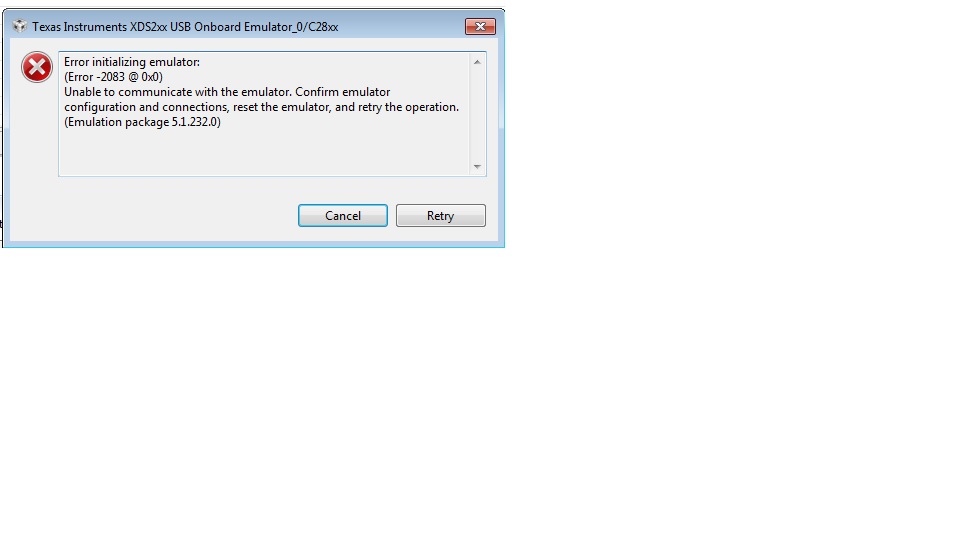
  • Now when I try to debug, I get the error message below.

    I never get to the point where I can click, Run --> Connect target.  See the picture below.

    As far as your other post goes. Every time I try to update CCS throught CCS, it breaks code composer and I have to uninstall, and then reinstall.  I have two co workers that are working on a E2E thread below attempting to resolve this issue. What i did was manually download the 6.2.3 compiler from

    https://www-a.ti.com/downloads/sds_support/TICodegenerationTools/download.htm#C2000

    and CCS automatically selects this compiler to use.  I have it in the same folder as the other compilers.

  • in your screenshot it looks like you are trying to launch XDS200. The emulator is XDS100v2  (however, this wouldn't explain the issue with the GUI, which is set to use XDS100v2 only).

    Try selecting your project and clicking the Green Bug to auto build, launch, connect, and load.


    This will use the Target Config in the project, so at least that will be correct.  It should change your display from the Editor View to Debug, and show you a screen like my previous image...hopefully yours will connect.


    If that doesn' t work, enabling debugger logging might provide additional clues. It logs all interaction between debugger and emulation driver. 

    http://processors.wiki.ti.com/index.php/Troubleshooting_CCSv5#Debug_Server_Logging


    My apologies...this is painful and really shouldn't be (and is very rare in my experience).


  • Im not sure why the error message is saying that I'm using xds200.  I set the xds100v2 to my target and default.  I uninstalled MotorWare 12, GUI 1.04, and CCS 5.5.  I then followed the"readmefirst_instaspin_motor_kits.pdf" instructions that came on the jump drive and in this order installed the GUI from the jump drive, installed MotorWare 12 from the .zip folder I downloaded from online and then installed CCS 5.5 (did not install the 6.2.3 compiler yet and I recieved the warning when building which I am familiar with because this threw me for a loop back in December).  I then tried the GUI and the same thing happen.  I then changed my debugger settings instructed in the link above and opened CCS.

    For the log, I simply selected the project like you said and clicked the green button (I also tried this the previous time as well).  This time I did not receive the error message like I did above.  It simply went thru the process in 5 seconds and then after 30 seconds, CCS just closed without any notification.

    I know I'm probably reaching here but I upgraded to a Dell Latitude E6440 which has USB3.0. Is this a concern? My old computer was an E6410 which had USB2.0 and I never saw this issue.  I am using the USB to mini USB cable that came with the DRV8301-HC-EVM Rev D kit. I know that the USB is powering the board because I can see the Green LED on the control stick light is on and the 2 blue LEd lights flicker on when making th einitial connection.  It just seems like the computer is having trouble communicating with the board.   Anyways below is the .txt from the log file you requested. Thanks for the help.


    M     15:06:27:149 | ICE CD: Initializing channel server in mode 1.
    M     15:06:27:199 | ICE CD: Strting to load ICE client properties.
    M     15:06:27:199 | ICE CD: Loaded ICE client properties.
    M     15:06:27:199 | ICE CD: Lookup trace server process returned 0 .
    M     15:06:27:219 | ICE CD: Trace Server invoked PID 1336 .
    M     15:06:27:219 | ICE CD: Trying to initialize ICE with properties.
    M     15:06:27:219 | ICE CD: Trying to get channel server instance.
    M     15:06:29:269 | ICE CD: Lookup trace server process returned 1616 .
    M     15:06:29:269 | ICE CD: Trying to initialize ICE with properties.
    M     15:06:29:269 | ICE CD: Trying to get channel server instance.
    M     15:06:31:319 | ICE CD: Lookup trace server process returned 1616 .
    M     15:06:31:319 | ICE CD: Trying to initialize ICE with properties.
    M     15:06:31:319 | ICE CD: Trying to get channel server instance.
    M     15:06:33:369 | ICE CD: Lookup trace server process returned 1616 .
    M     15:06:33:369 | ICE CD: Trying to initialize ICE with properties.
    M     15:06:33:369 | ICE CD: Trying to get channel server instance.
    M     15:06:35:429 | ICE CD: Lookup trace server process returned 1616 .
    M     15:06:35:429 | ICE CD: Trying to initialize ICE with properties.
    M     15:06:35:429 | ICE CD: Trying to get channel server instance.
    M     15:06:37:479 | ICE CD: Lookup trace server process returned 1616 .
    M     15:06:37:479 | ICE CD: Trying to initialize ICE with properties.
    M     15:06:37:479 | ICE CD: Trying to get channel server instance.
    M     15:06:39:529 | ICE CD: Lookup trace server process returned 1616 .
    M     15:06:39:529 | ICE CD: Trying to initialize ICE with properties.
    M     15:06:39:529 | ICE CD: Trying to get channel server instance.
    M     15:06:41:590 | ICE CD: Lookup trace server process returned 1616 .
    M     15:06:41:590 | ICE CD: Trying to initialize ICE with properties.
    M     15:06:41:590 | ICE CD: Trying to get channel server instance.
    M     15:06:43:650 | ICE CD: Lookup trace server process returned 1616 .
    M     15:06:43:650 | ICE CD: Trying to initialize ICE with properties.
    M     15:06:43:650 | ICE CD: Trying to get channel server instance.
    M     15:06:45:700 | ICE CD: Lookup trace server process returned 1616 .
    M     15:06:45:700 | ICE CD: Trying to initialize ICE with properties.
    M     15:06:45:700 | ICE CD: Trying to get channel server instance.
    M     15:06:47:760 | ICE CD: Lookup trace server process returned 1616 .
    M     15:06:47:760 | ICE CD: Trying to initialize ICE with properties.
    M     15:06:47:760 | ICE CD: Trying to get channel server instance.
    M     15:06:49:810 | ICE CD: Lookup trace server process returned 0 .
    M     15:06:49:830 | ICE CD: Trace Server invoked PID 596 .
    M     15:06:49:830 | ICE CD: Trying to initialize ICE with properties.
    M     15:06:49:830 | ICE CD: Trying to get channel server instance.
    M     15:06:51:910 | ICE CD: Lookup trace server process returned 1564 .
    M     15:06:51:910 | ICE CD: Trying to initialize ICE with properties.
    M     15:06:51:920 | ICE CD: Trying to get channel server instance.
    M     15:06:53:982 | ICE CD: Lookup trace server process returned 1564 .
    M     15:06:53:982 | ICE CD: Trying to initialize ICE with properties.
    M     15:06:53:982 | ICE CD: Trying to get channel server instance.
    M     15:06:56:044 | ICE CD: Lookup trace server process returned 1564 .
    M     15:06:56:044 | ICE CD: Trying to initialize ICE with properties.
    M     15:06:56:044 | ICE CD: Trying to get channel server instance.
    M     15:06:58:105 | ICE CD: Lookup trace server process returned 1564 .
    M     15:06:58:105 | ICE CD: Trying to initialize ICE with properties.
    M     15:06:58:105 | ICE CD: Trying to get channel server instance.
    M     15:07:00:167 | ICE CD: Lookup trace server process returned 1564 .
    M     15:07:00:167 | ICE CD: Trying to initialize ICE with properties.
    M     15:07:00:167 | ICE CD: Trying to get channel server instance.
    M     15:07:02:227 | ICE CD: Lookup trace server process returned 1564 .
    M     15:07:02:227 | ICE CD: Trying to initialize ICE with properties.
    M     15:07:02:227 | ICE CD: Trying to get channel server instance.
    M     15:07:04:287 | ICE CD: Lookup trace server process returned 1564 .
    M     15:07:04:287 | ICE CD: Trying to initialize ICE with properties.
    M     15:07:04:287 | ICE CD: Trying to get channel server instance.
    M     15:07:06:349 | ICE CD: Lookup trace server process returned 1564 .
    M     15:07:06:349 | ICE CD: Trying to initialize ICE with properties.
    M     15:07:06:349 | ICE CD: Trying to get channel server instance.
    M     15:07:08:411 | ICE CD: Lookup trace server process returned 1564 .
    M     15:07:08:411 | ICE CD: Trying to initialize ICE with properties.
    M     15:07:08:411 | ICE CD: Trying to get channel server instance.
    M     15:07:10:491 | ICE CD: Lookup trace server process returned 1564 .
    M     15:07:10:491 | ICE CD: Trying to initialize ICE with properties.
    M     15:07:10:491 | ICE CD: Trying to get channel server instance.
    M     15:07:12:543 | ICE CD: Lookup trace server process returned 0 .
    M     15:07:12:573 | ICE CD: Trace Server invoked PID 3828 .
    M     15:07:12:573 | ICE CD: Trying to initialize ICE with properties.
    M     15:07:12:573 | ICE CD: Trying to get channel server instance.
    M     15:07:14:624 | ICE CD: Lookup trace server process returned 6196 .
    M     15:07:14:624 | ICE CD: Trying to initialize ICE with properties.
    M     15:07:14:624 | ICE CD: Trying to get channel server instance.
    M     15:07:16:674 | ICE CD: Lookup trace server process returned 6196 .
    M     15:07:16:674 | ICE CD: Trying to initialize ICE with properties.
    M     15:07:16:674 | ICE CD: Trying to get channel server instance.
    M     15:07:18:724 | ICE CD: Lookup trace server process returned 6196 .
    M     15:07:18:724 | ICE CD: Trying to initialize ICE with properties.
    M     15:07:18:724 | ICE CD: Trying to get channel server instance.
    M     15:07:20:774 | ICE CD: Lookup trace server process returned 6196 .
    M     15:07:20:774 | ICE CD: Trying to initialize ICE with properties.
    M     15:07:20:774 | ICE CD: Trying to get channel server instance.
    M     15:07:22:824 | ICE CD: Lookup trace server process returned 6196 .
    M     15:07:22:824 | ICE CD: Trying to initialize ICE with properties.
    M     15:07:22:824 | ICE CD: Trying to get channel server instance.
    M     15:07:24:884 | ICE CD: Lookup trace server process returned 6196 .
    M     15:07:24:884 | ICE CD: Trying to initialize ICE with properties.
    M     15:07:24:884 | ICE CD: Trying to get channel server instance.
    M     15:07:26:944 | ICE CD: Lookup trace server process returned 6196 .
    M     15:07:26:944 | ICE CD: Trying to initialize ICE with properties.
    M     15:07:26:944 | ICE CD: Trying to get channel server instance.
    M     15:07:29:004 | ICE CD: Lookup trace server process returned 6196 .
    M     15:07:29:004 | ICE CD: Trying to initialize ICE with properties.
    M     15:07:29:004 | ICE CD: Trying to get channel server instance.
    M     15:07:31:075 | ICE CD: Lookup trace server process returned 6196 .
    M     15:07:31:075 | ICE CD: Trying to initialize ICE with properties.
    M     15:07:31:075 | ICE CD: Trying to get channel server instance.
    M     15:07:33:145 | ICE CD: Lookup trace server process returned 6196 .
    M     15:07:33:145 | ICE CD: Trying to initialize ICE with properties.
    M     15:07:33:145 | ICE CD: Trying to get channel server instance.
    M     15:07:35:215 | ICE CD: Lookup trace server process returned 0 .
    M     15:07:35:235 | ICE CD: Trace Server invoked PID 4012 .
    M     15:07:35:235 | ICE CD: Trying to initialize ICE with properties.
    M     15:07:35:235 | ICE CD: Trying to get channel server instance.
    M     15:07:37:315 | ICE CD: Lookup trace server process returned 6612 .
    M     15:07:37:315 | ICE CD: Trying to initialize ICE with properties.
    M     15:07:37:315 | ICE CD: Trying to get channel server instance.
    M     15:07:39:385 | ICE CD: Lookup trace server process returned 6612 .
    M     15:07:39:385 | ICE CD: Trying to initialize ICE with properties.
    M     15:07:39:385 | ICE CD: Trying to get channel server instance.
    M     15:07:41:455 | ICE CD: Lookup trace server process returned 6612 .
    M     15:07:41:455 | ICE CD: Trying to initialize ICE with properties.
    M     15:07:41:455 | ICE CD: Trying to get channel server instance.
    M     15:07:43:515 | ICE CD: Lookup trace server process returned 6612 .
    M     15:07:43:515 | ICE CD: Trying to initialize ICE with properties.
    M     15:07:43:515 | ICE CD: Trying to get channel server instance.
    M     15:07:45:585 | ICE CD: Lookup trace server process returned 6612 .
    M     15:07:45:585 | ICE CD: Trying to initialize ICE with properties.
    M     15:07:45:585 | ICE CD: Trying to get channel server instance.
    M     15:07:47:646 | ICE CD: Lookup trace server process returned 6612 .
    M     15:07:47:646 | ICE CD: Trying to initialize ICE with properties.
    M     15:07:47:646 | ICE CD: Trying to get channel server instance.
    M     15:07:49:706 | ICE CD: Lookup trace server process returned 6612 .
    M     15:07:49:706 | ICE CD: Trying to initialize ICE with properties.
    M     15:07:49:706 | ICE CD: Trying to get channel server instance.
    M     15:07:51:776 | ICE CD: Lookup trace server process returned 6612 .
    M     15:07:51:776 | ICE CD: Trying to initialize ICE with properties.
    M     15:07:51:776 | ICE CD: Trying to get channel server instance.
    M     15:07:53:846 | ICE CD: Lookup trace server process returned 6612 .
    M     15:07:53:846 | ICE CD: Trying to initialize ICE with properties.
    M     15:07:53:846 | ICE CD: Trying to get channel server instance.
    M     15:07:55:916 | ICE CD: Lookup trace server process returned 6612 .
    M     15:07:55:916 | ICE CD: Trying to initialize ICE with properties.
    M     15:07:55:916 | ICE CD: Trying to get channel server instance.
    M     15:07:57:986 | ICE CD: Lookup trace server process returned 0 .
    M     15:07:58:006 | ICE CD: Trace Server invoked PID 4208 .
    M     15:07:58:006 | ICE CD: Trying to initialize ICE with properties.
    M     15:07:58:006 | ICE CD: Trying to get channel server instance.
    M     15:08:00:066 | ICE CD: Lookup trace server process returned 6696 .
    M     15:08:00:066 | ICE CD: Trying to initialize ICE with properties.
    M     15:08:00:066 | ICE CD: Trying to get channel server instance.
    M     15:08:02:126 | ICE CD: Lookup trace server process returned 6696 .
    M     15:08:02:126 | ICE CD: Trying to initialize ICE with properties.
    M     15:08:02:126 | ICE CD: Trying to get channel server instance.
    M     15:08:04:187 | ICE CD: Lookup trace server process returned 6696 .
    M     15:08:04:187 | ICE CD: Trying to initialize ICE with properties.
    M     15:08:04:187 | ICE CD: Trying to get channel server instance.
    M     15:08:06:239 | ICE CD: Lookup trace server process returned 6696 .
    M     15:08:06:239 | ICE CD: Trying to initialize ICE with properties.
    M     15:08:06:239 | ICE CD: Trying to get channel server instance.
    M     15:08:08:299 | ICE CD: Lookup trace server process returned 6696 .
    M     15:08:08:299 | ICE CD: Trying to initialize ICE with properties.
    M     15:08:08:299 | ICE CD: Trying to get channel server instance.
        E 15:08:10:329 | ICE CD: failed to get proxy instance for the channel server. Ice::ConnectionRefusedException.


  • Hi Kelly, 

    I have seen some strange behaviour when using usb 3 on my machine as well. I have couple of usb 2 ports, thus I switched and things seemed to work ok for me. Unfortunately, the log file that you attached is not very helpful. I was hoping that you could try by enabling Debug Server Log. It will most likely generate a much bigger file. You would need to go to Help->CCS Support and click on "Debug Server Log" then on properties and enable logging as well as specify a file. It is just a text file thus any extension such as .log or .txt would work. 

    Martin

  • Martin,

    I believe the attached file is what you are asking for.


    4527.ti_trace_log_4302014_1908.txt

  • Hi Kelly, 

    Yes, this is what I was looking for. The last line of log file has a crash log file that I was hoping that you could attach as well. 

    ....

    0x000007B8 161533 1  ERT E: A crash occurred - dump file written to "C:\Users\YourUserId\AppData\Local\.TI\693494126\0\dmp\DebugServer20140430211505.dmp"

    If there are other .dmp files in that location, could you attach those as well? 

    Thank you,
    Martin

  • I wasn't able to attach the file with the .dmp extension so I change the extension to .txt.  Be sure to change the extension back to .dmp.  There also appears to be another .log file associated with the .dmp file (same time stamp on my computer) so I attached that as well.  Let me know if you need more. LIke I've said in this thread, I've been running into issue where CCS and the GUI jsut closes so as of now I have 10 .dmp files from yesterday.

    8304.DebugServer20140430211505.txt

    #
    # An unexpected error has been detected by Java Runtime Environment:
    #
    #  EXCEPTION_ACCESS_VIOLATION (0xc0000005) at pc=0x7c00249f, pid=4584, tid=1976
    #
    # Java VM: Java HotSpot(TM) Client VM (11.3-b02 mixed mode windows-x86)
    # Problematic frame:
    # C  0x7c00249f
    #
    # If you would like to submit a bug report, please visit:
    #   http://java.sun.com/webapps/bugreport/crash.jsp
    # The crash happened outside the Java Virtual Machine in native code.
    # See problematic frame for where to report the bug.
    #
    
    ---------------  T H R E A D  ---------------
    
    Current thread (0x02da4800):  JavaThread "polling thread" daemon [_thread_in_native, id=1976, stack(0x35870000,0x35970000)]
    
    siginfo: ExceptionCode=0xc0000005, reading address 0xcb1943ae
    
    Registers:
    EAX=0xcb1943ae, EBX=0x00000001, ECX=0xcb1943ae, EDX=0x00000001
    ESP=0x3596e4b0, EBP=0x3596e4e0, ESI=0x39087dd0, EDI=0x00000000
    EIP=0x7c00249f, EFLAGS=0x00010202
    
    Top of Stack: (sp=0x3596e4b0)
    0x3596e4b0:   7c081756 cb1943ae 39087d98 31808c6f
    0x3596e4c0:   cb1943ae 3776d058 cb1943ae 3596e580
    0x3596e4d0:   377fef8c 3596e4e4 3596e4e8 39087d98
    0x3596e4e0:   3181a538 3181a538 3181a538 3596e574
    0x3596e4f0:   31817dbf 0000000b 31801154 cb1943ae
    0x3596e500:   378522b0 37ce11f7 cb1943ae 2de4fa58
    0x3596e510:   3776d058 377fef8c 314eb098 3596e530
    0x3596e520:   75d514ad 2de40000 00000000 314eb0a0 
    
    Instructions: (pc=0x7c00249f)
    0x7c00248f:   04 2b c1 c3 8b 4c 24 04 f7 c1 03 00 00 00 74 1a
    0x7c00249f:   8a 01 83 c1 01 84 c0 74 42 f7 c1 03 00 00 00 75 
    
    
    Stack: [0x35870000,0x35970000],  sp=0x3596e4b0,  free space=1017k
    Native frames: (J=compiled Java code, j=interpreted, Vv=VM code, C=native code)
    C  0x7c00249f
    
    Java frames: (J=compiled Java code, j=interpreted, Vv=VM code)
    j  com.ti.xpcom.internal.XPCOMJavaProxy.callXPCOMMethod(JLjava/lang/String;[Ljava/lang/Object;)Ljava/lang/Object;+0
    j  com.ti.xpcom.internal.XPCOMJavaProxy.invoke(Ljava/lang/Object;Ljava/lang/reflect/Method;[Ljava/lang/Object;)Ljava/lang/Object;+108
    j  $Proxy2.pollThreadMain()J+9
    j  com.ti.debug.engine.cce.CCEDebugEngine.pollThreadMain()J+7
    j  com.ti.debug.engine.cce.CCEDebugEngine$PollingThread.run()V+125
    v  ~StubRoutines::call_stub
    
    ---------------  P R O C E S S  ---------------
    
    Java Threads: ( => current thread )
      0x332acc00 JavaThread "Thread-16" daemon [_thread_in_native, id=4828, stack(0x38dd0000,0x38ed0000)]
      0x332ac000 JavaThread "com.ti.ccstudio.debug.debugModel - 0" [_thread_blocked, id=6876, stack(0x36750000,0x36850000)]
      0x332aac00 JavaThread "[ThreadPool Manager] - Idle Thread" daemon [_thread_blocked, id=3668, stack(0x384e0000,0x385e0000)]
      0x332ab800 JavaThread "org.eclipse.cdt.internal.ui.text.CReconciler" daemon [_thread_blocked, id=5696, stack(0x36850000,0x36950000)]
      0x332aa800 JavaThread "org.eclipse.cdt.internal.ui.text.CReconciler" daemon [_thread_blocked, id=5200, stack(0x36650000,0x36750000)]
    =>0x02da4800 JavaThread "polling thread" daemon [_thread_in_native, id=1976, stack(0x35870000,0x35970000)]
      0x332a9c00 JavaThread "Scripting Console - Rhino" [_thread_blocked, id=6784, stack(0x34d50000,0x34e50000)]
      0x332a9800 JavaThread "xpcom dispose thread" daemon [_thread_blocked, id=6472, stack(0x35290000,0x35390000)]
      0x02da5400 JavaThread "Worker-7" [_thread_blocked, id=6616, stack(0x31700000,0x31800000)]
      0x02da2000 JavaThread "Worker-6" [_thread_blocked, id=5964, stack(0x30150000,0x30250000)]
      0x02da5800 JavaThread "Bundle File Closer" daemon [_thread_blocked, id=2404, stack(0x31140000,0x31240000)]
      0x02da5c00 JavaThread "Worker-5" [_thread_blocked, id=6164, stack(0x31600000,0x31700000)]
      0x02da4000 JavaThread "Worker-4" [_thread_blocked, id=7100, stack(0x30fc0000,0x310c0000)]
      0x02da3c00 JavaThread "JavaScript indexing" daemon [_thread_blocked, id=6120, stack(0x30e50000,0x30f50000)]
      0x02da3400 JavaThread "Worker-3" [_thread_blocked, id=6112, stack(0x30d50000,0x30e50000)]
      0x02da3000 JavaThread "Worker-2" [_thread_blocked, id=4536, stack(0x30c50000,0x30d50000)]
      0x02da2800 JavaThread "Java indexing" daemon [_thread_blocked, id=4484, stack(0x30b50000,0x30c50000)]
      0x02da2400 JavaThread "Worker-1" [_thread_blocked, id=5176, stack(0x30a50000,0x30b50000)]
      0x02da0c00 JavaThread "Worker-0" [_thread_blocked, id=3720, stack(0x30050000,0x30150000)]
      0x02da1800 JavaThread "Worker-JM" [_thread_blocked, id=6744, stack(0x2ecc0000,0x2edc0000)]
      0x02da1400 JavaThread "[Timer] - Main Queue Handler" daemon [_thread_blocked, id=4796, stack(0x2e6c0000,0x2e7c0000)]
      0x02da0800 JavaThread "Framework Event Dispatcher" daemon [_thread_blocked, id=1192, stack(0x2e4c0000,0x2e5c0000)]
      0x02da0000 JavaThread "Start Level Event Dispatcher" daemon [_thread_blocked, id=2608, stack(0x2e3c0000,0x2e4c0000)]
      0x02d9fc00 JavaThread "State Data Manager" daemon [_thread_blocked, id=6016, stack(0x2e200000,0x2e300000)]
      0x02d9f400 JavaThread "Framework Active Thread" [_thread_blocked, id=6704, stack(0x2e060000,0x2e160000)]
      0x02d9f000 JavaThread "Low Memory Detector" daemon [_thread_blocked, id=6036, stack(0x2d8e0000,0x2d9e0000)]
      0x02db3000 JavaThread "CompilerThread0" daemon [_thread_blocked, id=6244, stack(0x2d7a0000,0x2d8a0000)]
      0x02d9ec00 JavaThread "Attach Listener" daemon [_thread_blocked, id=2268, stack(0x2d660000,0x2d760000)]
      0x02d9e400 JavaThread "Signal Dispatcher" daemon [_thread_blocked, id=2332, stack(0x2d520000,0x2d620000)]
      0x02d8e000 JavaThread "Finalizer" daemon [_thread_blocked, id=4112, stack(0x2d3e0000,0x2d4e0000)]
      0x02d89800 JavaThread "Reference Handler" daemon [_thread_blocked, id=520, stack(0x2d2a0000,0x2d3a0000)]
      0x02e39c00 JavaThread "main" [_thread_in_native, id=1172, stack(0x00090000,0x00190000)]
    
    Other Threads:
      0x02d84400 VMThread [stack: 0x2d160000,0x2d260000] [id=4812]
      0x02db9800 WatcherThread [stack: 0x2da20000,0x2db20000] [id=3184]
    
    VM state:not at safepoint (normal execution)
    
    VM Mutex/Monitor currently owned by a thread: None
    
    Heap
     def new generation   total 8000K, used 5854K [0x04ec0000, 0x05760000, 0x06c40000)
      eden space 7168K,  77% used [0x04ec0000, 0x05435328, 0x055c0000)
      from space 832K,  31% used [0x05690000, 0x056d28d0, 0x05760000)
      to   space 832K,   0% used [0x055c0000, 0x055c0000, 0x05690000)
     tenured generation   total 104904K, used 62907K [0x06c40000, 0x0d2b2000, 0x1cec0000)
       the space 104904K,  59% used [0x06c40000, 0x0a9aefe0, 0x0a9af000, 0x0d2b2000)
     compacting perm gen  total 75520K, used 75325K [0x1cec0000, 0x21880000, 0x2cec0000)
       the space 75520K,  99% used [0x1cec0000, 0x2184f678, 0x2184f800, 0x21880000)
    No shared spaces configured.
    
    Dynamic libraries:
    0x00400000 - 0x0040d000 	C:\ti\ccsv5\eclipse\ccstudio.exe
    0x779c0000 - 0x77b40000 	C:\Windows\SysWOW64\ntdll.dll
    0x75d40000 - 0x75e50000 	C:\Windows\syswow64\kernel32.dll
    0x75b90000 - 0x75bd7000 	C:\Windows\syswow64\KERNELBASE.dll
    0x74d90000 - 0x74dfd000 	C:\Windows\SysWOW64\SYSFER.DLL
    0x773c0000 - 0x774c0000 	C:\Windows\syswow64\USER32.dll
    0x75810000 - 0x758a0000 	C:\Windows\syswow64\GDI32.dll
    0x75a60000 - 0x75a6a000 	C:\Windows\syswow64\LPK.dll
    0x75630000 - 0x756cd000 	C:\Windows\syswow64\USP10.dll
    0x77310000 - 0x773bc000 	C:\Windows\syswow64\msvcrt.dll
    0x75e60000 - 0x75f00000 	C:\Windows\syswow64\ADVAPI32.dll
    0x75610000 - 0x75629000 	C:\Windows\SysWOW64\sechost.dll
    0x758a0000 - 0x75990000 	C:\Windows\syswow64\RPCRT4.dll
    0x75520000 - 0x75580000 	C:\Windows\syswow64\SspiCli.dll
    0x75510000 - 0x7551c000 	C:\Windows\syswow64\CRYPTBASE.dll
    0x6b480000 - 0x6b504000 	C:\Windows\WinSxS\x86_microsoft.windows.common-controls_6595b64144ccf1df_5.82.7601.18201_none_ec80f00e8593ece5\COMCTL32.dll
    0x76660000 - 0x766c0000 	C:\Windows\system32\IMM32.DLL
    0x75990000 - 0x75a5c000 	C:\Windows\syswow64\MSCTF.dll
    0x68000000 - 0x68038000 	C:\Windows\system32\QIPCAP.DLL
    0x72000000 - 0x7200d000 	C:\ti\ccsv5\eclipse\plugins\org.eclipse.equinox.launcher.win32.win32.x86_1.1.200.v20120522-1813\eclipse_1503.dll
    0x74890000 - 0x74899000 	C:\Windows\system32\VERSION.dll
    0x70c30000 - 0x70cb0000 	C:\Windows\system32\uxtheme.dll
    0x75be0000 - 0x75d3c000 	C:\Windows\system32\ole32.dll
    0x76430000 - 0x764b3000 	C:\Windows\syswow64\CLBCatQ.DLL
    0x76040000 - 0x760cf000 	C:\Windows\syswow64\OLEAUT32.dll
    0x6d800000 - 0x6da56000 	C:\ti\ccsv5\eclipse\jre\bin\client\jvm.dll
    0x74b80000 - 0x74bb2000 	C:\Windows\system32\WINMM.dll
    0x7c360000 - 0x7c3b6000 	C:\Windows\system32\MSVCR71.dll
    0x74a80000 - 0x74acc000 	C:\Windows\system32\apphelp.dll
    0x6d290000 - 0x6d298000 	C:\ti\ccsv5\eclipse\jre\bin\hpi.dll
    0x77990000 - 0x77995000 	C:\Windows\syswow64\PSAPI.DLL
    0x6d7b0000 - 0x6d7bc000 	C:\ti\ccsv5\eclipse\jre\bin\verify.dll
    0x6d330000 - 0x6d34f000 	C:\ti\ccsv5\eclipse\jre\bin\java.dll
    0x6d7f0000 - 0x6d7ff000 	C:\ti\ccsv5\eclipse\jre\bin\zip.dll
    0x748b0000 - 0x748c6000 	C:\Windows\system32\CRYPTSP.dll
    0x74730000 - 0x7476b000 	C:\Windows\system32\rsaenh.dll
    0x72fb0000 - 0x72fc7000 	C:\Windows\system32\USERENV.dll
    0x743a0000 - 0x743ab000 	C:\Windows\system32\profapi.dll
    0x6d610000 - 0x6d623000 	C:\ti\ccsv5\eclipse\jre\bin\net.dll
    0x75b50000 - 0x75b85000 	C:\Windows\syswow64\WS2_32.dll
    0x75e50000 - 0x75e56000 	C:\Windows\syswow64\NSI.dll
    0x74980000 - 0x749bc000 	C:\Windows\system32\mswsock.dll
    0x73410000 - 0x73416000 	C:\Windows\System32\wship6.dll
    0x745e0000 - 0x745f0000 	C:\Windows\system32\NLAapi.dll
    0x745d0000 - 0x745e0000 	C:\Windows\system32\napinsp.dll
    0x745b0000 - 0x745c2000 	C:\Windows\system32\pnrpnsp.dll
    0x74560000 - 0x745a4000 	C:\Windows\system32\DNSAPI.dll
    0x74550000 - 0x74558000 	C:\Windows\System32\winrnr.dll
    0x74540000 - 0x7454d000 	C:\Windows\system32\wshbth.dll
    0x63560000 - 0x63568000 	C:\Program Files (x86)\National Instruments\Shared\mDNS Responder\nimdnsNSP.dll
    0x63550000 - 0x63559000 	C:\Windows\system32\nimdnsResponder.dll
    0x74bf0000 - 0x74c93000 	C:\Windows\WinSxS\x86_microsoft.vc90.crt_1fc8b3b9a1e18e3b_9.0.30729.6161_none_50934f2ebcb7eb57\MSVCR90.dll
    0x74bd0000 - 0x74bec000 	C:\Windows\system32\Iphlpapi.DLL
    0x74bc0000 - 0x74bc7000 	C:\Windows\system32\WINNSI.DLL
    0x74970000 - 0x74975000 	C:\Windows\System32\wshtcpip.dll
    0x744f0000 - 0x744f6000 	C:\Windows\system32\rasadhlp.dll
    0x74500000 - 0x74538000 	C:\Windows\System32\fwpuclnt.dll
    0x6d630000 - 0x6d639000 	C:\ti\ccsv5\eclipse\jre\bin\nio.dll
    0x2ef00000 - 0x2ef70000 	C:\ti\ccsv5\eclipse\configuration\org.eclipse.osgi\bundles\291\1\.cp\swt-win32-3834.dll
    0x75730000 - 0x757ab000 	C:\Windows\syswow64\comdlg32.dll
    0x75ad0000 - 0x75b27000 	C:\Windows\syswow64\SHLWAPI.dll
    0x740c0000 - 0x7425e000 	C:\Windows\WinSxS\x86_microsoft.windows.common-controls_6595b64144ccf1df_6.0.7601.17514_none_41e6975e2bd6f2b2\COMCTL32.dll
    0x766c0000 - 0x7730a000 	C:\Windows\syswow64\SHELL32.dll
    0x746d0000 - 0x74721000 	C:\Windows\system32\WINSPOOL.DRV
    0x774c0000 - 0x775b5000 	C:\Windows\syswow64\WININET.dll
    0x75f00000 - 0x76037000 	C:\Windows\syswow64\urlmon.dll
    0x760d0000 - 0x761f0000 	C:\Windows\syswow64\CRYPT32.dll
    0x761f0000 - 0x761fc000 	C:\Windows\syswow64\MSASN1.dll
    0x76200000 - 0x763ff000 	C:\Windows\syswow64\iertutil.dll
    0x742b0000 - 0x742c3000 	C:\Windows\system32\dwmapi.dll
    0x6b930000 - 0x6ba25000 	C:\Windows\system32\propsys.dll
    0x73620000 - 0x73629000 	C:\Windows\system32\LINKINFO.dll
    0x2edc0000 - 0x2eddd000 	C:\ti\ccsv5\eclipse\configuration\org.eclipse.osgi\bundles\291\1\.cp\swt-gdip-win32-3834.dll
    0x6b5a0000 - 0x6b730000 	C:\Windows\WinSxS\x86_microsoft.windows.gdiplus_6595b64144ccf1df_1.1.7601.18120_none_72d2e82386681b36\gdiplus.dll
    0x6dc20000 - 0x6dd50000 	C:\Windows\system32\WindowsCodecs.dll
    0x2e300000 - 0x2e30e000 	C:\ti\ccsv5\eclipse\configuration\org.eclipse.osgi\bundles\85\1\.cp\os\win32\x86\localfile_1_0_0.dll
    0x2e310000 - 0x2e318000 	C:\ti\ccsv5\eclipse\configuration\org.eclipse.osgi\bundles\90\1\.cp\os\win32\x86\win32refresh.dll
    0x74960000 - 0x7496f000 	C:\ti\ccsv5\eclipse\configuration\org.eclipse.osgi\bundles\88\1\.cp\jWinHttp-1.0.0.dll
    0x74450000 - 0x744a8000 	C:\Windows\system32\WINHTTP.dll
    0x74400000 - 0x7444f000 	C:\Windows\system32\webio.dll
    0x734b0000 - 0x734bd000 	C:\Windows\system32\dhcpcsvc6.DLL
    0x749c0000 - 0x749d2000 	C:\Windows\system32\dhcpcsvc.DLL
    0x6dbe0000 - 0x6dc1c000 	C:\Windows\system32\oleacc.dll
    0x6b2c0000 - 0x6b42f000 	C:\Windows\system32\explorerframe.dll
    0x6d5c0000 - 0x6d5ef000 	C:\Windows\system32\DUser.dll
    0x6c490000 - 0x6c542000 	C:\Windows\system32\DUI70.dll
    0x748a0000 - 0x748ae000 	C:\Windows\system32\RpcRtRemote.dll
    0x743b0000 - 0x743b5000 	C:\Windows\system32\msimg32.dll
    0x5e520000 - 0x5e54e000 	C:\Windows\system32\mlang.dll
    0x764c0000 - 0x7665d000 	C:\Windows\syswow64\SETUPAPI.dll
    0x75700000 - 0x75727000 	C:\Windows\syswow64\CFGMGR32.dll
    0x75b30000 - 0x75b42000 	C:\Windows\syswow64\DEVOBJ.dll
    0x74860000 - 0x74881000 	C:\Windows\system32\ntmarta.dll
    0x757b0000 - 0x757f5000 	C:\Windows\syswow64\WLDAP32.dll
    0x6f7b0000 - 0x6f820000 	C:\Windows\system32\ntshrui.dll
    0x74620000 - 0x74639000 	C:\Windows\system32\srvcli.dll
    0x74260000 - 0x7426b000 	C:\Windows\system32\cscapi.dll
    0x73610000 - 0x7361a000 	C:\Windows\system32\slc.dll
    0x70900000 - 0x70914000 	C:\Program Files\TortoiseSVN\bin\TortoiseStub32.dll
    0x6f050000 - 0x6f0c0000 	C:\Program Files\TortoiseSVN\bin\TortoiseSVN32.dll
    0x58850000 - 0x58bb5000 	C:\Program Files\TortoiseSVN\bin\libsvn_tsvn32.dll
    0x6fd50000 - 0x6fd77000 	C:\Program Files\TortoiseSVN\bin\libapr_tsvn32.dll
    0x6a490000 - 0x6a566000 	C:\Windows\system32\MSVCR110.dll
    0x6f950000 - 0x6f988000 	C:\Program Files\TortoiseSVN\bin\libaprutil_tsvn32.dll
    0x72e00000 - 0x72e0d000 	C:\Program Files\TortoiseSVN\bin\intl3_tsvn32.dll
    0x709e0000 - 0x709f3000 	C:\Program Files\TortoiseSVN\bin\libsasl32.dll
    0x74270000 - 0x74278000 	C:\Windows\system32\Secur32.dll
    0x6a570000 - 0x6a5f5000 	C:\Windows\system32\MSVCP110.dll
    0x74640000 - 0x74649000 	C:\Windows\system32\netutils.dll
    0x73600000 - 0x73608000 	C:\ti\ccsv5\ccs_base\DebugServer\bin\LibraryLoader.dll
    0x344a0000 - 0x34692000 	C:\ti\ccsv5\ccs_base\common\bin\xerces-c_2_5_0.dll
    0x6a1e0000 - 0x6a27b000 	C:\Windows\WinSxS\x86_microsoft.vc80.crt_1fc8b3b9a1e18e3b_8.0.50727.6229_none_d089f796442de10e\MSVCR80.dll
    0x6f860000 - 0x6f88f000 	C:\ti\ccsv5\ccs_base\common\bin\ti_logger.dll
    0x346c0000 - 0x34735000 	C:\ti\ccsv5\ccs_base\common\bin\C4DLL.DLL
    0x6fd30000 - 0x6fd46000 	C:\ti\ccsv5\ccs_base\common\bin\CCReg.dll
    0x6f180000 - 0x6f1d8000 	C:\ti\ccsv5\ccs_base\common\bin\fsutil.dll
    0x6fb50000 - 0x6fb5e000 	C:\ti\ccsv5\ccs_base\common\bin\fsutiljni.dll
    0x6f840000 - 0x6f851000 	C:\ti\ccsv5\ccs_base\common\bin\MiniDump.dll
    0x6c2a0000 - 0x6c489000 	C:\ti\ccsv5\ccs_base\common\bin\setup_parser.dll
    0x347a0000 - 0x347ad000 	C:\ti\ccsv5\ccs_base\common\bin\ti_targetdb_parser.dll
    0x749e0000 - 0x74a6e000 	C:\Windows\WinSxS\x86_microsoft.vc90.crt_1fc8b3b9a1e18e3b_9.0.30729.6161_none_50934f2ebcb7eb57\MSVCP90.dll
    0x69330000 - 0x6933c000 	C:\Windows\system32\mssprxy.dll
    0x6eff0000 - 0x6f04a000 	C:\ti\ccsv5\ccs_base\DebugServer\bin\ti_xpcom.dll
    0x74770000 - 0x7485b000 	C:\Windows\system32\DBGHELP.DLL
    0x6c0f0000 - 0x6c29e000 	C:\ti\ccsv5\ccs_base\DebugServer\bin\mdex.dll
    0x74650000 - 0x74661000 	C:\Windows\system32\NETAPI32.dll
    0x74610000 - 0x7461f000 	C:\Windows\system32\wkscli.dll
    0x74d20000 - 0x74d27000 	C:\Windows\system32\WSOCK32.dll
    
    VM Arguments:
    jvm_args: -Dosgi.requiredJavaVersion=1.5 -Dosgi.instance.area.default=@user.home/workspace_v5_5 -Dorg.eclipse.equinox.http.jetty.customizer.class=com.ti.ccstudio.gui.composer.http.jetty.MaqettaJettyCustomizer -Xms40m -Xmx384m -XX:ErrorFile=C:\Users\meemkks\AppData\Local\.TI\693494126\0\dmp\hs_err_%p.log -XX:MaxPermSize=256M 
    java_command: <unknown>
    Launcher Type: generic
    
    Environment Variables:
    PATH=C:\ti\ccsv5\ccs_base\emulation\analysis\bin\..\..\..\common\bin;C:\ti\ccsv5\ccs_base\emulation\analysis\bin\..\..\..\DebugServer\bin;C:\ti\ccsv5\ccs_base\emulation\analysis\bin\ofs;C:\ti\ccsv5\ccs_base\common\bin;C:\ti\ccsv5\ccs_base\common\uscif;C:\ti\ccsv5\ccs_base\DebugServer\license;C:/ti/ccsv5/eclipse/jre/bin/client;C:/ti/ccsv5/eclipse/jre/bin;C:/ti/ccsv5/eclipse/jre/lib/i386;C:\Windows\system32;C:\Windows;C:\Windows\System32\Wbem;C:\Windows\System32\WindowsPowerShell\v1.0\;C:\Program Files (x86)\Microsoft SQL Server\110\Tools\Binn\ManagementStudio\;C:\Program Files (x86)\Microsoft SQL Server\110\Tools\Binn\;C:\Program Files\Microsoft SQL Server\110\Tools\Binn\;C:\Program Files (x86)\Microsoft SQL Server\110\DTS\Binn\;C:\Program Files\EmEditor;C:\CCStudio_v3.3\cc\bin;C:\Program Files (x86)\QuickTime\QTSystem\;C:\Program Files\TortoiseSVN\bin;C:\ti\ccsv5\eclipse;;C:\ti\ccsv5\ccs_base\emulation\analysis\bin\.;C:\ti\ccsv5\ccs_base\emulation\analysis\bin\../xmldb/aet_config;C:\ti\ccsv5\ccs_base\emulation\analysis\bin\../xmldb/trace_config/setup;C:\ti\ccsv5\ccs_base\emulation\analysis\bin\../xmldb/trace_config/devices;C:\ti\ccsv5\ccs_base\emulation\analysis\bin\../../../common/bin;C:\ti\ccsv5\ccs_base\emulation\analysis\bin\../../../common/uscif;C:\ti\ccsv5\ccs_base\emulation\analysis\bin\../../tpi;C:\ti\ccsv5\ccs_base\emulation\drivers
    USERNAME=meemkks
    OS=Windows_NT
    PROCESSOR_IDENTIFIER=Intel64 Family 6 Model 60 Stepping 3, GenuineIntel


    ---------------  S Y S T E M  ---------------
    
    OS: Windows NT 6.1 Build 7601 Service Pack 1
    
    CPU:total 4 (8 cores per cpu, 2 threads per core) family 6 model 12 stepping 3, cmov, cx8, fxsr, mmx, sse, sse2, sse3, ssse3, ht
    
    Memory: 4k page, physical 4194303k(4194303k free), swap 4194303k(4194303k free)
    
    vm_info: Java HotSpot(TM) Client VM (11.3-b02) for windows-x86 JRE (1.6.0_13-b03), built on Mar  9 2009 01:15:24 by "java_re" with MS VC++ 7.1
    
    time: Wed Apr 30 16:15:05 2014
    elapsed time: 171 seconds


  • I'm not sure if it's helpful but I just installed the GUI from the same jump drive on an older computer (Dell Latitude E6400) and the GUI booted up perfectly without any issues. 

  • that's strange....which version of the GUI is on the USB Stick?

    if you try the latest install from the website it doesn't work?

    motorkitscncd69miso


  • I believe both are 1.04 and I initially tried the GUI download from online and it didnt work which is why I switched back to the jump drive, which didn't work.  The fact that I'm having issues with both the GUI and CCS when it comes to connecting with the emulator makes me believe it's something deeper than the download itself. 

  • I suspect it is an emulator / USB hardware (PC) issue as well, but just looking at all options.


  • Is the cable that comes with the dev kit USB 3.0 capable?

  • i didn't know USB 3.0 needed a specific cable...do you have a USB 3.0 compliant cable you can try?  I wonder what makes them compliant...


    At this point you are able to do some things with the InstaSPIN-MOTION GUI, correct?

  • I'm not sure if there are different cables but here is a summary of what I've done today. As I mentioned before I installed the GUI onto my seconds computer which is USB 2.0.  Everything worked great, I was spinning the motor thru the GUI without any issues.  Just to make sure that something didn't install on the new computer that  installed on the new computer, I compared the two GUI folders from each computer in Beyond Compare and didn't notice anything.  I then took the GUI install on the old computer and threw it on a jump drive.  I completely ran the GUI from the jump drive on the old computer without any isues.  I then pluged the jump drive into the new computer (USB 3.0) and tried running the GUI from the jump drive, the same exact thing happen.  For some reason, my new computer will not communicate with the dev board.  Both computers are running Windows 7 Enterprise with the exact same version (6.1.7601 Service Pack 1 BUild 7601).  The only difference I can think of is that my new computer only has USB 3.0 ports but my old computer has all 2.0 ports. USB 2.0/3.0 may not be the problem but the issue seems to occur with the communication between the computer and the board which is thru the USB. Both computers claim the drivers installed correctly and show up under my devices but the new computer will NOT communicate which is why I question the difference in 3.0 versus 2.0. I'm up for any sugestions because I don't want to run the GUI/ labs/ and motorware on my old computer long term because it's 6 years old and very slow but it's working for the time being. Luckily my motor has a high enough inductance that I can run the GUI for testing but this is just a temporary fix.  Let me know if you have any ideas for me to try.


    Martin,

    Have you finished looking at the .dmp files?  I can send you a .dmp file from my GUI failure as well if you need it.

  • Kelly, 

    Could you check your PATH environment variable to see if ccstudio 3.3 directory is listed there? The .dmp file is indicating that CCSv5.5 process is loading a dll from CCS v3.3 installation directory. Specifically, the dll below. 

    C:\CCStudio_v3.3\cc\bin\DeviceIdentifier.DLL

    Martin

  • I'm not 100% sure what you are asking for. Does the screen shot below answer your question?

    The file you specified above is at that location as well.

  • No, I am talking about windows "Path" environment variable that you configure through Windows control panel or see from command prompt when you execute "set" command. 

    Martin

  • yes it is. Should I erase this from my path?

    Path=C:\Windows\system32;C:\Windows;C:\Windows\System32\Wbem;C:\Windows\System32
    \WindowsPowerShell\v1.0\;C:\Program Files (x86)\Microsoft SQL Server\110\Tools\B
    inn\ManagementStudio\;C:\Program Files (x86)\Microsoft SQL Server\110\Tools\Binn
    \;C:\Program Files\Microsoft SQL Server\110\Tools\Binn\;C:\Program Files (x86)\M
    icrosoft SQL Server\110\DTS\Binn\;C:\Program Files\EmEditor;C:\CCStudio_v3.3\cc\
    bin;C:\Program Files (x86)\QuickTime\QTSystem\;C:\Program Files\TortoiseSVN\bin

  • Could you please try removing it? I don't remember if CCSv3.3 does require for that path to be part of Path environment variable. If you need to use ccsv3.3 after remove that segment from Path variable and it does not work properly, then you could work around it by creating a small .bat file that appends ccsv3.3 directory to Path and then starts CCStudio3.3. 

    Martin

  • Martin you are the man.  I do not recall adding that directory to my PATH but who knows. I may have added it when attempting to convert my CCS 3.3 projects over to CCS 5.5 but I can't say for sure. Either way I am now able to run the GUI and CCS so thank you very much. Thanks for your help also Chris.

  • I'm glad this is solved.

    But it really doesn't explain why the GUI wasn't originally working....


  • Why don't think the GUI was pulling C:\CCStudio_v3.3\cc\bin\DeviceIdentifier.dll instead of the DeviceIdentifier.dll from C:\ti\guicomposer\ccs_base\emulation\analysis\bin like Code Composer was? My computer path was pointing to the C:\CCSudio_v3.3\cc\bin and my crash log said that CCS was pulling the DeviceIdentifier.dll from the CCStudio_v3.3 instead. It seems like the GUI was doing the same.

  • GUI doesn't require CCS install, so I don't think it uses the windows CCS path variables at alll....


    If it's all working now I'll just shut up and not jinx it :)


  • hahaha thanks for the concern.  You know more than me and I agree, the GUI runs without CCS installed which is why I assume it has it's own CCS folder to hold the drivers inside the GUI folder C:\ti\guicomposer\ccs_base\emulation\analysis\bin. I'll just shut up as well and be happy that both CCS and the GUI work.  Thanks again guys.

  • GC and CCS are separate. However, under their different GUIs the debug engine/ jtag drivers are the same. Since Path is an environment variable that affects all processes running on the host system, I would expect GC and CCS to be affected in the same way. Hence, removal of that extra directory entry in Path fixes both tools. 

    Martin